Today's #edu522 #dailychallenge "Tell Us About Your Favorite Teacher"
{
    "type": "entry",
    "published": "2020-07-17T12:17:21+0000",
    "url": "https://quickthoughts.jgregorymcverry.com/2020/07/17/todays-edu522-dailychallenge-tell-us-about",
    "category": [
        "edu522",
        "dailychallenge"
    ],
    "syndication": [
        "https://twitter.com/jgmac1106/status/1284100027913252865"
    ],
    "content": {
        "text": "Today's #edu522 #dailychallenge \"Tell  Us About Your Favorite Teacher\"",
        "html": "Today's <a href=\"https://quickthoughts.jgregorymcverry.com/tag/edu522\" class=\"p-category\">#edu522</a> <a href=\"https://quickthoughts.jgregorymcverry.com/tag/dailychallenge\" class=\"p-category\">#dailychallenge</a> \"Tell  Us About Your Favorite Teacher\""
    },
    "author": {
        "type": "card",
        "name": "Greg McVerry",
        "url": "https://quickthoughts.jgregorymcverry.com/profile/jgmac1106",
        "photo": "https://quickthoughts.jgregorymcverry.com/file/2d6c9cfed7ac8e849f492b5bc7e6a630/thumb.jpg"
    },
    "post-type": "note",
    "_id": "13290011",
    "_source": "1300"
}
{
    "type": "entry",
    "published": "2020-07-17T12:17:58+00:00",
    "url": "https://twitter.com/jgmac1106/status/1284100027913252865",
    "content": {
        "text": "Today's #edu522 #dailychallenge \"Tell  Us About Your Favorite Teacher\" (quickthoughts.jgregorymcverry.com/s/X9aZP)",
        "html": "Today's <a href=\"https://twitter.com/search?q=%23edu522\">#edu522</a> <a href=\"https://twitter.com/search?q=%23dailychallenge\">#dailychallenge</a> \"Tell  Us About Your Favorite Teacher\" (<a href=\"https://quickthoughts.jgregorymcverry.com/s/X9aZP\">quickthoughts.jgregorymcverry.com/s/X9aZP</a>)"
    },
    "author": {
        "type": "card",
        "name": "https://jgregorymcverry.com",
        "url": "https://twitter.com/jgmac1106",
        "photo": "https://pbs.twimg.com/profile_images/565227710104883200/g4MDcTnx.jpeg"
    },
    "post-type": "note",
    "_id": "13289818",
    "_source": "2773"
}
The US Attorney General is using a personal email address, getiing official government email forwarded to an iPhone.
The B6 that @emptywheel refers to there is a FOIA privacy exception reason for redaction his personal email address.
#LockHimUp
The inclusion of Seth DuCharme in the Joe DiGenova meeting is particularly interesting given that Billy Barr has now puthim in charge of EDNY.
documentcloud.org/documen...
{
    "type": "entry",
    "published": "2020-07-17T12:09:57+00:00",
    "url": "https://twitter.com/karabaic/status/1284098010503196672",
    "quotation-of": "https://twitter.com/emptywheel/status/1284095791825588224",
    "content": {
        "text": "The US Attorney General is using a personal email address, getiing official government email forwarded to an iPhone. \n\nThe B6 that @emptywheel refers to there is a FOIA privacy exception reason for redaction his personal email address.\n\n#LockHimUp",
        "html": "The US Attorney General is using a personal email address, getiing official government email forwarded to an iPhone. \n\nThe B6 that <a href=\"https://twitter.com/emptywheel\">@emptywheel</a> refers to there is a FOIA privacy exception reason for redaction his personal email address.\n\n<a href=\"https://twitter.com/search?q=%23LockHimUp\">#LockHimUp</a>"
    },
    "author": {
        "type": "card",
        "name": "jk",
        "url": "https://twitter.com/karabaic",
        "photo": "https://pbs.twimg.com/profile_images/1256785873384861696/QfRzUvne.jpg"
    },
    "post-type": "note",
    "refs": {
        "https://twitter.com/emptywheel/status/1284095791825588224": {
            "type": "entry",
            "published": "2020-07-17T12:01:08+00:00",
            "url": "https://twitter.com/emptywheel/status/1284095791825588224",
            "in-reply-to": [
                "https://twitter.com/emptywheel/status/1284091775599222784"
            ],
            "content": {
                "text": "The inclusion of Seth DuCharme in the Joe DiGenova meeting is particularly interesting given that Billy Barr has now puthim in charge of EDNY. \n\ndocumentcloud.org/documents/6989\u2026",
                "html": "The inclusion of Seth DuCharme in the Joe DiGenova meeting is particularly interesting given that Billy Barr has now puthim in charge of EDNY. \n\n<a href=\"https://www.documentcloud.org/documents/6989382-DOJ-Records-of-Giuliani-Meetings-Concerning.html\">documentcloud.org/documents/6989\u2026</a>"
            },
            "author": {
                "type": "card",
                "name": "emptywheel",
                "url": "https://twitter.com/emptywheel",
                "photo": "https://pbs.twimg.com/profile_images/1773870183/image1327265832.png"
            },
            "post-type": "reply"
        }
    },
    "_id": "13289820",
    "_source": "2773"
}
Currently reading: Between the World and Me by Ta-Nehisi Coates (ISBN 9780679645986)
{
    "type": "entry",
    "published": "2020-07-17 02:08-0700",
    "url": "https://gregorlove.com/2020/07/currently-reading-between-the-world/",
    "syndication": [
        "https://www.goodreads.com/review/show/1507224793"
    ],
    "content": {
        "text": "Currently reading: Between the World and Me by Ta-Nehisi Coates (ISBN 9780679645986)",
        "html": "<p>Currently reading: <span class=\"p-read-of h-cite\"><a class=\"u-url\" href=\"https://gregorlove.com/isbn/9780679645986\">Between the World and Me</a> by <span class=\"p-author\">Ta-Nehisi Coates</span> (ISBN <span class=\"p-uid\">9780679645986</span>)</span></p>"
    },
    "post-type": "note",
    "_id": "13288508",
    "_source": "95"
}
{
    "type": "entry",
    "published": "2020-07-17T05:16:32+00:00",
    "url": "https://twitter.com/jaredcwhite/status/1283993970305990657",
    "content": {
        "text": "\ud83d\udea8\u203c\ufe0f\ud83d\udea8\u203c\ufe0f\ud83d\udea8\u203c\ufe0f\ud83d\udea8\u203c\ufe0f\ud83d\udea8\u203c\ufe0f\ud83d\udea8\u203c\ufe0f\ud83d\udea8\n\nopb.org/news/article/f\u2026",
        "html": "\ud83d\udea8\u203c\ufe0f\ud83d\udea8\u203c\ufe0f\ud83d\udea8\u203c\ufe0f\ud83d\udea8\u203c\ufe0f\ud83d\udea8\u203c\ufe0f\ud83d\udea8\u203c\ufe0f\ud83d\udea8\n\n<a href=\"https://www.opb.org/news/article/federal-law-enforcement-unmarked-vehicles-portland-protesters/\">opb.org/news/article/f\u2026</a>"
    },
    "author": {
        "type": "card",
        "name": "Jared White \ud83e\udd13",
        "url": "https://twitter.com/jaredcwhite",
        "photo": "https://pbs.twimg.com/profile_images/1232704698890670080/goiKk3uW.jpg"
    },
    "post-type": "note",
    "_id": "13283678",
    "_source": "2773"
}
Don’t forget to enjoy your new goods during eternal Caturday!
{
    "type": "entry",
    "published": "2020-07-16T21:33:07-0400",
    "url": "https://martymcgui.re/2020/07/16/213307/",
    "category": [
        "caturday"
    ],
    "video": [
        "https://media.martymcgui.re/eb/05/c1/23/5cf81f42a706a4ae80d4ebd8f281ff0ed2371bf43f796339af772f21.mov"
    ],
    "content": {
        "text": "Don\u2019t forget to enjoy your new goods during eternal Caturday!",
        "html": "<p>Don\u2019t forget to enjoy your new goods during eternal Caturday!</p>"
    },
    "author": {
        "type": "card",
        "name": "Marty McGuire",
        "url": "https://martymcgui.re/",
        "photo": "https://martymcgui.re/images/logo.jpg"
    },
    "post-type": "video",
    "_id": "13283353",
    "_source": "175"
}
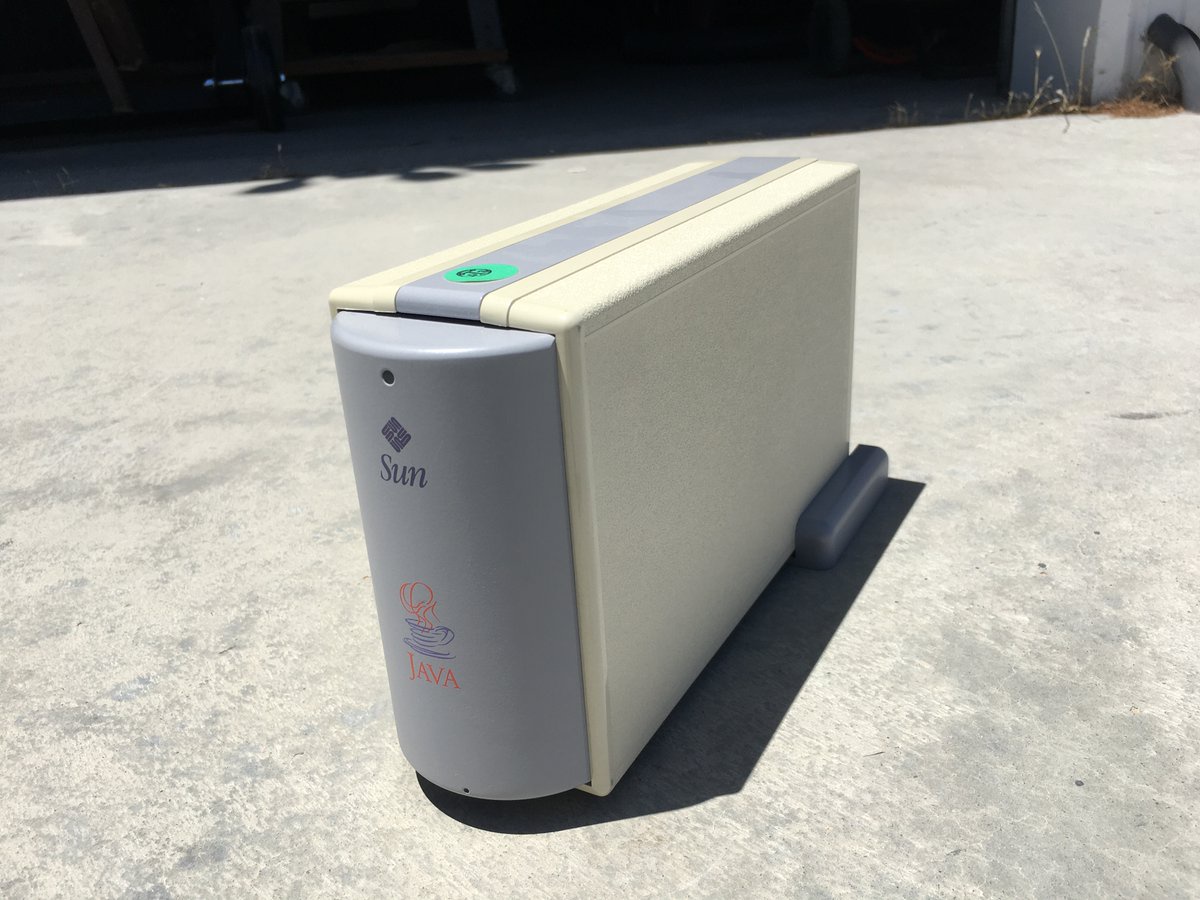
Was looking through the garage today and found this gem. A never released Sun Microsystems extremely compact computer prototype that preceded the Apple Mac mini by 9 yea...
{
    "type": "entry",
    "published": "2020-07-17T04:56:00+00:00",
    "url": "https://twitter.com/slsoftworks/status/1283988804349693952",
    "quotation-of": "https://twitter.com/markjkoch/status/1283905368402214912",
    "content": {
        "text": "TIL: #JavaOS",
        "html": "TIL: <a href=\"https://twitter.com/search?q=%23JavaOS\">#JavaOS</a>"
    },
    "author": {
        "type": "card",
        "name": "flaki",
        "url": "https://twitter.com/slsoftworks",
        "photo": "https://pbs.twimg.com/profile_images/749678683514896385/7gxIRnoC.jpg"
    },
    "post-type": "note",
    "refs": {
        "https://twitter.com/markjkoch/status/1283905368402214912": {
            "type": "entry",
            "published": "2020-07-16T23:24:28+00:00",
            "url": "https://twitter.com/markjkoch/status/1283905368402214912",
            "photo": [
                "https://pbs.twimg.com/media/EdFY8QMUMAEWRFX.jpg",
                "https://pbs.twimg.com/media/EdFY8QMU8AAW1ye.jpg",
                "https://pbs.twimg.com/media/EdFY8QMUEAATQgF.jpg",
                "https://pbs.twimg.com/media/EdFY8QMVAAAvalz.jpg"
            ],
            "content": {
                "text": "Was looking through the garage today and found this gem.  A never released Sun Microsystems extremely compact computer prototype that preceded the Apple Mac mini by 9 years.  Based on the #SPARCstation5 chipset. Demoed in 1996 at the Summer Olympics, only 200 made. Ran #JavaOS.",
                "html": "Was looking through the garage today and found this gem.  A never released Sun Microsystems extremely compact computer prototype that preceded the Apple Mac mini by 9 years.  Based on the <a href=\"https://twitter.com/search?q=%23SPARCstation5\">#SPARCstation5</a> chipset. Demoed in 1996 at the Summer Olympics, only 200 made. Ran <a href=\"https://twitter.com/search?q=%23JavaOS\">#JavaOS</a>."
            },
            "author": {
                "type": "card",
                "name": "Mark J Koch",
                "url": "https://twitter.com/markjkoch",
                "photo": "https://pbs.twimg.com/profile_images/378800000464043144/8cd432d346710877e8259434e295600d.png"
            },
            "post-type": "photo"
        }
    },
    "_id": "13283250",
    "_source": "2773"
}
Who is this Daniel Radiker? I want @kickscondor back… Guess I’ll have to await the release of National Treasure III in 2021.
Also, I now want a full hidden telnet BBS built into my website! HOLY SHIT!!!
kickscondor.com
boffosocko.com/2020/07/16/557…
{
    "type": "entry",
    "published": "2020-07-17T04:50:34+00:00",
    "url": "https://twitter.com/ChrisAldrich/status/1283987436331077633",
    "content": {
        "text": "Who is this Daniel Radiker? I want @kickscondor back\u2026 Guess I\u2019ll have to await the release of National Treasure III in 2021.\nAlso, I now want a full hidden telnet BBS built into my website! HOLY SHIT!!!\nkickscondor.com\nboffosocko.com/2020/07/16/557\u2026",
        "html": "Who is this Daniel Radiker? I want <a href=\"https://twitter.com/kickscondor\">@kickscondor</a> back\u2026 Guess I\u2019ll have to await the release of National Treasure III in 2021.\nAlso, I now want a full hidden telnet BBS built into my website! HOLY SHIT!!!\n<a href=\"https://www.kickscondor.com/\">kickscondor.com</a>\n<a href=\"https://boffosocko.com/2020/07/16/55773690/\">boffosocko.com/2020/07/16/557\u2026</a>"
    },
    "author": {
        "type": "card",
        "name": "Chris Aldrich",
        "url": "https://twitter.com/ChrisAldrich",
        "photo": "https://pbs.twimg.com/profile_images/890299009381916672/CafdvvxN.jpg"
    },
    "post-type": "note",
    "_id": "13283251",
    "_source": "2773"
}
Me: (minding my business reading)
All of the emails from everyone going live on Twitch:
{
    "type": "entry",
    "published": "2020-07-16T20:44:56.34814-07:00",
    "url": "https://v2.jacky.wtf/post/e44bffcc-5e7f-41d8-b310-3a2913c42c1c",
    "photo": [
        "https://v2.jacky.wtf/media/image/entry%24e44bffcc-5e7f-41d8-b310-3a2913c42c1c/EVLzzRnUMAEFMZM.jpeg?v=original"
    ],
    "content": {
        "text": "Me: (minding my business reading)All of the emails from everyone going live on Twitch:",
        "html": "<p>Me: (minding my business reading)</p><p>All of the emails from everyone going live on Twitch:</p>"
    },
    "author": {
        "type": "card",
        "name": "",
        "url": "https://v2.jacky.wtf",
        "photo": null
    },
    "post-type": "photo",
    "_id": "13282441",
    "_source": "1886"
}
This is the interface for Koype Publish after you use Web sign in. It’ll pull some of the last articles you’ve written and (depending on the support your site exposes) allow you to create new articles and pages as well as customize your homepage.

{
    "type": "entry",
    "published": "2020-07-16T19:37:00.21670-07:00",
    "url": "https://v2.jacky.wtf/post/23652566-6fce-4725-b8d3-e62b75e1bd7f",
    "category": [
        "devlog"
    ],
    "photo": [
        "https://v2.jacky.wtf/media/image/entry%2423652566-6fce-4725-b8d3-e62b75e1bd7f/Screenshot_20200716_193517.png?v=original"
    ],
    "content": {
        "text": "This is the interface for Koype Publish after you use Web sign in. It\u2019ll pull some of the last articles you\u2019ve written and (depending on the support your site exposes) allow you to create new articles and pages as well as customize your homepage.",
        "html": "<p>This is the interface for Koype Publish after you use Web sign in. It\u2019ll pull some of the last articles you\u2019ve written and (depending on the support your site exposes) allow you to create new articles and pages as well as customize your homepage.</p>"
    },
    "author": {
        "type": "card",
        "name": "",
        "url": "https://v2.jacky.wtf",
        "photo": null
    },
    "post-type": "photo",
    "_id": "13282443",
    "_source": "1886"
}
TIL that Debian codenames are based from characters in Toy Story, lol
{
    "type": "entry",
    "published": "2020-07-16T17:21:00.00000-07:00",
    "url": "https://v2.jacky.wtf/post/f0e8643b-bffc-4db3-99ea-366945a897fd",
    "content": {
        "text": "TIL that Debian codenames are based from characters in Toy Story, lol",
        "html": "<p>TIL that Debian codenames are based from characters in Toy Story, lol</p>"
    },
    "author": {
        "type": "card",
        "name": "",
        "url": "https://v2.jacky.wtf",
        "photo": null
    },
    "post-type": "note",
    "_id": "13282444",
    "_source": "1886"
}
This is a bit of a warning but I’m changing all of the feed URLs for my site. Mainly to make them a bit more friendly to read but I’m also deprecating the ATOM and JSON Feeds. This is largely to reduce the computational burden on my site as building them correctly for each format is a considerable effort I don’t want to invest in Koype (at the moment). I’m planning to make it easy to use those formats again in the future. For now, I’d recommend using something like https://granary.io/ to convert the feeds available at https://v2.jacky.wtf/feeds/ under the hFeed section.
{
    "type": "entry",
    "published": "2020-07-16T16:05:28.57469-07:00",
    "url": "https://v2.jacky.wtf/post/3f7e3d6f-94ab-4843-a8ea-f2887ba8935f",
    "content": {
        "text": "This is a bit of a warning but I\u2019m changing all of the feed URLs for my site. Mainly to make them a bit more friendly to read but I\u2019m also deprecating the ATOM and JSON Feeds. This is largely to reduce the computational burden on my site as building them correctly for each format is a considerable effort I don\u2019t want to invest in Koype (at the moment). I\u2019m planning to make it easy to use those formats again in the future. For now, I\u2019d recommend using something like https://granary.io/ to convert the feeds available at https://v2.jacky.wtf/feeds/ under the hFeed section.",
        "html": "<p>This is a bit of a warning but I\u2019m changing <em>all</em> of the feed URLs for my site. Mainly to make them a bit more friendly to read but I\u2019m also deprecating the ATOM and JSON Feeds. This is largely to reduce the computational burden on my site as building them correctly for each format is a considerable effort I don\u2019t want to invest in Koype (at the moment). I\u2019m planning to make it easy to use those formats again in the future. For now, I\u2019d recommend using something like <a href=\"https://granary.io/\">https://granary.io/</a> to convert the feeds available at <a href=\"https://v2.jacky.wtf/feeds/\">https://v2.jacky.wtf/feeds/</a> under the hFeed section.</p>"
    },
    "author": {
        "type": "card",
        "name": "",
        "url": "https://v2.jacky.wtf",
        "photo": null
    },
    "post-type": "note",
    "_id": "13282446",
    "_source": "1886"
}
I haven’t loved using a terminal font more than I have with Iosevka. Like it works amazing at small and super BIG sizes and of course, solid ligature support.

{
    "type": "entry",
    "published": "2020-07-16T13:38:18.58979-07:00",
    "url": "https://v2.jacky.wtf/post/277c47aa-2b21-458d-ac05-b4c7ff2649a5",
    "photo": [
        "https://v2.jacky.wtf/media/image/entry%24277c47aa-2b21-458d-ac05-b4c7ff2649a5/Screen%20Shot%202020-07-16%20at%201.36.37%20PM.png?v=original"
    ],
    "content": {
        "text": "I haven\u2019t loved using a terminal font more than I have with Iosevka. Like it works amazing at small and super BIG sizes and of course, solid ligature support.",
        "html": "<p>I haven\u2019t loved using a terminal font more than I have with <a href=\"https://typeof.net/Iosevka/\">Iosevka</a>. Like it works amazing at small and super BIG sizes and of course, solid ligature support.</p>"
    },
    "author": {
        "type": "card",
        "name": "",
        "url": "https://v2.jacky.wtf",
        "photo": null
    },
    "post-type": "photo",
    "_id": "13282448",
    "_source": "1886"
}

{
"type": "entry",
"published": "2020-07-17T00:37:38+00:00",
"url": "https://caffeinewitch.tech/2020/07/qubes-tails-persistence-hax",
"name": "Qubes + Tails + Persistence = Hax",
"content": {
"text": "For the large part, when I want to use Tor, I run Whonix - because it's integrated very nicely into Qubes which is my daily driver for both work and personal projects. But, lately,\u00a0Whonix is looking awfully fashy. Maybe they're not, but if they're not, they're certainly not handling it well.And if you know me, that's reason enough to want to delete my Whonix templates & virtual machines. But I needed a good alternative - Tails is my goto when I'm not using Qubes. Tails has\u00a0never worked quite right on Qubes - requiring you to boot from a CD image or external USB disk. Typically, persistence hasn't worked, which isn't great for a Tor-based workstation VM.I've now managed to get a fully virtualised (as in, no USB disk) Tails AppVM on Qubes with persistence. All of this was tested against Qubes R4.0 with Tails 4.8Unfortunately, there are still caveats - the most important of which is that it requires manual network configuration each boot. If you make careful use of the pause/continue AppVM functions in Qubes, you can make this significantly less annoying. The setup process to get this working at all is also a bit of a pain in the ass.Making it go.Caveats\nYou'll need to set an administration password every boot so that you can configure the IP address.\nYou can probably due the same through the GUI without an administration password, but I haven't tested this.\n\n\nThe networking will need to be manually configured each boot\nQubes doesn't use DHCP, but rather a set of custom scripts to dynamically pass in network configuration. Tails doesn't support this out of the box. We may be able to script this, but I need to investigate how static the IP and gateway addresses are in Qubes.\n\nYou're running it in a virtual machine, so it's gonna whine about that.\nIt can't support Qubes' seamless mode, so the entire Tails desktop will be run in it's own window.\nCreate a Tails USB deviceUse dd to create a Tails USB disk on a different computer.Use a different computer\nDownload the Tails USB image\n\nInsert a USB disk\nWrite it to the USB device with sudo dd if=tails-amd64-[version].img of=/dev/[USB device] bs=1M status=progress\nSubstitute [ version ] above with the Tails version - e.g. 4.8\n\nSubstitue [ USB device ] above with the USB device of your thumbdrive - sudo dmesg can help you find out, usually something like sdb\n\n\nRemove the USB disk once it's done.\nCreate a standalone HVM virtual machineCreate the AppVM, making sure to allocate it enough RAM to run, and enough disk space (Private storage in Qubes terms) that your persistent partition will be comfortable.In Qube manager, create a new Qube.\nName it (tails), it give it a colour.\nFor Networking choose your sys-firewall Qube.\nSet type to Empty standalone\n\nUntick install system from device\n\nTick launch settings after creation\n\nCreate it and the settings dialogue should open\nThe Private storage max size option will dictate how big your persistent storage is. I kept mine at 2GB - beware, changing it later will be a headache.\nUnder the Advanced tab, bump Initial memory to at least 1GB - I recommend a minimum of 2. Too low and Tails will fail to boot with a GDM error.\nSave that.\n(Now comes the fun part)Wedge tails into the disk image by abusing dd and qvm-run\nRun dd on sys-usb via qvm-run to dump out the Tails USB disk, pipe it to dd in dom0 and have it write it to the LVM partition that serves as your Tails AppVM's root disk.Insert the USB disk that you wrote Tails to earlier.\nUse qvm-block to find the device's name in your sys-usb qube - usually something like sda\n\nOpen a dom0 terminal\nWe're going to image the Tails disk into the LVM partition that serves as the VM's boot disk: qvm-run --pass-io --user=root sys-usb \"dd if=/dev/[USB Device]\" | sudo dd of=/dev/qubes_dom0/vm-tails-root-snap status=progress\nSubstitue [ USB device ] above with the device's name from step 2.\nIf you didn't name your Qube tails when you created the Qube, the of= parameter above will be different - tails would be replaced with the qube name.\n\nYou can remove the USB disk once it's done.\nGet it bootedStart the AppVM, and edit the boot configuration so that it no longer believes it's on live media and doesn't support persistence. Add in a sudo password in the Tails greeter and go to the desktop.Start the Qube. It'll display the boot process in a window.\nWhen the SYSLINUX boot menu appears, press tab before the timer counts down\nUse your home/end/delete/backspace keys & your arrow keys to find and delete the live-media= parameter (and it's value!) as well as the nopersistence option.\nPress enter to finish booting.\nWhen you get to the TAILS greeter, click the + at the bottom and choose Administration password. Enter a password twice and click Add.\nClick Start Tails to get to the Tails desktop.\nIgnore the rather obvious virtual machine warning.\n\nFix the boot options permanentlyRemount the partition with the syslinux boot options as read-write, edit the boot options to make the manual boot option changes from the last section permanent. Save & remount as read-only again.From the Applications menu, System tools submenu, open a Terminal.\nRun sudo su\u00a0to become an administrator and enter the administration password from step 5 of the boot process.\nRun mount -o remount,rw /lib/live/mount/medium\n\nRun nano /lib/live/mount/medium/syslinux/live.cfg\n\nUse your home/end/delete/backspace keys & your arrow keys to find and delete the live-media= parameter (and it's value!) as well as the nopersistence option. These will appear twice in the file.\nPress ctrl+o then enter to save and ctrl+x to exit.\nRun nano /lib/live/mount/medium/syslinux/live64.cfg\n\nRepeat steps 5 & 6, then continue to 9.\nRun mount -o remount,ro /lib/live/mount/medium\n\nCreating a persistent volume the hard wayCreate a GPT volume label your Private storage disk (xvdb), and then create a partition to fill it. Encrypt it, then format the encrypted partition as ext4. Note that the volume name matters (TailsData). Then mount the new partition, copy the home directory structure in, set all the ownership and permissions where they need to be, and create the persistent storage configuration file.From the Applications menu, System tools submenu, open a Terminal.\nPartition your disk by typing and pressing enter after each:\nsudo su\nenter your administration password from step 5 of the booting process\nparted /dev/xvdb\nmklabel gpt\nq \nparted -a optimal /dev/xvdb mkpart TailsData ext4 0% 100%\n\nCreate the encrypted partition by typing and press enter after each:\n(If you get an error on step e below, shut down Tails, restart the Qube and follow steps 5-7 on the booting process above. Repeat steps a and b below, then re-attempt step e)\ncryptsetup luksFormat /dev/xvdb1\nYES\nenter your chosen disk encryption password\nenter it again\ncryptsetup luksOpen /dev/xvdb1 tails_persist\nenter your disk encryption password again\nmkfs.ext4 /dev/disk/by-id/dm-name-tails_persist\n\nSetup the persistent storage and permissions:\nmount /dev/disk/by-id/dm-name-tails_persist /mnt\ncd /mnt\nchown root:root .\nchmod 0775 .\nsetfacl -m -u tails-persistence-setup:rwx .\ntouch persistence.conf\nchown tails-persistence-setup:tails-persistence-setup persistence.conf\nchmod 0600 persistence.conf\ncp -r /etc/skel amnesia\nchown -R amnesia:amnesia amnesia\necho \"/home/amnesia source=amnesia\" > persistence.conf\ncd\numount /mnt\ncryptsetup luksClose tails_persist\n\nFirst real bootThis will have to be done each time you boot your Tails VM.Restart your AppVM, and you should be able to decrypt the persistent volume in the greeter. You'll also want to set the sudo password again, while you're here.Shut down Tails again, and then restart the Qube\nWhen it boots, the greeter should detect the persistent volume - enter your disk encryption password and click Unlock.\nWhen you get to the TAILS greeter, click the + at the bottom and choose Administration password. Enter a password twice and click Add.\nClick Start Tails to get to the TAILS desktop.\nManually configure networkingUnfortunately, this will also have to be done each time you boot your Tails VM.Qubes doesn't use DHCP on it's internal networking, but rather passes network config values around with qubesdb. Unfortunately, we can't use that inside Tails right now, so we'll need to login and manually configure networking.In Qube Manager, open the settings for the Tails qube and move it to one side where you can see the Networking section.\nIn Tails, from the Applications menu, System tools submenu, open a Terminal.\nIn the terminal, type:\nsudo su\nenter your administration password from step 3 of the First real boot process above.\n\nip addr add 10.137.0.xx/32 dev eth0\nsubstitute 10.137.0.xx with the IP value from the Qube settings.\n\n\nip route add 10.137.0.yy/32 dev eth0\nsubstitute 10.137.0.yy with the Gateway value from the Qube settings.\n\n\nip route add 0.0.0.0/0 via 10.137.0.yy dev eth0\nsubstitute 10.137.0.yy with the Gateway value from the Qube settings.\n\nexit\nexit\n\nAt this stage, the terminal will disappear, and you'll get a notification saying you're connected to Tor.\nCongrats.\n\u00a0",
"html": "<p>For the large part, when I want to use Tor, I run Whonix - because it's integrated very nicely into <a href=\"https://qubes-os.org\">Qubes</a> which is my daily driver for both work and personal projects. But, lately,\u00a0<a href=\"https://micahflee.com/2020/06/is-the-whonix-project-run-by-fascists/\">Whonix is looking awfully fashy</a>. Maybe they're not, but if they're not, they're certainly not <a href=\"https://forums.whonix.org/t/whonix-is-loosing-their-antifacist-supporters/9844/25\">handling it well</a>.</p><p>And if you know me, that's reason enough to want to delete my Whonix templates & virtual machines. But I needed a good alternative - <a href=\"https://tails.boum.org\">Tails</a> is my goto when I'm not using Qubes. Tails has\u00a0<a href=\"https://www.qubes-os.org/doc/tails/\">never worked quite right</a> on Qubes - requiring you to boot from a CD image or external USB disk. Typically, persistence hasn't worked, which isn't great for a Tor-based workstation VM.</p><p>I've now managed to get a fully virtualised (as in, no USB disk) Tails AppVM on Qubes with persistence. All of this was tested against Qubes R4.0 with Tails 4.8</p><p>Unfortunately, there are still caveats - the most important of which is that it requires manual network configuration each boot. If you make careful use of the pause/continue AppVM functions in Qubes, you can make this significantly less annoying. The setup process to get this working at all is also a bit of a pain in the ass.</p><h1>Making it go.</h1><h2><span style=\"color:#003366;\">Caveats</span></h2><ul><li>\n<span style=\"color:#003366;\">You'll need to set an administration password every boot so that you can configure the IP address.</span>\n<ul><li><span style=\"color:#003366;\">You can probably due the same through the GUI without an administration password, but I haven't tested this.</span></li>\n</ul></li>\n<li>\n<span style=\"color:#003366;\">The networking will need to be manually configured each boot</span>\n<ul><li><span style=\"color:#003366;\">Qubes doesn't use DHCP, but rather a set of custom scripts to dynamically pass in network configuration. Tails doesn't support this out of the box. We may be able to script this, but I need to investigate how static the IP and gateway addresses are in Qubes.</span></li>\n</ul></li>\n<li><span style=\"color:#003366;\">You're running it in a virtual machine, so it's gonna whine about that.</span></li>\n<li><span style=\"color:#003366;\">It can't support Qubes' seamless mode, so the entire Tails desktop will be run in it's own window.</span></li>\n</ul><h2>Create a Tails USB device</h2><p>Use <em>dd</em> to create a Tails USB disk on a different computer.</p><ol><li>Use a different computer</li>\n<li>Download the <a href=\"https://tails.boum.org/install/download/index.en.html\">Tails USB image</a>\n</li>\n<li>Insert a USB disk</li>\n<li>Write it to the USB device with <code>sudo </code><code>dd if=tails-amd64-[version].img of=/dev/[USB device] bs=1M status=progress</code>\n<ul><li>Substitute <em>[ version ]</em> above with the Tails version - e.g. <em>4.8</em>\n</li>\n<li>Substitue <em>[ USB device ] </em> above with the USB device of your thumbdrive - <code>sudo dmesg </code>can help you find out, usually something like <code>sdb</code>\n</li>\n</ul></li>\n<li>Remove the USB disk once it's done.</li>\n</ol><h2>Create a standalone HVM virtual machine</h2><p>Create the AppVM, making sure to allocate it enough RAM to run, and enough disk space (<em>Private storage</em> in Qubes terms) that your persistent partition will be comfortable.</p><ol><li>In Qube manager, create a new Qube.</li>\n<li>Name it (<code>tails</code>), it give it a colour.</li>\n<li>For <em>Networking</em> choose your <em>sys-firewall</em> Qube.</li>\n<li>Set type to <em>Empty standalone</em>\n</li>\n<li>Untick <em>install system from device</em>\n</li>\n<li>Tick <em>launch settings after creation</em>\n</li>\n<li>Create it and the settings dialogue should open</li>\n<li>The <em>Private storage max size</em> option will dictate how big your persistent storage is. I kept mine at 2GB - beware, changing it later will be a headache.</li>\n<li>Under the <em>Advanced </em>tab, bump <em>Initial memory</em> to at least 1GB - I recommend a minimum of 2. Too low and Tails will fail to boot with a GDM error.</li>\n<li>Save that.</li>\n</ol><p>(Now comes the fun part)</p><h2>Wedge tails into the disk image by abusing <em>dd</em> and <em>qvm-run</em>\n</h2><p>Run <em>dd</em> on <em>sys-usb </em>via <em>qvm-run</em> to dump out the Tails USB disk, pipe it to <em>dd</em> in dom0 and have it write it to the LVM partition that serves as your Tails AppVM's root disk.</p><ol><li>Insert the USB disk that you wrote Tails to earlier.</li>\n<li>Use <code>qvm-block</code> to find the device's name in your sys-usb qube - usually something like <code>sda</code>\n</li>\n<li>Open a dom0 terminal</li>\n<li>We're going to image the Tails disk into the LVM partition that serves as the VM's boot disk: <code>qvm-run --pass-io --user=root sys-usb \"dd if=/dev/[USB Device]\" | sudo dd of=/dev/qubes_dom0/vm-tails-root-snap status=progress</code>\n<ul><li>Substitue <em>[ USB device ]</em> above with the device's name from step 2.</li>\n<li>If you <em>didn't</em> name your Qube <code>tails </code>when you created the Qube, the <code>of=</code> parameter above will be different - <code>tails</code> would be replaced with the qube name.</li>\n</ul></li>\n<li>You can remove the USB disk once it's done.</li>\n</ol><h2>Get it booted</h2><p>Start the AppVM, and edit the boot configuration so that it no longer believes it's on live media and doesn't support persistence. Add in a sudo password in the Tails greeter and go to the desktop.</p><ol><li>Start the Qube. It'll display the boot process in a window.</li>\n<li>When the <code>SYSLINUX</code> boot menu appears, press tab before the timer counts down</li>\n<li>Use your home/end/delete/backspace keys & your arrow keys to find and delete the <code>live-media=</code> parameter (<em>and it's value!</em>) as well as the <code>nopersistence</code> option.</li>\n<li>Press enter to finish booting.</li>\n<li>When you get to the TAILS greeter, click the <em>+ </em>at the bottom and choose <em>Administration password</em>. Enter a password twice and click <em>Add</em>.</li>\n<li>Click <em>Start</em><em> Tails</em> to get to the Tails desktop.</li>\n<li>Ignore the rather obvious <em>virtual machine warning.</em>\n</li>\n</ol><h2>Fix the boot options permanently</h2><p>Remount the partition with the syslinux boot options as read-write, edit the boot options to make the manual boot option changes from the last section permanent. Save & remount as read-only again.</p><ol><li>From the <em>Applications</em> menu, <em>System tools</em> submenu, open a <em>Terminal</em>.</li>\n<li>Run <code>sudo su\u00a0</code>to become an administrator and enter the administration password from step 5 of the boot process.</li>\n<li>Run <code>mount -o remount,rw /lib/live/mount/medium</code>\n</li>\n<li>Run <code>nano /lib/live/mount/medium/syslinux/live.cfg</code>\n</li>\n<li>Use your home/end/delete/backspace keys & your arrow keys to find and delete the <code>live-media=</code> parameter (<em>and it's value!</em>) as well as the <code>nopersistence</code> option. These will appear twice in the file.</li>\n<li>Press <code>ctrl+o </code>then <code>enter</code> to save and <code>ctrl+x </code>to exit.</li>\n<li>Run <code>nano /lib/live/mount/medium/syslinux/live64.cfg</code>\n</li>\n<li>Repeat steps 5 & 6, then continue to 9.</li>\n<li>Run <code>mount -o remount,ro /lib/live/mount/medium</code>\n</li>\n</ol><h2>Creating a persistent volume the hard way</h2><p>Create a GPT volume label your <em>Private storage</em> disk (<em>xvdb</em>), and then create a partition to fill it. Encrypt it, then format the encrypted partition as ext4. Note that the volume name matters (<em>TailsData</em>). Then mount the new partition, copy the home directory structure in, set all the ownership and permissions where they need to be, and create the persistent storage configuration file.</p><ol><li>From the <em>Applications</em> menu, <em>System tools</em> submenu, open a <em>Terminal</em>.</li>\n<li>Partition your disk by typing and pressing enter after each:\n<ol><li><code>sudo su</code></li>\n<li>enter your administration password from step 5 of the booting process</li>\n<li><code>parted /dev/xvdb</code></li>\n<li><code>mklabel gpt</code></li>\n<li><code>q </code></li>\n<li><code>parted -a optimal /dev/xvdb mkpart TailsData ext4 0% 100%</code></li>\n</ol></li>\n<li>Create the encrypted partition by typing and press enter after each:<br /><em>(If you get an error on step <strong>e</strong> below, shut down Tails, restart the Qube and follow steps <strong>5-7</strong> on the <strong>booting process</strong> above. Repeat steps <strong>a</strong> and <strong>b</strong> below, then re-attempt step <strong>e</strong>)</em><br /><ol><li><code>cryptsetup luksFormat /dev/xvdb1</code></li>\n<li><code>YES</code></li>\n<li>enter your chosen disk encryption password</li>\n<li>enter it again</li>\n<li><code>cryptsetup luksOpen /dev/xvdb1 tails_persist</code></li>\n<li>enter your disk encryption password again</li>\n<li><code>mkfs.ext4 /dev/disk/by-id/dm-name-tails_persist</code></li>\n</ol></li>\n<li>Setup the persistent storage and permissions:\n<ol><li><code>mount /dev/disk/by-id/dm-name-tails_persist /mnt</code></li>\n<li><code>cd /mnt</code></li>\n<li><code>chown root:root .</code></li>\n<li><code>chmod 0775 .</code></li>\n<li><code>setfacl -m -u tails-persistence-setup:rwx .</code></li>\n<li><code>touch persistence.conf</code></li>\n<li><code>chown tails-persistence-setup:tails-persistence-setup persistence.conf</code></li>\n<li><code>chmod 0600 persistence.conf</code></li>\n<li><code>cp -r /etc/skel amnesia</code></li>\n<li><code>chown -R amnesia:amnesia amnesia</code></li>\n<li><code>echo \"/home/amnesia source=amnesia\" > persistence.conf</code></li>\n<li><code>cd</code></li>\n<li><code>umount /mnt</code></li>\n<li><code>cryptsetup luksClose tails_persist</code></li>\n</ol></li>\n</ol><h2>First real boot</h2><p><strong>This will have to be done each time you boot your Tails VM.</strong></p><p>Restart your AppVM, and you should be able to decrypt the persistent volume in the greeter. You'll also want to set the sudo password again, while you're here.</p><ol><li>Shut down Tails again, and then restart the Qube</li>\n<li>When it boots, the greeter should detect the persistent volume - enter your disk encryption password and click <em>Unlock</em>.</li>\n<li>When you get to the TAILS greeter, click the <em>+ </em>at the bottom and choose <em>Administration password</em>. Enter a password twice and click <em>Add</em>.</li>\n<li>Click <em>Start</em><em> Tails</em> to get to the TAILS desktop.</li>\n</ol><h2>Manually configure networking</h2><p><strong>Unfortunately, this will also have to be done each time you boot your Tails VM.</strong></p><p>Qubes doesn't use DHCP on it's internal networking, but rather passes network config values around with <a href=\"https://www.qubes-os.org/doc/vm-interface/\">qubesdb</a>. Unfortunately, we can't use that inside Tails right now, so we'll need to login and manually configure networking.</p><ol><li>In Qube Manager, open the settings for the Tails qube and move it to one side where you can see the <em>Networking</em> section.</li>\n<li>In Tails, from the <em>Applications</em> menu, <em>System tools</em> submenu, open a <em>Terminal</em>.</li>\n<li>In the terminal, type:\n<ol><li><code>sudo su</code></li>\n<li>enter your administration password from step 3 of the <em>First real boot</em> process above.</li>\n<li>\n<code>ip addr add 10.137.0.xx/32 dev eth0</code>\n<ol><li>substitute <code>10.137.0.xx</code> with the <em>IP</em> value from the Qube settings.</li>\n</ol></li>\n<li>\n<code>ip route add 10.137.0.yy/32 dev eth0</code>\n<ol><li>substitute <code>10.137.0.yy</code> with the <em>Gateway</em> value from the Qube settings.</li>\n</ol></li>\n<li>\n<code>ip route add 0.0.0.0/0 via 10.137.0.yy dev eth0</code>\n<ol><li>substitute <code>10.137.0.yy</code> with the <em>Gateway</em> value from the Qube settings.</li>\n</ol></li>\n<li><code>exit</code></li>\n<li><code>exit</code></li>\n</ol></li>\n<li>At this stage, the terminal will disappear, and you'll get a notification saying you're connected to Tor.</li>\n<li>Congrats.</li>\n</ol><p>\u00a0</p>"
},
"author": {
"type": "card",
"name": "ketudb",
"url": "https://caffeinewitch.tech/profile/ketudb",
"photo": "https://caffeinewitch.tech/file/b787c17e8a12ffeac8a16f236a53cccc/thumb.jpg"
},
"post-type": "article",
"_id": "13281681",
"_source": "2779"
}
Much as I sympathize, I think this is one for @BadLegalTakes
Mayor @tedwheeler: invoke 3rd amendment to evict federal troops from Portland Marriott. Get occupying soldiers out of PDX!
Call to Action: Contact Ted Wheeler and demand...
{
    "type": "entry",
    "published": "2020-07-17T02:44:11+00:00",
    "url": "https://twitter.com/karabaic/status/1283955629745270785",
    "quotation-of": "https://twitter.com/grassgoth/status/1283946552881373184",
    "content": {
        "text": "Much as I sympathize, I think this is one for @BadLegalTakes",
        "html": "Much as I sympathize, I think this is one for <a href=\"https://twitter.com/BadLegalTakes\">@BadLegalTakes</a>"
    },
    "author": {
        "type": "card",
        "name": "jk",
        "url": "https://twitter.com/karabaic",
        "photo": "https://pbs.twimg.com/profile_images/1256785873384861696/QfRzUvne.jpg"
    },
    "post-type": "note",
    "refs": {
        "https://twitter.com/grassgoth/status/1283946552881373184": {
            "type": "entry",
            "published": "2020-07-17T02:08:07+00:00",
            "url": "https://twitter.com/grassgoth/status/1283946552881373184",
            "content": {
                "text": "Mayor @tedwheeler: invoke 3rd amendment to evict federal troops from Portland Marriott. Get occupying soldiers out of PDX!\n\nCall to Action: Contact Ted Wheeler and demand #fedsoutofPDX\n\n#NoFedsInPDX #3RDAmendment \n\nen.as.com/en/2020/06/06/\u2026",
                "html": "Mayor <a href=\"https://twitter.com/tedwheeler\">@tedwheeler</a>: invoke 3rd amendment to evict federal troops from Portland Marriott. Get occupying soldiers out of PDX!\n\nCall to Action: Contact Ted Wheeler and demand <a href=\"https://twitter.com/search?q=%23fedsoutofPDX\">#fedsoutofPDX</a>\n\n<a href=\"https://twitter.com/search?q=%23NoFedsInPDX\">#NoFedsInPDX</a> <a href=\"https://twitter.com/search?q=%233RDAmendment\">#3RDAmendment</a> \n\n<a href=\"https://en.as.com/en/2020/06/06/other_sports/1591455316_049832.html\">en.as.com/en/2020/06/06/\u2026</a>"
            },
            "author": {
                "type": "card",
                "name": "Mierin Fanucchi - The Real Trim Shady (They/Them)",
                "url": "https://twitter.com/grassgoth",
                "photo": "https://pbs.twimg.com/profile_images/1283124200887083008/nfh8WUAw.jpg"
            },
            "post-type": "note"
        }
    },
    "_id": "13281679",
    "_source": "2773"
}
Defund the police, just not these police. #beforeigners
{
    "type": "entry",
    "published": "2020-07-17T02:41:55+00:00",
    "url": "https://twitter.com/karabaic/status/1283955061131841537",
    "video": [
        "https://video.twimg.com/ext_tw_video/1283955031281004544/pu/vid/1280x720/0Gt91yUhrYc1Uz7g.mp4?tag=10"
    ],
    "content": {
        "text": "Defund the police, just not these police. #beforeigners",
        "html": "Defund the police, just not these police. <a href=\"https://twitter.com/search?q=%23beforeigners\">#beforeigners</a>"
    },
    "author": {
        "type": "card",
        "name": "jk",
        "url": "https://twitter.com/karabaic",
        "photo": "https://pbs.twimg.com/profile_images/1256785873384861696/QfRzUvne.jpg"
    },
    "post-type": "video",
    "_id": "13281680",
    "_source": "2773"
}
Crave
Music,
Dance,
Sound.
Melt
bodies.
felt
prodigies
found
Trance
Acoustic Slave
#smallpoems (quickthoughts.jgregorymcverry.com/s/1JWbJt)
{
    "type": "entry",
    "published": "2020-07-17T01:44:26+00:00",
    "url": "https://twitter.com/jgmac1106/status/1283940592817405952",
    "content": {
        "text": "Crave\nMusic, \nDance, \nSound. \nMelt \nbodies. \n\nfelt\nprodigies\nfound\n Trance\nAcoustic Slave\n#smallpoems (quickthoughts.jgregorymcverry.com/s/1JWbJt)",
        "html": "Crave\nMusic, \nDance, \nSound. \nMelt \nbodies. \n\nfelt\nprodigies\nfound\n Trance\nAcoustic Slave\n<a href=\"https://twitter.com/search?q=%23smallpoems\">#smallpoems</a> (<a href=\"https://quickthoughts.jgregorymcverry.com/s/1JWbJt\">quickthoughts.jgregorymcverry.com/s/1JWbJt</a>)"
    },
    "author": {
        "type": "card",
        "name": "https://jgregorymcverry.com",
        "url": "https://twitter.com/jgmac1106",
        "photo": "https://pbs.twimg.com/profile_images/565227710104883200/g4MDcTnx.jpeg"
    },
    "post-type": "note",
    "_id": "13280663",
    "_source": "2773"
}
Crave
Music,
Dance,
Sound.
Melt
bodies.
felt
prodigies
found
Trance
Acoustic Slave
#smallpoems
{
    "type": "entry",
    "published": "2020-07-17T01:44:02+0000",
    "url": "https://quickthoughts.jgregorymcverry.com/2020/07/17/cravemusic-dance-sound-melt-bodies-feltprodigiesfound-tranceacoustic",
    "category": [
        "smallpoems"
    ],
    "syndication": [
        "https://twitter.com/jgmac1106/status/1283940592817405952"
    ],
    "content": {
        "text": "Crave\n\nMusic, \n\nDance, \n\nSound. \n\nMelt \n\nbodies. \n\n\nfelt\n\nprodigies\n\nfound\n\n Trance\n\nAcoustic Slave\n#smallpoems",
        "html": "Crave<br />\nMusic, <br />\nDance, <br />\nSound. <br />\nMelt <br />\nbodies. <br /><br />\nfelt<br />\nprodigies<br />\nfound<br />\n Trance<br />\nAcoustic Slave<br /><a href=\"https://quickthoughts.jgregorymcverry.com/tag/smallpoems\" class=\"p-category\">#smallpoems</a> <br />"
    },
    "author": {
        "type": "card",
        "name": "Greg McVerry",
        "url": "https://quickthoughts.jgregorymcverry.com/profile/jgmac1106",
        "photo": "https://quickthoughts.jgregorymcverry.com/file/2d6c9cfed7ac8e849f492b5bc7e6a630/thumb.jpg"
    },
    "post-type": "note",
    "_id": "13280537",
    "_source": "1300"
}
basement
hangs
Two fiddling fish
Wrapped in YinYang
Pandas
In Green
Ironman, of
Cal, not Tony
Machine
Elephant eyes glean
eclectic stare
while #33
Celtic flys in air
And a two headed turtle
Struggles
To nowhere.
#smallpoems
{
    "type": "entry",
    "published": "2020-07-16T23:57:18+0000",
    "url": "https://quickthoughts.jgregorymcverry.com/2020/07/16/basementhangstwo-fiddling-fishwrapped-in-yinyangpandasin-greenironman-ofcal",
    "category": [
        "smallpoems"
    ],
    "syndication": [
        "https://twitter.com/jgmac1106/status/1283913753302642688"
    ],
    "content": {
        "text": "basement\n\nhangs\n\nTwo fiddling fish\n\nWrapped in YinYang\n\nPandas\n\nIn Green\n\nIronman, of\n\nCal, not Tony\n\nMachine\n\n Elephant eyes glean\n\n eclectic stare\n\nwhile #33\n\nCeltic flys in air\n\nAnd a two headed turtle\n\nStruggles\n\nTo nowhere.\n#smallpoems",
        "html": "basement<br />\nhangs<br />\nTwo fiddling fish<br />\nWrapped in YinYang<br />\nPandas<br />\nIn Green<br />\nIronman, of<br />\nCal, not Tony<br />\nMachine<br />\n Elephant eyes glean<br />\n eclectic stare<br />\nwhile #33<br />\nCeltic flys in air<br />\nAnd a two headed turtle<br />\nStruggles<br />\nTo nowhere.<br /><a href=\"https://quickthoughts.jgregorymcverry.com/tag/smallpoems\" class=\"p-category\">#smallpoems</a>"
    },
    "author": {
        "type": "card",
        "name": "Greg McVerry",
        "url": "https://quickthoughts.jgregorymcverry.com/profile/jgmac1106",
        "photo": "https://quickthoughts.jgregorymcverry.com/file/2d6c9cfed7ac8e849f492b5bc7e6a630/thumb.jpg"
    },
    "post-type": "note",
    "_id": "13278800",
    "_source": "1300"
}
basement
hangs
Two fiddling fish
Wrapped in YinYang
Pandas
In Green
Ironman, of
Cal, not Tony
Machine
Elephant eyes glean
eclectic stare
while #33
Celtic flys in air
And a two headed turtle
Struggles
To nowhere.
#smallpoems (quickthoughts.jgregorymcverry.com/s/1dYBKM)
{
    "type": "entry",
    "published": "2020-07-16T23:57:47+00:00",
    "url": "https://twitter.com/jgmac1106/status/1283913753302642688",
    "content": {
        "text": "basement\nhangs\nTwo fiddling fish\nWrapped in YinYang\nPandas\nIn Green\nIronman, of\nCal, not Tony\nMachine\n Elephant eyes glean\n eclectic stare\nwhile #33\nCeltic flys in air\nAnd a two headed turtle\nStruggles\nTo nowhere.\n#smallpoems (quickthoughts.jgregorymcverry.com/s/1dYBKM)",
        "html": "basement\nhangs\nTwo fiddling fish\nWrapped in YinYang\nPandas\nIn Green\nIronman, of\nCal, not Tony\nMachine\n Elephant eyes glean\n eclectic stare\nwhile #33\nCeltic flys in air\nAnd a two headed turtle\nStruggles\nTo nowhere.\n<a href=\"https://twitter.com/search?q=%23smallpoems\">#smallpoems</a> (<a href=\"https://quickthoughts.jgregorymcverry.com/s/1dYBKM\">quickthoughts.jgregorymcverry.com/s/1dYBKM</a>)"
    },
    "author": {
        "type": "card",
        "name": "https://jgregorymcverry.com",
        "url": "https://twitter.com/jgmac1106",
        "photo": "https://pbs.twimg.com/profile_images/565227710104883200/g4MDcTnx.jpeg"
    },
    "post-type": "note",
    "_id": "13278666",
    "_source": "2773"
}