{
"type": "entry",
"published": "2020-09-27T03:21:19+00:00",
"url": "https://twitter.com/cleverdevil/status/1310056900378066947",
"quotation-of": "https://twitter.com/CanesFootball/status/1310055048299401218",
"content": {
"text": "Fiddy burger!"
},
"author": {
"type": "card",
"name": "Jonathan LaCour",
"url": "https://twitter.com/cleverdevil",
"photo": "https://pbs.twimg.com/profile_images/744804831064317952/W-gMo7AO.jpg"
},
"post-type": "note",
"refs": {
"https://twitter.com/CanesFootball/status/1310055048299401218": {
"type": "entry",
"published": "2020-09-27T03:13:57+00:00",
"url": "https://twitter.com/CanesFootball/status/1310055048299401218",
"content": {
"text": "\ud83c\udf54\ud83c\udf54\ud83c\udf54\ud83c\udf54\ud83c\udf54\ud83c\udf54\ud83c\udf54\ud83c\udf54\ud83c\udf54\ud83c\udf54\ud83c\udf54\ud83c\udf54\ud83c\udf54\ud83c\udf54\ud83c\udf54\ud83c\udf54\ud83c\udf54\ud83c\udf54\ud83c\udf54\ud83c\udf54\ud83c\udf54\ud83c\udf54\ud83c\udf54\ud83c\udf54\ud83c\udf54\ud83c\udf54\ud83c\udf54\ud83c\udf54\ud83c\udf54\ud83c\udf54\ud83c\udf54\ud83c\udf54\ud83c\udf54\ud83c\udf54\ud83c\udf54\ud83c\udf54\ud83c\udf54\ud83c\udf54\ud83c\udf54\ud83c\udf54\ud83c\udf54\ud83c\udf54\ud83c\udf54\ud83c\udf54\ud83c\udf54\ud83c\udf54\ud83c\udf54\ud83c\udf54\ud83c\udf54\ud83c\udf54\ud83c\udf54\ud83c\udf54"
},
"author": {
"type": "card",
"name": "Canes F\ud83d\ude37\ud83d\ude37tball",
"url": "https://twitter.com/CanesFootball",
"photo": "https://pbs.twimg.com/profile_images/1298634783044636673/Em3wDadY.jpg"
},
"post-type": "note"
}
},
"_id": "15080492",
"_source": "2773"
}
Converting Your WordPress Theme for Microformats 2 Part 2: di5.us/b/yV
{
"type": "entry",
"published": "2020-09-27T02:31:19+00:00",
"url": "https://twitter.com/dshanske/status/1310044319265566720",
"content": {
"text": "Converting Your WordPress Theme for Microformats 2 Part 2: di5.us/b/yV",
"html": "Converting Your WordPress Theme for Microformats 2 Part 2: <a href=\"https://di5.us/b/yV\">di5.us/b/yV</a>"
},
"author": {
"type": "card",
"name": "David Shanske",
"url": "https://twitter.com/dshanske",
"photo": "https://pbs.twimg.com/profile_images/945095985340080128/oHe8j2na.jpg"
},
"post-type": "note",
"_id": "15079778",
"_source": "2773"
}
{
"type": "entry",
"published": "2020-09-26T22:31:06-04:00",
"url": "https://david.shanske.com/2020/09/26/converting-your-wordpress-theme-for-microformats-2-part-2/",
"syndication": [
"https://news.indieweb.org/en/david.shanske.com/2020/09/26/converting-your-wordpress-theme-for-microformats-2-part-2/",
"https://twitter.com/dshanske/status/1310044319265566720",
"https://micro.blog/dshanske/10321960"
],
"name": "Converting Your WordPress Theme for Microformats 2 Part 2",
"content": {
"text": "Okay, so four years after I wrote how to start Converting Your WordPress Theme for Microformats 2, I\u2019m back with Part 2.\nFirst, four years later, we need to recap, update, and expand what we discussed last time.\nBefore you start, you need to clean up two very simple things.\n\u00a0Don\u2019t style any Microformats Classes. WordPress commonly supports classic microformats. WordPress actually adds hentry, the predecessor to h-entry, into every single post in the post_class filter. So, you want to be able to supplement, replace, or fix Microformats classes without changing the look of your theme. So if you are updating a theme that already does this, add a styling class and change your CSS to do that. For example, I add entry alongside hentry and rewrite all the CSS to style entry, then I can take hentry out where it shouldn\u2019t be.\nSomeone years ago decided to add hfeed to the header file of their theme and everyone copied it. hfeed indicates a page is a feed\u2026which means it contains multiple entries(date archive, author archive, main posts page, etc). This should therefore not appear on a single page\u2026so if it does, take it out.\nWhere do you start?\nAdd h-entry and h-feed in the proper places. See Part 1 for some sample code on how to do that using the body_class and post_class filters. You could also add it manually by surrounding your post, class=\"h-entry\", and surrounding all the posts in an archive/feed page with an element that has class=\"h-feed\" Congratulations, you\u2019ve now marked up your posts as posts and your feeds as feeds.\nNow that we\u2019ve marked up feeds and posts, we want to get down deeper\u2026namely, inside your posts. We want to mark up things like author, publish date, etc.\nIn most themes, time is already marked up, something like this, with an HTML5 time element. The full time is present in ISO8601 format, with the timezone offset for your site, and inside the tag is the human readable one.\n<time datetime=\"2016-06-22T23:52:09-04:00\">June 22, 2016</time>\nYou get two times per post..the published time and the updated time.\u00a0 Many themes have the updated time visually hidden, but available for parsing. If you do not have a fully formatted timestamp in datetime, you should do so. Positively, since WordPress 5.3, the offset is properly set based on your site settings, where previously you had to edit the theme to get this. The displayed time is up to you.\nAdd class=\"dt-published\" to the publish time of the post, and class=\"dt-updated\" to the updated/modified time of the post.\nWe also, most importantly, want to make sure the author is marked up correctly. That should include, at minimum, the author\u2019s name, if not URL and photo. All author properties should be surrounded by an element that has class=\"p-author h-card\". The photo should have class=\"u-photo\", indicating it is a representative photo of the element it is inside\u2026the h-card. H-cards represent people, organizations, or places. By adding the p-author, we indicate that this person is the author of the piece. The p- tells the parser that whatever text is inside here is the value of the author property. You can also add a url for the author website, marking it class=\"u-url\" which states it is the URL that represents the containing element\u2026the h-card/author property.\nHere is a simplified example of what this might look like\u2026\n<div class=\"h-entry\">\n<time class=\"dt-published\" datetime=\"2016-06-22T23:52:09-04:00\">June 22, 2016</time>\n<span class=\"p-author h-card\"><a href=\"https://joebloggs.com\">Joe Bloggs</a><img class=\"u-photo\" src=\"https://joebloggs.com/avatar.jpg\" /></span>\n</div>\nSo, if we run the new file through a Microformats parser(I like php.microformats.io), we\u2019d get a nice output\u2026\n{\n \"type\": [\n \"h-entry\"\n ],\n \"properties\": {\n \"published\": [\n \"2016-06-22T23:52:09-04:00\"\n ],\n \"author\": [\n {\n \"type\": [\n \"h-card\"\n ],\n \"properties\": {\n \"photo\": [\n \"https://joebloggs.com/avatar.jpg\"\n ],\n \"name\": [\n \"Joe Bloggs\"\n ]\n },\n \"value\": \"Joe Bloggs\"\n }\n ]\n }\n}\nLooks pretty good\u2026except no content\u2026 Content is a bit more complicated, because WordPress stores content in the database, but when outputting it, puts it through a filter called \u201cthe_content\u201d, which many plugins use to add things that aren\u2019t content to the post.\nContent is supposed to be wrapped in an element with the class=\"e-content\". If we wrap the output of the_content, we might incorporate things from other plugins.\nWhile it is by no means the most reliable way, my solution is to use the same content filter, but at the first priority, wrapping what original came out of post_content before all the other items.\nYou can do the same with the summary, if it exists, wrapping it in p-summary.\nfunction add_econtent( $content ) {\n // Do Not Add this is it is a Feed.\n if ( is_feed() ) {\n return $content;\n }\n $wrap = '<div class=\"e-content\">';\n // If there is no content, do not bother.\n if ( empty( $content ) ) {\n return $content;\n }\n return $wrap . $content . '</div>';\n}\nadd_filter( 'the_content', 'add_econtent', 1 ); \n\nfunction add_psummary( $excerpt ) {\n // Do Not Add this is it is a Feed.\n if ( is_feed() ) {\n return $excerpt;\n }\n $wrap = '<div class=\"p-summary\">';\n // If there is no excerpt, do not bother.\n if ( empty( $excerpt ) ) {\n return $excerpt;\n }\n return $wrap . $excerpt . '</div>';\n}\nadd_filter( 'the_excerpt', 'add_psummary', 1 );\nIn the next part, we\u2019ll dive even more into the weeds, talking about other classic microformats and rel-values and what to do with them. Probably before 2024.",
"html": "Okay, so four years after I wrote how to start <a href=\"https://david.shanske.com/2016/06/22/converting-wordpress-themes-microformats-2-part-1/\">Converting Your WordPress Theme for Microformats 2</a>, I\u2019m back with Part 2.\n<p>First, four years later, we need to recap, update, and expand what we discussed last time.</p>\n<p>Before you start, you need to clean up two very simple things.</p>\n<ul><li>\u00a0Don\u2019t style any Microformats Classes. WordPress commonly supports <a href=\"https://microformats.org/wiki/hentry\">classic microformats</a>. WordPress actually adds hentry, the predecessor to h-entry, into every single post in the post_class filter. So, you want to be able to supplement, replace, or fix Microformats classes without changing the look of your theme. So if you are updating a theme that already does this, add a styling class and change your CSS to do that. For example, I add entry alongside hentry and rewrite all the CSS to style entry, then I can take hentry out where it shouldn\u2019t be.</li>\n<li>Someone years ago decided to add hfeed to the header file of their theme and everyone copied it. hfeed indicates a page is a feed\u2026which means it contains multiple entries(date archive, author archive, main posts page, etc). This should therefore not appear on a single page\u2026so if it does, take it out.</li>\n</ul><p><strong>Where do you start?</strong></p>\n<p style=\"padding-left:40px;\">Add h-entry and h-feed in the proper places. See <a href=\"https://david.shanske.com/2016/06/22/converting-wordpress-themes-microformats-2-part-1/\">Part 1 </a>for some sample code on how to do that using the body_class and post_class filters. You could also add it manually by surrounding your post, <code>class=\"h-entry\"</code>, and surrounding all the posts in an archive/feed page with an element that has <code>class=\"h-feed\"</code> Congratulations, you\u2019ve now marked up your posts as posts and your feeds as feeds.</p>\n<p>Now that we\u2019ve marked up feeds and posts, we want to get down deeper\u2026namely, inside your posts. We want to mark up things like author, publish date, etc.</p>\n<p style=\"padding-left:40px;\">In most themes, time is already marked up, something like this, with an HTML5 time element. The full time is present in ISO8601 format, with the timezone offset for your site, and inside the tag is the human readable one.</p>\n<pre><<span>time</span> <span>datetime</span>=\"2016-06-22T23:52:09-04:00\">June 22, 2016</<span>time</span>></pre>\n<p style=\"padding-left:40px;\">You get two times per post..the published time and the updated time.\u00a0 Many themes have the updated time visually hidden, but available for parsing. If you do not have a fully formatted timestamp in datetime, you should do so. Positively, since WordPress 5.3, the offset is properly set based on your site settings, where previously you had to edit the theme to get this. The displayed time is up to you.</p>\n<p style=\"padding-left:40px;\">Add <code>class=\"dt-published\"</code> to the publish time of the post, and <code>class=\"dt-updated\"</code> to the updated/modified time of the post.</p>\n<p>We also, most importantly, want to make sure the author is marked up correctly. That should include, at minimum, the author\u2019s name, if not URL and photo. All author properties should be surrounded by an element that has <code>class=\"p-author h-card\"</code>. The photo should have <code>class=\"u-photo\"</code>, indicating it is a representative photo of the element it is inside\u2026the h-card. H-cards represent people, organizations, or places. By adding the p-author, we indicate that this person is the author of the piece. The p- tells the parser that whatever text is inside here is the value of the author property. You can also add a url for the author website, marking it <code>class=\"u-url\"</code> which states it is the URL that represents the containing element\u2026the h-card/author property.</p>\n<p>Here is a simplified example of what this might look like\u2026</p>\n<pre><div class=\"h-entry\">\n<time class=\"dt-published\" datetime=\"2016-06-22T23:52:09-04:00\">June 22, 2016</time>\n<span class=\"p-author h-card\"><a href=\"https://joebloggs.com\">Joe Bloggs</a><img class=\"u-photo\" src=\"https://joebloggs.com/avatar.jpg\" /></span>\n</div></pre>\n<p>So, if we run the new file through a Microformats parser(I like <a href=\"https://php.microformats.io\">php.microformats.io</a>), we\u2019d get a nice output\u2026</p>\n<pre>{\n \"type\": [\n \"h-entry\"\n ],\n \"properties\": {\n \"published\": [\n \"2016-06-22T23:52:09-04:00\"\n ],\n \"author\": [\n {\n \"type\": [\n \"h-card\"\n ],\n \"properties\": {\n \"photo\": [\n \"https://joebloggs.com/avatar.jpg\"\n ],\n \"name\": [\n \"Joe Bloggs\"\n ]\n },\n \"value\": \"Joe Bloggs\"\n }\n ]\n }\n}</pre>\n<p>Looks pretty good\u2026except no content\u2026 Content is a bit more complicated, because WordPress stores content in the database, but when outputting it, puts it through a filter called \u201cthe_content\u201d, which many plugins use to add things that aren\u2019t content to the post.</p>\n<p>Content is supposed to be wrapped in an element with the <code>class=\"e-content\"</code>. If we wrap the output of the_content, we might incorporate things from other plugins.</p>\n<p>While it is by no means the most reliable way, my solution is to use the same content filter, but at the first priority, wrapping what original came out of post_content before all the other items.</p>\n<p>You can do the same with the summary, if it exists, wrapping it in p-summary.</p>\n<pre>function add_econtent( $content ) {\n // Do Not Add this is it is a Feed.\n if ( is_feed() ) {\n return $content;\n }\n $wrap = '<span><div class=\"e-content\"></span>';\n // If there is no content, do not bother.\n if ( empty( $content ) ) {\n return $content;\n }\n return $wrap . $content . '<span></div>'</span>;\n}\nadd_filter( 'the_content', 'add_econtent', 1 ); \n\nfunction add_psummary( $excerpt ) {\n // Do Not Add this is it is a Feed.\n if ( is_feed() ) {\n return $excerpt;\n }\n $wrap = '<span><div class=\"p-summary\"></span>';\n // If there is no excerpt, do not bother.\n if ( empty( $excerpt ) ) {\n return $excerpt;\n }\n return $wrap . $excerpt . '<span></div>'</span>;\n}\nadd_filter( 'the_excerpt', 'add_psummary', 1 );</pre>\n<p>In the next part, we\u2019ll dive even more into the weeds, talking about other classic microformats and rel-values and what to do with them. Probably before 2024.</p>"
},
"author": {
"type": "card",
"name": "David Shanske",
"url": "https://david.shanske.com/",
"photo": "https://david.shanske.com/avatar/dshanske?s=49"
},
"post-type": "article",
"_id": "15079684",
"_source": "1905"
}
Watching the sunset (@ The Place in Portland, OR) swarmapp.com/c/gARtEglRHn5
{
"type": "entry",
"published": "2020-09-27T02:22:08+00:00",
"url": "https://twitter.com/karabaic/status/1310042006484398082",
"content": {
"text": "Watching the sunset (@ The Place in Portland, OR) swarmapp.com/c/gARtEglRHn5",
"html": "Watching the sunset (@ The Place in Portland, OR) <a href=\"https://www.swarmapp.com/c/gARtEglRHn5\">swarmapp.com/c/gARtEglRHn5</a>"
},
"author": {
"type": "card",
"name": "jk",
"url": "https://twitter.com/karabaic",
"photo": "https://pbs.twimg.com/profile_images/1256785873384861696/QfRzUvne.jpg"
},
"post-type": "note",
"_id": "15079607",
"_source": "2773"
}
Stupid broadcast TV rules are preventing me from watching the game from the beginning on YouTube TV while I am traveling. So dumb. I recorded it why can’t I watch it until its complete?
Oh well, at least we’re absolutely destroying them. I’ll watch the second half first I guess.
{
"type": "entry",
"published": "2020-09-27T01:49:54+00:00",
"url": "https://twitter.com/cleverdevil/status/1310033894805135360",
"content": {
"text": "Stupid broadcast TV rules are preventing me from watching the game from the beginning on YouTube TV while I am traveling. So dumb. I recorded it why can\u2019t I watch it until its complete?\n\nOh well, at least we\u2019re absolutely destroying them. I\u2019ll watch the second half first I guess."
},
"author": {
"type": "card",
"name": "Jonathan LaCour",
"url": "https://twitter.com/cleverdevil",
"photo": "https://pbs.twimg.com/profile_images/744804831064317952/W-gMo7AO.jpg"
},
"post-type": "note",
"_id": "15079245",
"_source": "2773"
}
I think Miami might just cover. #BeatFSU
{
"type": "entry",
"published": "2020-09-27T01:45:15+00:00",
"url": "https://twitter.com/cleverdevil/status/1310032725605195776",
"content": {
"text": "I think Miami might just cover. #BeatFSU",
"html": "I think Miami might just cover. <a href=\"https://twitter.com/search?q=%23BeatFSU\">#BeatFSU</a>"
},
"author": {
"type": "card",
"name": "Jonathan LaCour",
"url": "https://twitter.com/cleverdevil",
"photo": "https://pbs.twimg.com/profile_images/744804831064317952/W-gMo7AO.jpg"
},
"post-type": "note",
"_id": "15079029",
"_source": "2773"
}
Couch glamour shot. Going live on YouTube in 36 mins to eat way too many @BlueStarDonuts and discuss the fincen file leak.

{
"type": "entry",
"published": "2020-09-26T23:26:40+00:00",
"url": "https://twitter.com/anomalily/status/1309997847329214464",
"photo": [
"https://pbs.twimg.com/media/Ei4MGRrU8AABLLY.jpg"
],
"content": {
"text": "Couch glamour shot. Going live on YouTube in 36 mins to eat way too many @BlueStarDonuts and discuss the fincen file leak.",
"html": "Couch glamour shot. Going live on YouTube in 36 mins to eat way too many <a href=\"https://twitter.com/BlueStarDonuts\">@BlueStarDonuts</a> and discuss the fincen file leak."
},
"author": {
"type": "card",
"name": "Lillian Karabaic \ud83e\udd44\ud83c\udff3\ufe0f\u200d\ud83c\udf08 BLM",
"url": "https://twitter.com/anomalily",
"photo": "https://pbs.twimg.com/profile_images/1123802400731664385/dsHQG1nZ.jpg"
},
"post-type": "photo",
"_id": "15077021",
"_source": "2773"
}
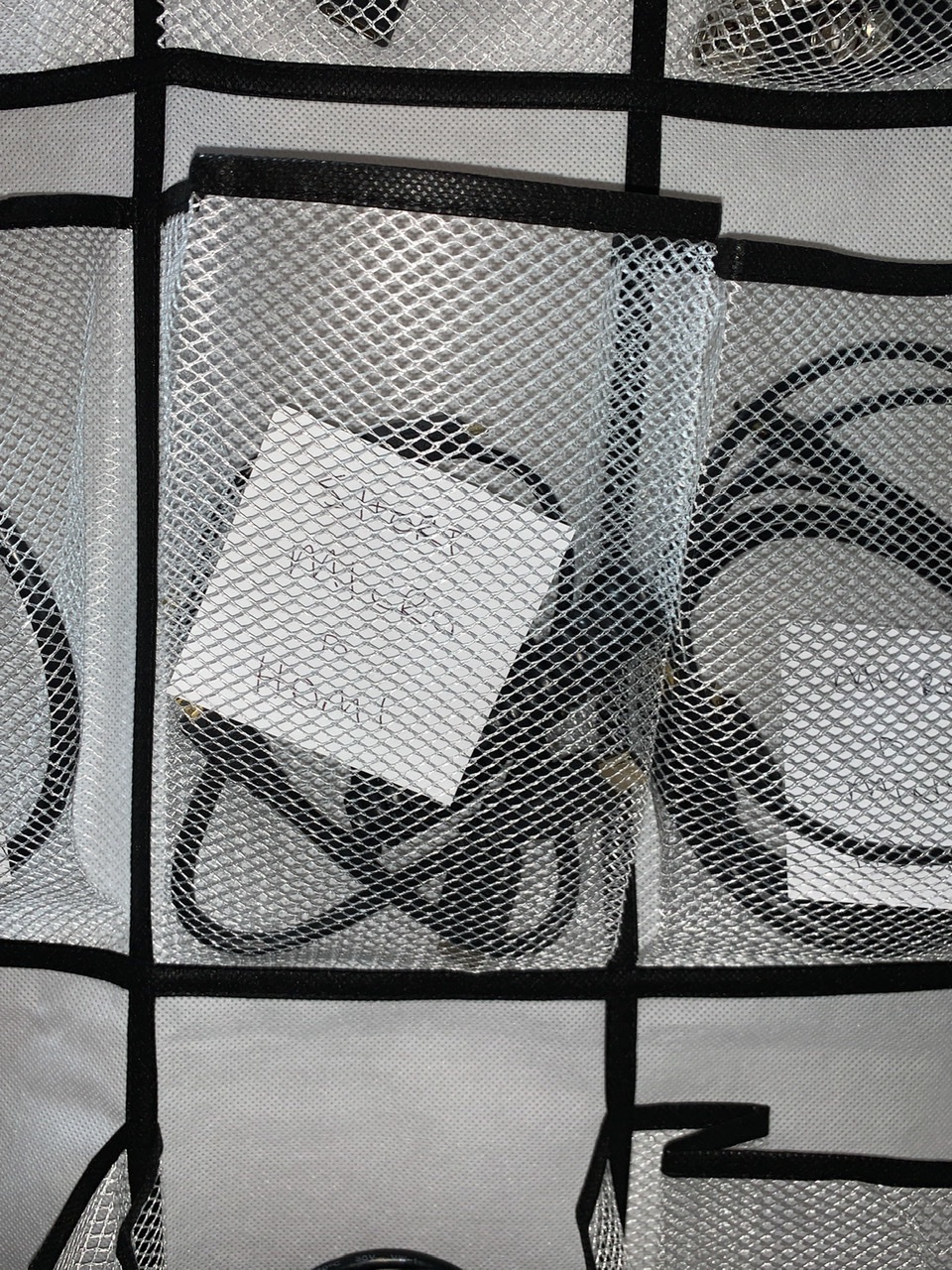
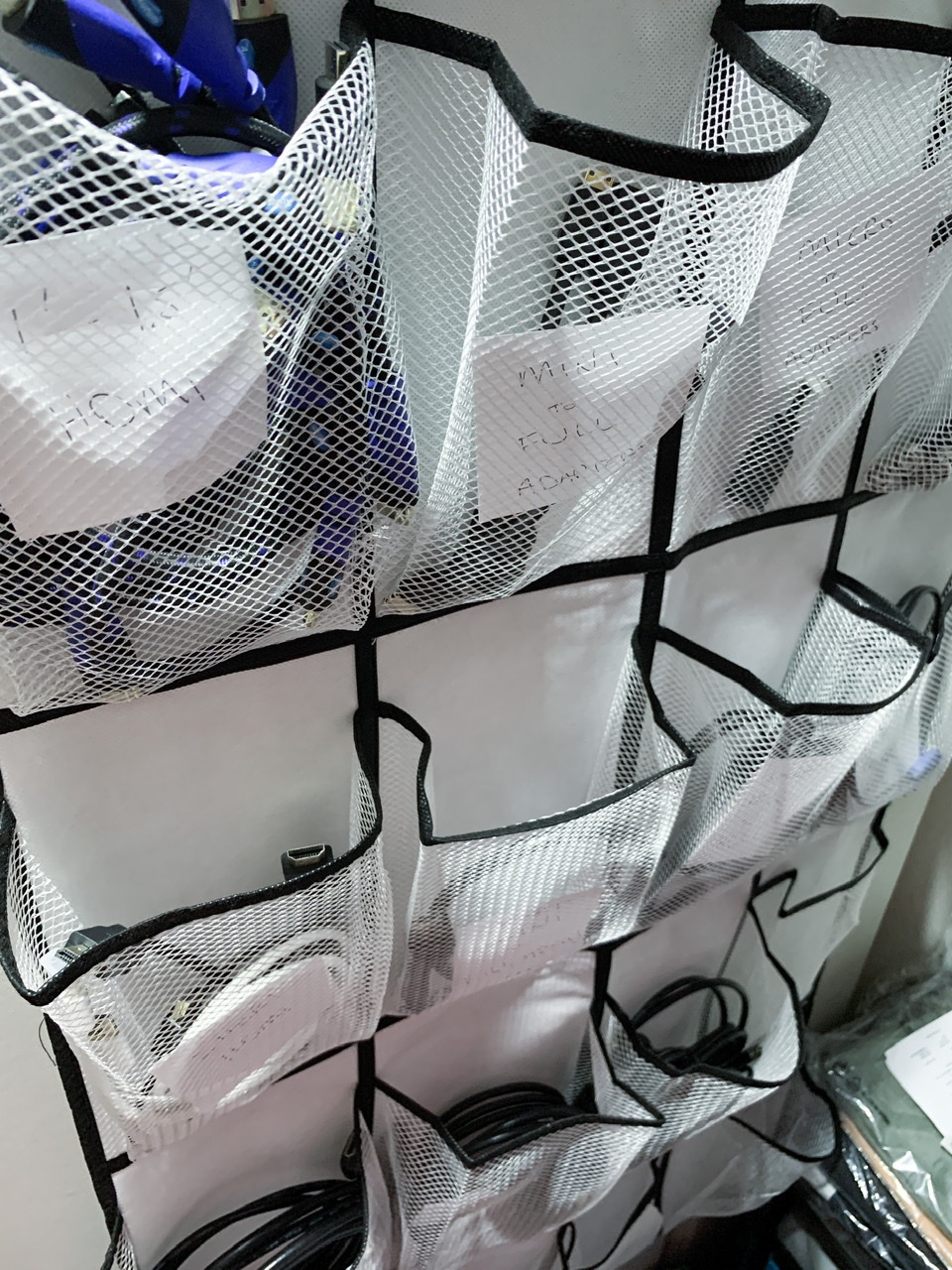
All my HDMI cords are now sorted by length and connector combo (full HDMI, micro, mini) and hung up on the inside of my closet door and this is so much nicer than cramming them into various drawers! Next up: USB
{
"type": "entry",
"published": "2020-09-26T23:11:01+00:00",
"url": "https://twitter.com/aaronpk/status/1309993909976621057",
"photo": [
"https://pbs.twimg.com/media/Ei4IhCTVgAAZTnZ.jpg",
"https://pbs.twimg.com/media/Ei4IhMWVkAA3z8f.jpg"
],
"content": {
"text": "All my HDMI cords are now sorted by length and connector combo (full HDMI, micro, mini) and hung up on the inside of my closet door and this is so much nicer than cramming them into various drawers! Next up: USB"
},
"author": {
"type": "card",
"name": "Aaron Parecki",
"url": "https://twitter.com/aaronpk",
"photo": "https://pbs.twimg.com/profile_images/1276535180979695616/MX2AtlXM.jpg"
},
"post-type": "photo",
"_id": "15076832",
"_source": "2773"
}
All my HDMI cords are now sorted by length and connector combo (full HDMI, micro, mini) and hung up on the inside of my closet door and this is so much nicer than cramming them into various drawers! Next up: USB
{
"type": "entry",
"published": "2020-09-26T16:10:56-07:00",
"url": "https://aaronparecki.com/2020/09/26/9/hdmi",
"photo": [
"https://aperture-media.p3k.io/aaronparecki.com/112b26b132c9b1cb0178d4accd0f668e236b8d5dd655560c46d8a465582a5273.jpg",
"https://aperture-media.p3k.io/aaronparecki.com/6d40e662905ac69de0dac65a414b64830fc8fe8c2bfd8b58114cf6cce047991e.jpg"
],
"syndication": [
"https://twitter.com/aaronpk/status/1309993909976621057"
],
"content": {
"text": "All my HDMI cords are now sorted by length and connector combo (full HDMI, micro, mini) and hung up on the inside of my closet door and this is so much nicer than cramming them into various drawers! Next up: USB"
},
"author": {
"type": "card",
"name": "Aaron Parecki",
"url": "https://aaronparecki.com/",
"photo": "https://aperture-media.p3k.io/aaronparecki.com/41061f9de825966faa22e9c42830e1d4a614a321213b4575b9488aa93f89817a.jpg"
},
"post-type": "photo",
"_id": "15076713",
"_source": "16"
}
I am liking @larrywilmore’s new show, but I really really miss the Nightly Show’s roundtable discussions. An excellent moderator. Oooh...would love to see a Wilmore Presidential Debate when we have more than 1 serious & rational major candidate!
{
"type": "entry",
"published": "2020-09-26T22:52:58+00:00",
"url": "https://twitter.com/karabaic/status/1309989366354173952",
"content": {
"text": "I am liking @larrywilmore\u2019s new show, but I really really miss the Nightly Show\u2019s roundtable discussions. An excellent moderator. Oooh...would love to see a Wilmore Presidential Debate when we have more than 1 serious & rational major candidate!",
"html": "I am liking <a href=\"https://twitter.com/larrywilmore\">@larrywilmore</a>\u2019s new show, but I really really miss the Nightly Show\u2019s roundtable discussions. An excellent moderator. Oooh...would love to see a Wilmore Presidential Debate when we have more than 1 serious & rational major candidate!"
},
"author": {
"type": "card",
"name": "jk",
"url": "https://twitter.com/karabaic",
"photo": "https://pbs.twimg.com/profile_images/1256785873384861696/QfRzUvne.jpg"
},
"post-type": "note",
"_id": "15076431",
"_source": "2773"
}
Looking forward to all of the honest and not at all ridiculous takes of SEC football’s obvious superiority over everyone else after this UGA-ARK game.
{
"type": "entry",
"published": "2020-09-26T21:36:45+00:00",
"url": "https://twitter.com/cleverdevil/status/1309970188217982977",
"content": {
"text": "Looking forward to all of the honest and not at all ridiculous takes of SEC football\u2019s obvious superiority over everyone else after this UGA-ARK game."
},
"author": {
"type": "card",
"name": "Jonathan LaCour",
"url": "https://twitter.com/cleverdevil",
"photo": "https://pbs.twimg.com/profile_images/744804831064317952/W-gMo7AO.jpg"
},
"post-type": "note",
"_id": "15075277",
"_source": "2773"
}
I've been producing online events for clients like @duolingo and @adobe full-time for the last 6 months, and I'm really good at it. If you're considering producing an online event, or you need help transitioning an in-person event online, hit me up: andy@regular.events.
{
"type": "entry",
"published": "2020-09-26T20:17:42+00:00",
"url": "https://twitter.com/andymcmillan/status/1309950294650843136",
"content": {
"text": "I've been producing online events for clients like @duolingo and @adobe full-time for the last 6 months, and I'm really good at it. If you're considering producing an online event, or you need help transitioning an in-person event online, hit me up: andy@regular.events.",
"html": "I've been producing online events for clients like <a href=\"https://twitter.com/duolingo\">@duolingo</a> and <a href=\"https://twitter.com/Adobe\">@adobe</a> full-time for the last 6 months, and I'm really good at it. If you're considering producing an online event, or you need help transitioning an in-person event online, hit me up: andy@regular.events."
},
"author": {
"type": "card",
"name": "Andy McMillan",
"url": "https://twitter.com/andymcmillan",
"photo": "https://pbs.twimg.com/profile_images/1151993418232369153/9ShXZFLh.jpg"
},
"post-type": "note",
"_id": "15073741",
"_source": "2773"
}
“And friends are friends forever
If the Lord's the Lord of them
And a friend will not say never
'Cause the Covid will not end”
Well over 50,000 Christians lifting their prayer and worship over America today at the Lincoln Memorial with my friend @michaelwsmith
#PrayerMarch2020
{
"type": "entry",
"published": "2020-09-26T20:10:21+00:00",
"url": "https://twitter.com/gRegorLove/status/1309948442743984129",
"quotation-of": "https://twitter.com/seanfeucht/status/1309900815860146177",
"content": {
"text": "\u201cAnd friends are friends forever\nIf the Lord's the Lord of them\nAnd a friend will not say never\n'Cause the Covid will not end\u201d"
},
"author": {
"type": "card",
"name": "gRegor Morrill",
"url": "https://twitter.com/gRegorLove",
"photo": "https://pbs.twimg.com/profile_images/714490697764716545/je7VCyLC.jpg"
},
"post-type": "note",
"refs": {
"https://twitter.com/seanfeucht/status/1309900815860146177": {
"type": "entry",
"published": "2020-09-26T17:01:05+00:00",
"url": "https://twitter.com/seanfeucht/status/1309900815860146177",
"video": [
"https://video.twimg.com/ext_tw_video/1309900599396368390/pu/vid/720x900/LS2gnwfGzqI1CmrS.mp4?tag=10"
],
"content": {
"text": "Well over 50,000 Christians lifting their prayer and worship over America today at the Lincoln Memorial with my friend @michaelwsmith \n\n#PrayerMarch2020",
"html": "Well over 50,000 Christians lifting their prayer and worship over America today at the Lincoln Memorial with my friend <a href=\"https://twitter.com/michaelwsmith\">@michaelwsmith</a> \n\n<a href=\"https://twitter.com/search?q=%23PrayerMarch2020\">#PrayerMarch2020</a>"
},
"author": {
"type": "card",
"name": "Sean Feucht",
"url": "https://twitter.com/seanfeucht",
"photo": "https://pbs.twimg.com/profile_images/1294132883498532865/00mkCmTK.jpg"
},
"post-type": "video"
}
},
"_id": "15073604",
"_source": "2773"
}
In other news, I decided to just record all of my team’s games today so I could try and enjoy Santa Barbara.
{
"type": "entry",
"published": "2020-09-26T19:55:26+00:00",
"url": "https://twitter.com/cleverdevil/status/1309944692574806016",
"photo": [
"https://pbs.twimg.com/media/Ei3bvzbVkAAMhfK.jpg"
],
"content": {
"text": "In other news, I decided to just record all of my team\u2019s games today so I could try and enjoy Santa Barbara."
},
"author": {
"type": "card",
"name": "Jonathan LaCour",
"url": "https://twitter.com/cleverdevil",
"photo": "https://pbs.twimg.com/profile_images/744804831064317952/W-gMo7AO.jpg"
},
"post-type": "photo",
"_id": "15073326",
"_source": "2773"
}
Remember when I said that Georgia Tech would be better this year?
I may have been wrong. Yikes.
{
"type": "entry",
"published": "2020-09-26T19:50:51+00:00",
"url": "https://twitter.com/cleverdevil/status/1309943539292188673",
"content": {
"text": "Remember when I said that Georgia Tech would be better this year?\n\nI may have been wrong. Yikes."
},
"author": {
"type": "card",
"name": "Jonathan LaCour",
"url": "https://twitter.com/cleverdevil",
"photo": "https://pbs.twimg.com/profile_images/744804831064317952/W-gMo7AO.jpg"
},
"post-type": "note",
"_id": "15073168",
"_source": "2773"
}
On not choosing WordPress for the W3C redesign project - Working in the open with W3C and Studio 24. #Goodreads w3c.studio24.net/updates/on-not…
{
"type": "entry",
"published": "2020-09-26T19:45:18+00:00",
"url": "https://twitter.com/scott_gruber/status/1309942142064705542",
"content": {
"text": "On not choosing WordPress for the W3C redesign project - Working in the open with W3C and Studio 24. #Goodreads w3c.studio24.net/updates/on-not\u2026",
"html": "On not choosing WordPress for the W3C redesign project - Working in the open with W3C and Studio 24. <a href=\"https://twitter.com/search?q=%23Goodreads\">#Goodreads</a> <a href=\"https://w3c.studio24.net/updates/on-not-choosing-wordpress/\">w3c.studio24.net/updates/on-not\u2026</a>"
},
"author": {
"type": "card",
"name": "Scott Gruber",
"url": "https://twitter.com/scott_gruber",
"photo": "https://pbs.twimg.com/profile_images/1308856922993352704/4rS0TM6t.jpg"
},
"post-type": "note",
"_id": "15073169",
"_source": "2773"
}
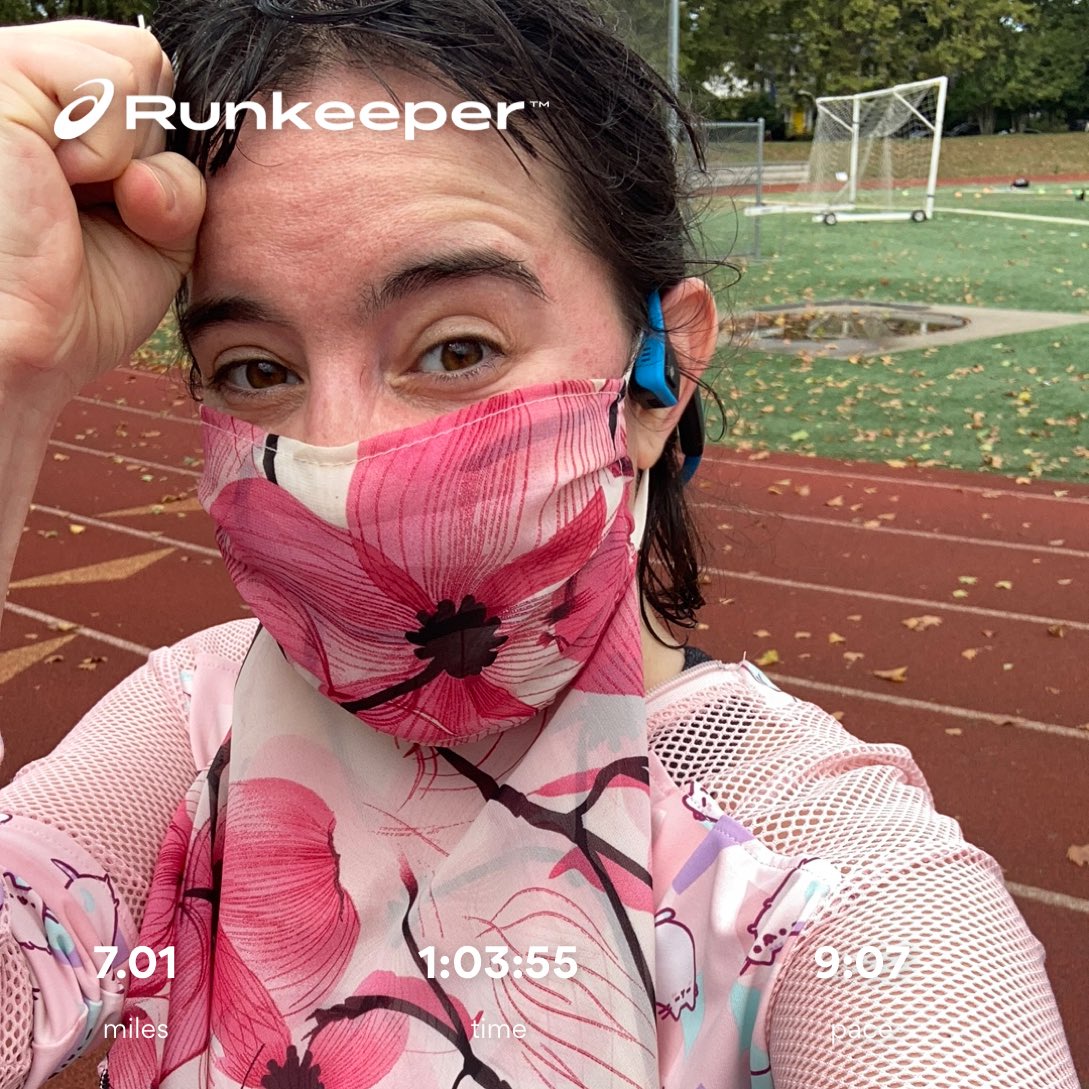
I did the thing I said I would. Ran 7 miles in the rain without complaining (much). Thank you for precious breathable air and lungs that can heal from 10 days of poison air.
{
"type": "entry",
"published": "2020-09-26T18:08:01+00:00",
"url": "https://twitter.com/anomalily/status/1309917657387261952",
"photo": [
"https://pbs.twimg.com/media/Ei3DKhmUcAArLnx.jpg"
],
"content": {
"text": "I did the thing I said I would. Ran 7 miles in the rain without complaining (much). Thank you for precious breathable air and lungs that can heal from 10 days of poison air."
},
"author": {
"type": "card",
"name": "Lillian Karabaic \ud83e\udd44\ud83c\udff3\ufe0f\u200d\ud83c\udf08 BLM",
"url": "https://twitter.com/anomalily",
"photo": "https://pbs.twimg.com/profile_images/1123802400731664385/dsHQG1nZ.jpg"
},
"post-type": "photo",
"_id": "15071224",
"_source": "2773"
}
2nd Ruby API Announcement: Today I made a prototype of a full REPL editor that anyone can use! You can write your own code & pick a Ruby engine like MRI 3.0 preview 1, MR...
{
"type": "entry",
"published": "2020-09-26T17:41:36+00:00",
"url": "https://twitter.com/jaredcwhite/status/1309911011558711297",
"quotation-of": "https://twitter.com/oceanicpanda/status/1309857076336680960",
"content": {
"text": "This is freaking cool!!"
},
"author": {
"type": "card",
"name": "Jared White",
"url": "https://twitter.com/jaredcwhite",
"photo": "https://pbs.twimg.com/profile_images/1300145786466959360/mfgpyZb8.jpg"
},
"post-type": "note",
"refs": {
"https://twitter.com/oceanicpanda/status/1309857076336680960": {
"type": "entry",
"published": "2020-09-26T14:07:17+00:00",
"url": "https://twitter.com/oceanicpanda/status/1309857076336680960",
"video": [
"https://video.twimg.com/ext_tw_video/1309856723260174341/pu/vid/1152x720/WS3agLKbA9hw3Q_G.mp4?tag=10"
],
"content": {
"text": "2nd Ruby API Announcement: Today I made a prototype of a full REPL editor that anyone can use! You can write your own code & pick a Ruby engine like MRI 3.0 preview 1, MRI 2.7, JRuby, MRuby & even Artichoke Ruby! You can find it at rubyapi.org/repl (it's very experimental)",
"html": "2nd Ruby API Announcement: Today I made a prototype of a full REPL editor that anyone can use! You can write your own code & pick a Ruby engine like MRI 3.0 preview 1, MRI 2.7, JRuby, MRuby & even Artichoke Ruby! You can find it at <a href=\"http://rubyapi.org/repl\">rubyapi.org/repl</a> (it's very experimental)"
},
"author": {
"type": "card",
"name": "Colby Swandale",
"url": "https://twitter.com/oceanicpanda",
"photo": "https://pbs.twimg.com/profile_images/830728928859820032/8Mfqs3lI.jpg"
},
"post-type": "video"
}
},
"_id": "15070669",
"_source": "2773"
}
{
"type": "entry",
"author": {
"name": "Cathie",
"url": "https://cathieleblanc.com/",
"photo": null
},
"url": "https://cathieleblanc.com/2020/09/23/online-asynch-collaboration-mid-semester-reflection/",
"published": "2020-09-23T06:08:22-04:00",
"content": {
"html": "<p>As is typical in the Fall semesters, I am teaching a section of our first year, project-based course <em>Tackling a Wicked Problem</em>. Back before we knew the extent of the COVID-19 crisis, we knew that there were going to be at least some students who wanted to take all of their courses online. Some of these students would be first year students and we didn\u2019t want to have to tell them that they couldn\u2019t enroll in some of this required first year course so we decided that we needed to offer at least one section of it fully online. At the time, we were only really talking about fully online asychronous courses and so I volunteered to pilot a section in that modality.</p>\n<p>I have written about <em>Tackling a Wicked Problem</em> <a href=\"https://cathieleblanc.com/category/tackling-a-wicked-problem/\">many times before</a>, particularly in this post: <a href=\"https://cathieleblanc.com/2019/05/10/what-is-tackling-a-wicked-problem/\">What is </a><em><a href=\"https://cathieleblanc.com/2019/05/10/what-is-tackling-a-wicked-problem/\">Tackling a Wicked Problem</a></em><a href=\"https://cathieleblanc.com/2019/05/10/what-is-tackling-a-wicked-problem/\">?</a> Through the evolution of this course, we developed the idea of<a href=\"https://cathieleblanc.com/category/cluster-pedagogy/\"> cluster pedagogy</a> or what we are now calling cluster learning. In particular, the course provides students with the opportunity to engage in interdisciplinary, integrative, project-based learning experiences using open education strategies. This means that students will work in groups on challenging projects that have potentially significant implications outside of the classroom. In order to do this work, students need to look at the problems they are approaching from a variety of standpoints using knowledge from multiple disciplines. In order to effectively work on these kinds of projects, students must collaborate closely with each other and potentially with people outside of the classroom.</p>\n<p>I have taught many online, asynchronous classes in the past and have come away from those experiences feeling as though I have taught each student in an individual enrollment. In these classes, I tried to get students to interact with each other via the Discussion Forums in the Learning Management System (LMS) which was always artificial and didn\u2019t lead to very many natural interactions among the students, even when they were supposed to be working on projects together. Anyone who has ever tried to use the LMS to collaborate for committee work knows how static the Discussion Forums feel. And how they actually somehow inhibit meaningful interaction. If you can\u2019t have meaningful interaction, there is no way to truly collaborate.</p>\n<p>I have also taught face-to-face classes in which we utilized the Microsoft collaboration tools that we had at the time. For example, a few years ago, I taught a section of <em>Media and Cultural Studies</em> in which I asked students to begin the development of an OER for the class. They wrote chapters together. To facilitate that work, I set up a OneDrive space for the class and created folders for each group where they could collaborate on as many documents (Word, Powerpoint, other tools) as they needed. Once they had a polished draft of their chapter, I copied and pasted it to <a href=\"https://mediastudies.pressbooks.com/\">our OER</a>. This process worked pretty well because 1. the students had a shared online space where they could easily share their work with each other, and, 2. I gave them time in class to engage in face-to-face collaboration. They didn\u2019t have to rely on our LMS to discuss their work together.</p>\n<p>So for this semester, I knew that I was going to use something similar to the OneDrive space for the students to be able to easily share their work with each other. But I needed some online tool(s) to replace the face-to-face collaboration that students have done in the past. Since I last taught <em>Media and Cultural Studies</em>, PSU has gone all-in with our Office 365 tools. In particular, we have implemented MS Teams, which is a chat-based workspace in Office 365 that makes it easy to have conversations, share files and collaborate on documents, and get work done with teams across the organization. Within MS Teams, there is a chat tool, a video conferencing tool, space for conversations within the group, and a space for storing, sharing, and working collaboratively on documents (Word, Powerpoint, Excel, etc.). MS Teams also allows embedding of other apps into the Team for ease of use. MS Teams runs on multiple platforms\u2013on the web within a browser, in a desktop app, and/or in a mobile app. Because most of our PSU service work this summer was remote, we used MS Teams extensively and it works pretty well although it has a couple of annoying bugs.</p>\n<p>As I was beginning to plan my course for this semester, I read \u201c<a href=\"https://journals.sfu.ca/jalt/index.php/jalt/article/view/215/191\">Introducing the Tri-layered Student Online Experience Framework: Moving from file repository to narrative journey</a>,\u201d by Eager, Lehman, and Scollard. I <a href=\"https://cathieleblanc.com/2020/05/25/moving-from-file-repository-to-narrative-journey/\">wrote</a> about the article back in May. The TL;DR of the article is that students view the online educational materials of a class as a \u201cvalue-added investment in exchange for their time.\u201d In other words, students ask themselves \u201cWhy should I engage with this online material?\u201d When we put the educational materials into a typical LMS, the list of materials looks like an undifferentiated list\u2013a file repository. The framework that Eager, et all propose puts educational materials into a context (a narrative journey) that helps students answer the question of why they should engage with each online resource. By implementing this framework, the designer of the LMS-based class helps students begin to understand how engaging with each of the educational resources contributes to the learning goals of the class.</p>\n<p>In my early interactions with students this semester, several told me that they really like how the Moodle course is set up because they understand what they need to do, when they need to do it, and why they need to it. That\u2019s validating but the idea that the primary purpose of the LMS is to facilitate the storage and dissemination of educational materials helped me to understand why I have always found the discussion forums provided in the LMS to be too static for authentic interaction among the students. The LMS is designed for the exchange of static documents and text and it does that job really well. But it isn\u2019t designed for conversations or sustained multi-way interactions among individuals. That is exactly what a tool like Microsoft (MS) Teams is designed for, however. So I decided that I would use Moodle, our LMS, in my class this fall for the things that it was designed to do well. And I would integrate that with MS Teams for the things that it was designed to do well.</p>\n<p>I set up my Moodle class as I normally would, with weekly schedules, copies of and links to various educational materials, and places for the students to submit assignments that are for my eyes only. Moodle shows up for students in their My Courses tab on our University portal so they are able to find it easily. I also put a link in the Moodle class to a MS Team for our class. so that students would also always be able to easily find it. To give students access to the Team, I had to manually add each student because there is no way (that I know of) to import a roster. Whenever there is an activity or an assignment that asks students to interact with each other, I point out from Moodle to our MS Team. I set the Team up with a number of channels so that conversations would be easier to follow and engage in.</p>\n<p>For example, an assignment for the first week was for students to introduce themselves to the class. So I created a channel called Introductions. Students chose the medium they wanted to use for their introductions. Some typed an introduction directly into the Posts tab of the Introductions channel. Some uploaded a video introduction. Some created a Powerpoint and uploaded the file. The second part of the assignment asked students to comment on at least 4 of their classmates introduction with a question, a comment about something they found interesting, a comment about something they had in common, and so on. I have used this assignment in every online class that I have ever taught but in the past, I used the Discussion Forums in the LMS but I was always disappointed in how stilted the interactions between students seemed. In Teams, I immediately saw a difference. When students received comments or questions on their introduction post, they responded. And then the other student responded. And then they were asking each other for their xBox login names so they could play video games together. This happened many times in this introduction channel. The students were having actual conversations.</p>\n<p>As I said, <em>Tackling a Wicked Problem</em> is a project-based class in which students work in teams on a project that tries to address some aspect of the wicked problem. I was most worried about how to facilitate the group projects given that the class is online asynchronous. I was hopeful that MS Teams would facilitate the team interactions in ways that I have never seen work on the LMS. So for each group, I set up a private channel and added the members to the channel. Each channel has two tabs, a Posts tab and a Files tab. I created a video to explain that the Posts tab can be used for conversation while the Files tab is a space where the students can store documents that they are collaborating on. To get them started on the first activity of their project, I put an annotated bibliography template in the File space for each group. At first, the interaction was slow but as they have worked on this project (it isn\u2019t due for another couple of weeks), each group is using Teams more and more. They are having conversations, sometimes asking me questions. Because I have Teams both on my computer and my phone, I get notified when there\u2019s something that needs my attention and I can jump in immediately (if I want). Even more exciting is when they answer each other\u2019s questions which happens regularly. Their annotated bibliographies were due on Sunday of this past week. They posted them in the Files tab of their group and I was able to provide feedback right in the document for them all to see. I can also see who contributed what to the various documents.</p>\n<p>At the start of the semester, I also set up a \u201cAsk Questions Here\u201d channel for students to ask any questions they might have. In my introductory materials for the class, I encouraged them to answer any of the questions that they might see in that channel if they knew the answer. The first time that a student answered a question here, I positively acknowledged the answer and again encouraged them to jump in if they know the answers. Students now regularly post questions and answer each other\u2019s questions in this channel. That\u2019s an exciting development.</p>\n<p>MS Teams has a chat feature and students regularly chat me there. Finally, MS Teams has a \u201cMeet Now\u201d video conferencing tool built in and several of the groups are regularly using that feature to talk about their projects.</p>\n<p>The set up of the MS Team for my class can be seen in the featured image on this post. I also included an anonymized conversation among a group of students. We are still early in the semester but I am very encouraged about using MS Teams in this online asynchronous class to facilitate group projects.</p>\n<p>Image Credit: screenshot of the MS Team for the Fall 2020 offering IS1115.01.</p>",
"text": "As is typical in the Fall semesters, I am teaching a section of our first year, project-based course Tackling a Wicked Problem. Back before we knew the extent of the COVID-19 crisis, we knew that there were going to be at least some students who wanted to take all of their courses online. Some of these students would be first year students and we didn\u2019t want to have to tell them that they couldn\u2019t enroll in some of this required first year course so we decided that we needed to offer at least one section of it fully online. At the time, we were only really talking about fully online asychronous courses and so I volunteered to pilot a section in that modality.\nI have written about Tackling a Wicked Problem many times before, particularly in this post: What is Tackling a Wicked Problem? Through the evolution of this course, we developed the idea of cluster pedagogy or what we are now calling cluster learning. In particular, the course provides students with the opportunity to engage in interdisciplinary, integrative, project-based learning experiences using open education strategies. This means that students will work in groups on challenging projects that have potentially significant implications outside of the classroom. In order to do this work, students need to look at the problems they are approaching from a variety of standpoints using knowledge from multiple disciplines. In order to effectively work on these kinds of projects, students must collaborate closely with each other and potentially with people outside of the classroom.\nI have taught many online, asynchronous classes in the past and have come away from those experiences feeling as though I have taught each student in an individual enrollment. In these classes, I tried to get students to interact with each other via the Discussion Forums in the Learning Management System (LMS) which was always artificial and didn\u2019t lead to very many natural interactions among the students, even when they were supposed to be working on projects together. Anyone who has ever tried to use the LMS to collaborate for committee work knows how static the Discussion Forums feel. And how they actually somehow inhibit meaningful interaction. If you can\u2019t have meaningful interaction, there is no way to truly collaborate.\nI have also taught face-to-face classes in which we utilized the Microsoft collaboration tools that we had at the time. For example, a few years ago, I taught a section of Media and Cultural Studies in which I asked students to begin the development of an OER for the class. They wrote chapters together. To facilitate that work, I set up a OneDrive space for the class and created folders for each group where they could collaborate on as many documents (Word, Powerpoint, other tools) as they needed. Once they had a polished draft of their chapter, I copied and pasted it to our OER. This process worked pretty well because 1. the students had a shared online space where they could easily share their work with each other, and, 2. I gave them time in class to engage in face-to-face collaboration. They didn\u2019t have to rely on our LMS to discuss their work together.\nSo for this semester, I knew that I was going to use something similar to the OneDrive space for the students to be able to easily share their work with each other. But I needed some online tool(s) to replace the face-to-face collaboration that students have done in the past. Since I last taught Media and Cultural Studies, PSU has gone all-in with our Office 365 tools. In particular, we have implemented MS Teams, which is a chat-based workspace in Office 365 that makes it easy to have conversations, share files and collaborate on documents, and get work done with teams across the organization. Within MS Teams, there is a chat tool, a video conferencing tool, space for conversations within the group, and a space for storing, sharing, and working collaboratively on documents (Word, Powerpoint, Excel, etc.). MS Teams also allows embedding of other apps into the Team for ease of use. MS Teams runs on multiple platforms\u2013on the web within a browser, in a desktop app, and/or in a mobile app. Because most of our PSU service work this summer was remote, we used MS Teams extensively and it works pretty well although it has a couple of annoying bugs.\nAs I was beginning to plan my course for this semester, I read \u201cIntroducing the Tri-layered Student Online Experience Framework: Moving from file repository to narrative journey,\u201d by Eager, Lehman, and Scollard. I wrote about the article back in May. The TL;DR of the article is that students view the online educational materials of a class as a \u201cvalue-added investment in exchange for their time.\u201d In other words, students ask themselves \u201cWhy should I engage with this online material?\u201d When we put the educational materials into a typical LMS, the list of materials looks like an undifferentiated list\u2013a file repository. The framework that Eager, et all propose puts educational materials into a context (a narrative journey) that helps students answer the question of why they should engage with each online resource. By implementing this framework, the designer of the LMS-based class helps students begin to understand how engaging with each of the educational resources contributes to the learning goals of the class.\nIn my early interactions with students this semester, several told me that they really like how the Moodle course is set up because they understand what they need to do, when they need to do it, and why they need to it. That\u2019s validating but the idea that the primary purpose of the LMS is to facilitate the storage and dissemination of educational materials helped me to understand why I have always found the discussion forums provided in the LMS to be too static for authentic interaction among the students. The LMS is designed for the exchange of static documents and text and it does that job really well. But it isn\u2019t designed for conversations or sustained multi-way interactions among individuals. That is exactly what a tool like Microsoft (MS) Teams is designed for, however. So I decided that I would use Moodle, our LMS, in my class this fall for the things that it was designed to do well. And I would integrate that with MS Teams for the things that it was designed to do well.\nI set up my Moodle class as I normally would, with weekly schedules, copies of and links to various educational materials, and places for the students to submit assignments that are for my eyes only. Moodle shows up for students in their My Courses tab on our University portal so they are able to find it easily. I also put a link in the Moodle class to a MS Team for our class. so that students would also always be able to easily find it. To give students access to the Team, I had to manually add each student because there is no way (that I know of) to import a roster. Whenever there is an activity or an assignment that asks students to interact with each other, I point out from Moodle to our MS Team. I set the Team up with a number of channels so that conversations would be easier to follow and engage in.\nFor example, an assignment for the first week was for students to introduce themselves to the class. So I created a channel called Introductions. Students chose the medium they wanted to use for their introductions. Some typed an introduction directly into the Posts tab of the Introductions channel. Some uploaded a video introduction. Some created a Powerpoint and uploaded the file. The second part of the assignment asked students to comment on at least 4 of their classmates introduction with a question, a comment about something they found interesting, a comment about something they had in common, and so on. I have used this assignment in every online class that I have ever taught but in the past, I used the Discussion Forums in the LMS but I was always disappointed in how stilted the interactions between students seemed. In Teams, I immediately saw a difference. When students received comments or questions on their introduction post, they responded. And then the other student responded. And then they were asking each other for their xBox login names so they could play video games together. This happened many times in this introduction channel. The students were having actual conversations.\nAs I said, Tackling a Wicked Problem is a project-based class in which students work in teams on a project that tries to address some aspect of the wicked problem. I was most worried about how to facilitate the group projects given that the class is online asynchronous. I was hopeful that MS Teams would facilitate the team interactions in ways that I have never seen work on the LMS. So for each group, I set up a private channel and added the members to the channel. Each channel has two tabs, a Posts tab and a Files tab. I created a video to explain that the Posts tab can be used for conversation while the Files tab is a space where the students can store documents that they are collaborating on. To get them started on the first activity of their project, I put an annotated bibliography template in the File space for each group. At first, the interaction was slow but as they have worked on this project (it isn\u2019t due for another couple of weeks), each group is using Teams more and more. They are having conversations, sometimes asking me questions. Because I have Teams both on my computer and my phone, I get notified when there\u2019s something that needs my attention and I can jump in immediately (if I want). Even more exciting is when they answer each other\u2019s questions which happens regularly. Their annotated bibliographies were due on Sunday of this past week. They posted them in the Files tab of their group and I was able to provide feedback right in the document for them all to see. I can also see who contributed what to the various documents.\nAt the start of the semester, I also set up a \u201cAsk Questions Here\u201d channel for students to ask any questions they might have. In my introductory materials for the class, I encouraged them to answer any of the questions that they might see in that channel if they knew the answer. The first time that a student answered a question here, I positively acknowledged the answer and again encouraged them to jump in if they know the answers. Students now regularly post questions and answer each other\u2019s questions in this channel. That\u2019s an exciting development.\nMS Teams has a chat feature and students regularly chat me there. Finally, MS Teams has a \u201cMeet Now\u201d video conferencing tool built in and several of the groups are regularly using that feature to talk about their projects.\nThe set up of the MS Team for my class can be seen in the featured image on this post. I also included an anonymized conversation among a group of students. We are still early in the semester but I am very encouraged about using MS Teams in this online asynchronous class to facilitate group projects.\nImage Credit: screenshot of the MS Team for the Fall 2020 offering IS1115.01."
},
"name": "Online Asynchronous Collaboration: Mid-Semester Reflection",
"post-type": "article",
"_id": "15070600",
"_source": "2782"
}
Alright, starting in 10 minutes!
Things you don’t want to miss:
🚌 The bus
🔥 Your daily lesson
🦉 DUOCON!
Tune in TODAY starting at 11AM EDT: bit.ly/32CDwNd
Check our feed throughout the day ...
{
"type": "entry",
"published": "2020-09-26T14:52:03+00:00",
"url": "https://twitter.com/andymcmillan/status/1309868341327134728",
"quotation-of": "https://twitter.com/duolingo/status/1309840279688613888",
"content": {
"text": "Alright, starting in 10 minutes!"
},
"author": {
"type": "card",
"name": "Andy McMillan",
"url": "https://twitter.com/andymcmillan",
"photo": "https://pbs.twimg.com/profile_images/1151993418232369153/9ShXZFLh.jpg"
},
"post-type": "note",
"refs": {
"https://twitter.com/duolingo/status/1309840279688613888": {
"type": "entry",
"published": "2020-09-26T13:00:32+00:00",
"url": "https://twitter.com/duolingo/status/1309840279688613888",
"photo": [
"https://pbs.twimg.com/media/Ei18ysJXgAkpdqI.jpg"
],
"content": {
"text": "Things you don\u2019t want to miss: \n\ud83d\ude8c The bus\n\ud83d\udd25 Your daily lesson\n\ud83e\udd89 DUOCON!\n\nTune in TODAY starting at 11AM EDT: bit.ly/32CDwNd\n\nCheck our feed throughout the day for highlights from each session!",
"html": "Things you don\u2019t want to miss: \n\ud83d\ude8c The bus\n\ud83d\udd25 Your daily lesson\n\ud83e\udd89 DUOCON!\n\nTune in TODAY starting at 11AM EDT: <a href=\"https://bit.ly/32CDwNd\">bit.ly/32CDwNd</a>\n\nCheck our feed throughout the day for highlights from each session!"
},
"author": {
"type": "card",
"name": "Duolingo",
"url": "https://twitter.com/duolingo",
"photo": "https://pbs.twimg.com/profile_images/1293188125792051200/ntfgHxxL.jpg"
},
"post-type": "photo"
}
},
"_id": "15067212",
"_source": "2773"
}