{
    "type": "entry",
    "published": "2024-10-17T22:54:29-07:00",
    "url": "https://beesbuzz.biz/blog/16065-PlexAmp-update",
    "category": [
        "PlexAmp",
        "music"
    ],
    "name": "PlexAmp update",
    "content": {
        "text": "Okay it turns out that while the mobile version of PlexAmp works exactly how I want it to, the desktop version kind of sucks? Like, if you\u2019re doing \u201calbum radio\u201d (which is the shuffle-by-album thing I love so much) it is super easy to get out of the actual player view, and as far as I can tell there\u2019s no way to get back into it except by restarting \u201calbum radio,\u201d which then interrupts whatever it is you\u2019re listening to.\n\nAlso its AirTunes \u201csupport\u201d is just that it doesn\u2019t prevent you from setting your system audio to AirTunes. That is\u2026 not useful.\n\nSo, okay, I think I\u2019m sticking with iTunes on desktop, and still using my album shuffle playlist hack (which also lets me curate my upcoming listening and also, y'know, pause and resume).\n\nBut on mobile, PlexAmp seems to be the way to go.",
        "html": "<p>Okay it turns out that while the mobile version of PlexAmp works exactly how I want it to, the desktop version kind of sucks? Like, if you\u2019re doing \u201calbum radio\u201d (which is the shuffle-by-album thing I love so much) it is <em>super easy</em> to get out of the actual player view, and as far as I can tell there\u2019s no way to get back into it except by restarting \u201calbum radio,\u201d which then interrupts whatever it is you\u2019re listening to.</p><p>Also its AirTunes \u201csupport\u201d is just that it doesn\u2019t prevent you from setting your system audio to AirTunes. That is\u2026 not useful.</p><p>So, okay, I think I\u2019m sticking with iTunes on desktop, and still using my album shuffle playlist hack (which also lets me curate my upcoming listening and also, y'know, <em>pause and resume</em>).</p><p>But on mobile, PlexAmp seems to be the way to go.</p>"
    },
    "author": {
        "type": "card",
        "name": "fluffy",
        "url": "https://beesbuzz.biz/",
        "photo": "https://beesbuzz.biz/static/headshot.jpg"
    },
    "post-type": "article",
    "_id": "42595668",
    "_source": "2778"
}
“This workshop teaches a layered approach to reducing COVID spread at events through a disability justice and harm reductionist lens. We will go over specific tools like masks and air purifiers, as well as some tips on implementation and navigating questions or pushback from venues or attendees.”
{
    "type": "entry",
    "published": "2024-10-15 19:28-0700",
    "url": "https://gregorlove.com/2024/10/signed-up-for/",
    "category": [
        "organizing",
        "HealthAndSafety"
    ],
    "syndication": [
        "https://bsky.app/profile/gregorlove.com/post/3l6lvmvzgy32d"
    ],
    "content": {
        "text": "Signed up for Fan Club\u2019s Guide to COVID Safe(r) Events, a free Zoom workshop this Thursday. Sounds great:\n\n\n\u201cThis workshop teaches a layered approach to reducing COVID spread at events through a disability justice and harm reductionist lens. We will go over specific tools like masks and air purifiers, as well as some tips on implementation and navigating questions or pushback from venues or attendees.\u201d",
        "html": "<p>Signed up for <a href=\"https://www.eventbrite.com/e/fan-clubs-guide-to-covid-safer-events-tickets-1042973821777\">Fan Club\u2019s Guide to COVID Safe(r) Events</a>, a free Zoom workshop this Thursday. Sounds great:</p>\n\n<blockquote>\n<p>\u201cThis workshop teaches a layered approach to reducing COVID spread at events through a disability justice and harm reductionist lens. We will go over specific tools like masks and air purifiers, as well as some tips on implementation and navigating questions or pushback from venues or attendees.\u201d</p>\n</blockquote>"
    },
    "author": {
        "type": "card",
        "name": "gRegor Morrill",
        "url": "https://gregorlove.com/",
        "photo": "https://gregorlove.com/site/assets/files/6268/profile-2021-square.300x0.jpg"
    },
    "post-type": "note",
    "_id": "42570790",
    "_source": "95"
}
Bing use-case! AKA One Weird Trick Time And Date Sites Hate
In my prior post¹ I noted that I use 'b' as a Search Shortcut for #Bing. Here is why:
* quickly view a Gregorian calendar month display, with readable days, days of the week, and weekends & holidays highlighted.
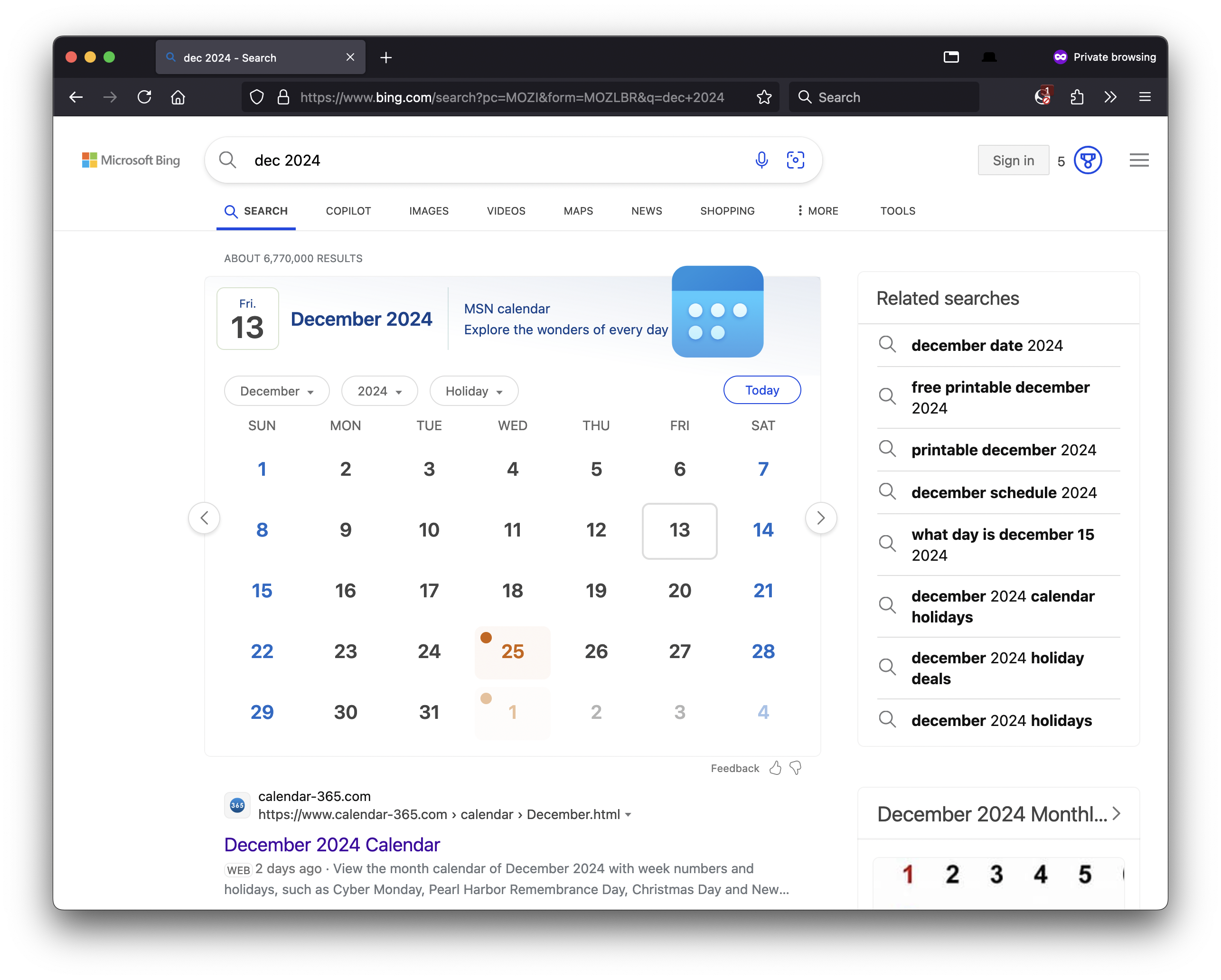
E.g. I type this into my Firefox address bar:
b dec 2024
then press return and immediately see:
Only Microsoft Bing search supports this.
On other search engines (Duckduckgo, Google, Yahoo) all you get are links to random date time sites littered with ads, or blurry images of calendar months where the day numbers and holidays are too small to read.
This is something I have informally complained about to friends for years, that if you use Google Search for unit conversions, simple arithmetic, and even names of holidays, you get a nice large font “featured snippet” display of exactly your answer. But not something as simple as a month and year or even month with the implication that you want to see the current or next instance of that month.
How hard can that be to build? 12 names of months. 12 more 3-letter abbreviations. Multiplied by however number of languages supported. An intern could code that in under an hour. Someone has likely already written a regular expression for detecting this. (Aside: I tried year first, e.g. 2024 Dec, and hilariously enough that did not work to show the nice month display. So I suspect there is a minimal regular expression under the covers of this Bing feature.)
From having tried search engines for years, I was pretty convinced no one supported this.
Then on a whim I tried this in Bing recently (maybe I hadn’t before?) and to my pleasant surprise it worked.
There you have it, a use-case for Bing that only works in Bing, and reason enough to add a 'b' Search Shortcut in Firefox for Bing.
{
"type": "entry",
"published": "2024-10-13 16:58-0700",
"url": "https://tantek.com/2024/287/t3/bing-use-case-calendar-month",
"category": [
"Bing",
"search",
"webSearch",
"SearchShortcut",
"Microsoft",
"BingTip",
"searchTip",
"calendar",
"month"
],
"content": {
"text": "Bing use-case! AKA One Weird Trick Time And Date Sites Hate\n\nIn my prior post\u00b9 I noted that I use 'b' as a Search Shortcut for #Bing. Here is why: \n\n* quickly view a Gregorian calendar month display, with readable days, days of the week, and weekends & holidays highlighted.\n\nE.g. I type this into my Firefox address bar:\n\nb dec 2024\n\nthen press return and immediately see:\n\n\nOnly Microsoft Bing search supports this. \n\nOn other search engines (Duckduckgo, Google, Yahoo) all you get are links to random date time sites littered with ads, or blurry images of calendar months where the day numbers and holidays are too small to read.\n\nThis is something I have informally complained about to friends for years, that if you use Google Search for unit conversions, simple arithmetic, and even names of holidays, you get a nice large font \u201cfeatured snippet\u201d display of exactly your answer. But not something as simple as a month and year or even month with the implication that you want to see the current or next instance of that month. \n\nHow hard can that be to build? 12 names of months. 12 more 3-letter abbreviations. Multiplied by however number of languages supported. An intern could code that in under an hour. Someone has likely already written a regular expression for detecting this. (Aside: I tried year first, e.g. 2024 Dec, and hilariously enough that did not work to show the nice month display. So I suspect there is a minimal regular expression under the covers of this Bing feature.)\n\nFrom having tried search engines for years, I was pretty convinced no one supported this.\n\nThen on a whim I tried this in Bing recently (maybe I hadn\u2019t before?) and to my pleasant surprise it worked.\n\nThere you have it, a use-case for Bing that only works in Bing, and reason enough to add a 'b' Search Shortcut in Firefox for Bing.\n\n#search #webSearch #SearchShortcut #Microsoft #BingTip #searchTip #calendar #month\n\n\u00b9 https://tantek.com/2024/287/t2/setup-search-shortcuts-firefox",
"html": "Bing use-case! AKA One Weird Trick Time And Date Sites Hate<br /><br />In my prior post<a href=\"https://tantek.com/#t5ZV3_note-1\">\u00b9</a> I noted that I use 'b' as a Search Shortcut for #<span class=\"p-category\">Bing</span>. Here is why: <br /><br />* quickly view a Gregorian calendar month display, with readable days, days of the week, and weekends & holidays highlighted.<br /><br />E.g. I type this into my Firefox address bar:<br /><br />b dec 2024<br /><br />then press return and immediately see:<br /><br /><a href=\"https://www.bing.com/search?q=dec+2024\"><img alt=\"Screenshot of a Firefox private browsing window searching Bing for dec 2024 and showing a big text display of the month of December 2024 with headings for the days of the week and weekends and holidays highlighted.\" src=\"https://indieweb.org/images/8/81/2024-10-13-bing-dec-2024.png\" /></a><br />Only Microsoft Bing search supports this. <br /><br />On other search engines (Duckduckgo, Google, Yahoo) all you get are links to random date time sites littered with ads, or blurry images of calendar months where the day numbers and holidays are too small to read.<br /><br />This is something I have informally complained about to friends for years, that if you use Google Search for unit conversions, simple arithmetic, and even names of holidays, you get a nice large font \u201cfeatured snippet\u201d display of exactly your answer. But not something as simple as a month and year or even month with the implication that you want to see the current or next instance of that month. <br /><br />How hard can that be to build? 12 names of months. 12 more 3-letter abbreviations. Multiplied by however number of languages supported. An intern could code that in under an hour. Someone has likely already written a regular expression for detecting this. (Aside: I tried year first, e.g. 2024 Dec, and hilariously enough that did not work to show the nice month display. So I suspect there is a minimal regular expression under the covers of this Bing feature.)<br /><br />From having tried search engines for years, I was pretty convinced no one supported this.<br /><br />Then on a whim I tried this in Bing recently (maybe I hadn\u2019t before?) and to my pleasant surprise it worked.<br /><br />There you have it, a use-case for Bing that only works in Bing, and reason enough to add a 'b' Search Shortcut in Firefox for Bing.<br /><br />#<span class=\"p-category\">search</span> #<span class=\"p-category\">webSearch</span> #<span class=\"p-category\">SearchShortcut</span> #<span class=\"p-category\">Microsoft</span> #<span class=\"p-category\">BingTip</span> #<span class=\"p-category\">searchTip</span> #<span class=\"p-category\">calendar</span> #<span class=\"p-category\">month</span><br /><br /><a href=\"https://tantek.com/#t5ZV3_ref-1\">\u00b9</a> <a href=\"https://tantek.com/2024/287/t2/setup-search-shortcuts-firefox\">https://tantek.com/2024/287/t2/setup-search-shortcuts-firefox</a>"
},
"author": {
"type": "card",
"name": "Tantek \u00c7elik",
"url": "https://tantek.com/",
"photo": "https://tantek.com/photo.jpg"
},
"post-type": "note",
"_id": "42547408",
"_source": "2460"
}