




📗 Want to read The Hidden Curriculum of Video Games by David I Waddington ISBN: 9780228027881

My wife and daughter are in Manhattan to catch a few shows, so my son and I are having a geeky boys weekend. I took him to learn how to play Magic at a local game store today and we are going to watch Lord of the Rings tonight. 🤓

Science & Education Center (PSU)
Claude Hackathon!
This nearly indestructible black and gray powder-coated 20 gauge steel constructed 8 drawer cabinet with art deco flourishes has 36 linear feet of storage space for over 2,000 Field Notes notebooks.
This is enough space for over 83 years' worth of subscription to the quarterly notebooks. Literally enough space for a lifetime of notes.
Staple Day, eat your heart out! We’re stalking down the elusive 4 Drawer Day!


Several people have asked for some detail on the new site. I am working on a write-up, but it’ll take some time to finish. There’s a lot to cover!
Had a fun evening in Nashville for a work event. Our creative events team rented a jewelry store, brought in a bar and food, and gave 10 clients some gift cards. Smart cookies, those folks. Back to LA tomorrow.

“Choice. The solution is choice.”*
You should download Firefox 148 (released today!) and explicitly set the new "AI Controls" to your preferred choice.
* https://www.firefox.com/
Disclosure: I work for Mozilla, but this post, like all on this site, represents my personal thoughts and opinions.
More and more software includes various “AI” features. The “quotes” are deliberate because there is an increasingly fuzzy popular understanding of what is or is not “AI” that continues to diverge from any specific technical meaning.
Many folks have expressed strong opinions against “AI” features (for lots of reasons which are worth a separate blog post), in particular in web browsers, and a desire for a simple way to disable such features.
Tentatively called an “AI kill switch”, the Firefox team developed both an overall switch to turn off or block various "AI" features by default (including any future features), and the ability to selectively enable specific features. Or vice versa (turn on by default, and selectively disable specific features).
See the official blog post for screenshots and lots more details:
* https://blog.mozilla.org/en/firefox/how-to-use-ai-controls/
I have set my own "Block AI enhancements" setting to "blocked", with the exception of enabling "Translations". Translations are a feature I use often, a feature that requires per-page activation (another degree of user-control), and runs completely locally on my browser. Nothing automatic, nothing that requires submitting what I’m reading to a random server.
For me this was an easy choice because it fits within my prior larger personal preference of using a restricted browser by default, with leaner settings, for greater security, privacy, and performance reasons. I do keep various other browser variants (and profiles) for testing purposes, experiments, or seeing what a new user may be experiencing.
The rest of this post is not about AI.
My Top Two Browser Extensions
As part a more restricted personal browser approach, for a long time I have run with two add-ons that block A LOT more by default:
* NOSCRIPT: https://addons.mozilla.org/en-US/firefox/addon/noscript/
* EFF Privacy Badger: https://addons.mozilla.org/en-US/firefox/addon/privacy-badger17/
I do not use a separate ad blocker. With NOSCRIPT, in general I don’t have to.
I prefer to explicitly grant permission to a site (domain) for its scripts to load. Some sites I use often enough that I've granted persistent permissions for their scripts. Others, third parties in particular, that I know function purely for analytics or tracking I explicitly persistently block, because they seem totally disconnected from any user benefit.
Yes it’s extra work, however, I find it worth seeing just how much each site depends on scripts, third party scripts, and how many.
It’s especially worth it when I'm on slow or intermittent wifi, where every script blocked makes a big difference in how fast a site loads. Yes this is still a problem.
The network is not the computer. The network is the weakest link.
Even now, in 2026, contrary to popular (especially developer) beliefs that fast internet access is ubiquitous, frequently it is not.
If you’re on a train, plane, or at an event with thousands of people like a concert or many conferences, your wifi or even mobile connection will be intermittent or slow at best.
Just this past Saturday at the F1 Exhibition in the San Francisco Marina, the cell networks were overwhelmed due to the crowds, with even “simple” text or chat messages failing to send. Last year at the Portola Festival their wifi was so bad that even if you managed to connect to it, simple HTML pages barely loaded, while native applications dependent on network access failed completely.
JS;DR
Many times if a site fails to display content without JavaScript, I simply close the tab.
I already have so many open tabs to read (process) that I no longer feel any need to read any particular new website that fails to show content without JavaScript. If their web developers can’t be bothered to take the time to implement progressive enhancement, why should I bother to take the time to read their content? More on this:
* https://tantek.com/2025/069/t1/ten-years-jsdr-javascript-required-didnt-read
* https://indieweb.org/js;dr
A subtler form of JavaScript failure is when a site’s content is displayed, however its buttons or even simple hyperlinks fail to function due to scripts not loading:
* https://tantek.com/2012/073/t4/js-ajax-only-tired-waiting-bloated-scripts-sxsw-wifi
Progressive Permissions
On sites that I do allow scripts, I still limit their access to cookies using the Privacy Badger add-on, and only selectively enable them if I’m logging in or otherwise customizing my experience on that site.
When websites immediately request use of a cookie disconnected from any user action that would justify a need for a cookie, it seems both presumptuous, and frankly, a bit pushy or rude. It also seems like rushed or lazy coding.
User requests are what computers are for.
A user-centric approach to any kind of permission or capability, whether cookies or personal information like location, would only request such as part of directly handling an explicit user action that requires the capability.
The simple act of viewing a website should never require cookies, location information, or any other capabilities that require special permissions. E.g.
* If I successfully log into a website, a cookie helps me stayed logged in.
* If I click a "show me my present location" button on a map site, it makes sense to request my location to fullfil that user request.
This probably could have been several blog posts.
Yet the common theme across all of these is user choice.
Whether new features, use of scripts, or privacy impacting features such as cookies or personal location, users should always have the choice and agency to say no, and customize their web browsing experience accordingly.
#Firefox #Firefox148 #AIcontrol #AIkillswitch #JSDR #UserChoice
*Top of post quote paraphrased from Neo in The Matrix Reloaded who said: “Choice. The problem is choice.”
You should download Firefox 148 (released today!) and explicitly set the new "AI Controls" to your preferred choice.
* https://www.firefox.com/
Disclosure: I work for Mozilla, but this post, like all on this site, represents my personal thoughts and opinions.
More and more software includes various “AI” features. The “quotes” are deliberate because there is an increasingly fuzzy popular understanding of what is or is not “AI” that continues to diverge from any specific technical meaning.
Many folks have expressed strong opinions against “AI” features (for lots of reasons which are worth a separate blog post), in particular in web browsers, and a desire for a simple way to disable such features.
Tentatively called an “AI kill switch”, the Firefox team developed both an overall switch to turn off or block various "AI" features by default (including any future features), and the ability to selectively enable specific features. Or vice versa (turn on by default, and selectively disable specific features).
See the official blog post for screenshots and lots more details:
* https://blog.mozilla.org/en/firefox/how-to-use-ai-controls/
I have set my own "Block AI enhancements" setting to "blocked", with the exception of enabling "Translations". Translations are a feature I use often, a feature that requires per-page activation (another degree of user-control), and runs completely locally on my browser. Nothing automatic, nothing that requires submitting what I’m reading to a random server.
For me this was an easy choice because it fits within my prior larger personal preference of using a restricted browser by default, with leaner settings, for greater security, privacy, and performance reasons. I do keep various other browser variants (and profiles) for testing purposes, experiments, or seeing what a new user may be experiencing.
The rest of this post is not about AI.
My Top Two Browser Extensions
As part a more restricted personal browser approach, for a long time I have run with two add-ons that block A LOT more by default:
* NOSCRIPT: https://addons.mozilla.org/en-US/firefox/addon/noscript/
* EFF Privacy Badger: https://addons.mozilla.org/en-US/firefox/addon/privacy-badger17/
I do not use a separate ad blocker. With NOSCRIPT, in general I don’t have to.
I prefer to explicitly grant permission to a site (domain) for its scripts to load. Some sites I use often enough that I've granted persistent permissions for their scripts. Others, third parties in particular, that I know function purely for analytics or tracking I explicitly persistently block, because they seem totally disconnected from any user benefit.
Yes it’s extra work, however, I find it worth seeing just how much each site depends on scripts, third party scripts, and how many.
It’s especially worth it when I'm on slow or intermittent wifi, where every script blocked makes a big difference in how fast a site loads. Yes this is still a problem.
The network is not the computer. The network is the weakest link.
Even now, in 2026, contrary to popular (especially developer) beliefs that fast internet access is ubiquitous, frequently it is not.
If you’re on a train, plane, or at an event with thousands of people like a concert or many conferences, your wifi or even mobile connection will be intermittent or slow at best.
Just this past Saturday at the F1 Exhibition in the San Francisco Marina, the cell networks were overwhelmed due to the crowds, with even “simple” text or chat messages failing to send. Last year at the Portola Festival their wifi was so bad that even if you managed to connect to it, simple HTML pages barely loaded, while native applications dependent on network access failed completely.
JS;DR
Many times if a site fails to display content without JavaScript, I simply close the tab.
I already have so many open tabs to read (process) that I no longer feel any need to read any particular new website that fails to show content without JavaScript. If their web developers can’t be bothered to take the time to implement progressive enhancement, why should I bother to take the time to read their content? More on this:
* https://tantek.com/2025/069/t1/ten-years-jsdr-javascript-required-didnt-read
* https://indieweb.org/js;dr
A subtler form of JavaScript failure is when a site’s content is displayed, however its buttons or even simple hyperlinks fail to function due to scripts not loading:
* https://tantek.com/2012/073/t4/js-ajax-only-tired-waiting-bloated-scripts-sxsw-wifi
Progressive Permissions
On sites that I do allow scripts, I still limit their access to cookies using the Privacy Badger add-on, and only selectively enable them if I’m logging in or otherwise customizing my experience on that site.
When websites immediately request use of a cookie disconnected from any user action that would justify a need for a cookie, it seems both presumptuous, and frankly, a bit pushy or rude. It also seems like rushed or lazy coding.
User requests are what computers are for.
A user-centric approach to any kind of permission or capability, whether cookies or personal information like location, would only request such as part of directly handling an explicit user action that requires the capability.
The simple act of viewing a website should never require cookies, location information, or any other capabilities that require special permissions. E.g.
* If I successfully log into a website, a cookie helps me stayed logged in.
* If I click a "show me my present location" button on a map site, it makes sense to request my location to fullfil that user request.
This probably could have been several blog posts.
Yet the common theme across all of these is user choice.
Whether new features, use of scripts, or privacy impacting features such as cookies or personal location, users should always have the choice and agency to say no, and customize their web browsing experience accordingly.
#Firefox #Firefox148 #AIcontrol #AIkillswitch #JSDR #UserChoice
*Top of post quote paraphrased from Neo in The Matrix Reloaded who said: “Choice. The problem is choice.”
Happy Twin Peaks day to those who celebrate!
In Agent Cooper’s first appearance in the show, he’s driving a car, right hand on the steering wheel, left hand holding a small black box (a microcassette recorder), that, if you don’t look too closely, could easily be mistaken for a regular sized black iPhone with a flush battery pack attached to its back.
You may search the web for a screen capture or video if you like, or continue with this plain text description.
He's keeping his eyes on the road, and dictating audio.
“Diane, 11:30 a.m., February 24th. Entering the town of Twin Peaks.”
In 1989 he’s dictating a log entry to his presumably human assistant, Diane, for her to transcribe after the fact.
In 2026 (notwithstanding safety and legal concerns while driving) it’s not a stretch to say he could (would likely) be dictating to his (perhaps renamed) digital assistant, Diane, or at least a speech-to-text feature in a note-taking application that would automatically transcribe his words in real time.
Those transcribed words could even be saved as a private post or draft, either locally on his device, or to his personal website, for him to review and clean-up if necessary before publishing to and notifying perhaps a limited audience.
Imagine capturing your thoughts without having to look at a screen. No scrolling to first see what others have said. No attention-distracting alerts or admintax prompts to update an application. Capture your thoughts as they occur, and continue onward, focused on your current task or project, uninterrupted.
Today’s technologies and standards should enable such an interaction, all the way through to storing your dictations in a location of your choice. I wonder if anyone has built this.
This is post 8 of #100PostsOfIndieWeb. #100Posts #IndieWeb #TwinPeaksDay
← https://tantek.com/2026/007/t3/wikipedia-edited-year-in-review
→ 🔮
In Agent Cooper’s first appearance in the show, he’s driving a car, right hand on the steering wheel, left hand holding a small black box (a microcassette recorder), that, if you don’t look too closely, could easily be mistaken for a regular sized black iPhone with a flush battery pack attached to its back.
You may search the web for a screen capture or video if you like, or continue with this plain text description.
He's keeping his eyes on the road, and dictating audio.
“Diane, 11:30 a.m., February 24th. Entering the town of Twin Peaks.”
In 1989 he’s dictating a log entry to his presumably human assistant, Diane, for her to transcribe after the fact.
In 2026 (notwithstanding safety and legal concerns while driving) it’s not a stretch to say he could (would likely) be dictating to his (perhaps renamed) digital assistant, Diane, or at least a speech-to-text feature in a note-taking application that would automatically transcribe his words in real time.
Those transcribed words could even be saved as a private post or draft, either locally on his device, or to his personal website, for him to review and clean-up if necessary before publishing to and notifying perhaps a limited audience.
Imagine capturing your thoughts without having to look at a screen. No scrolling to first see what others have said. No attention-distracting alerts or admintax prompts to update an application. Capture your thoughts as they occur, and continue onward, focused on your current task or project, uninterrupted.
Today’s technologies and standards should enable such an interaction, all the way through to storing your dictations in a location of your choice. I wonder if anyone has built this.
This is post 8 of #100PostsOfIndieWeb. #100Posts #IndieWeb #TwinPeaksDay
← https://tantek.com/2026/007/t3/wikipedia-edited-year-in-review
→ 🔮
This weekend I started watching the new Netflix series “How to Get to Heaven from Belfast.” It’s from the creator of the absolutely perfect “Derry Girls,” and while it’s often funny, it’s as much a mystery and thriller as it is a comedy.
It reminds me a bit of “Hot Fuzz,” one of my all time favorite movies from the brilliant Edgar Wright. As the show pulls you deeper and deeper into its world, it becomes clear that there is something amiss.
I highly recommend it! Such a fun watch.

As rubber replacement is one of the necessary and sometimes more finnicky parts of typewriter restoration, I thought it would be useful to write up the details of a small recent repair for others as well as my future self.
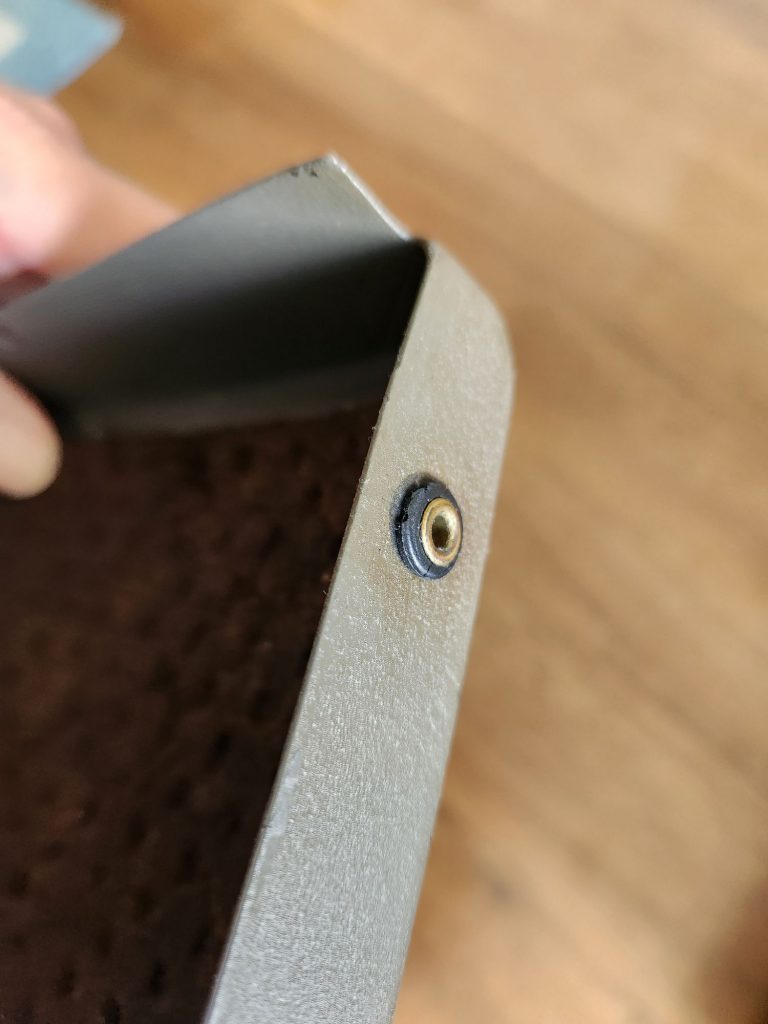
Late last May, I did a full clean, oil, and adjust (COA) on my 1951 Remington Super-Riter. One of the few restorations steps I didn't carry out at the time was the replacement of the rubber grommets on the two side panels and the rear panel. The rubber was so hard and brittle on most of them that they crumbled off leaving only the brass inserts. Some of them also left a sludgy black residue on the metal.
 [caption id="attachment_55834713" align="aligncenter" width="660"]
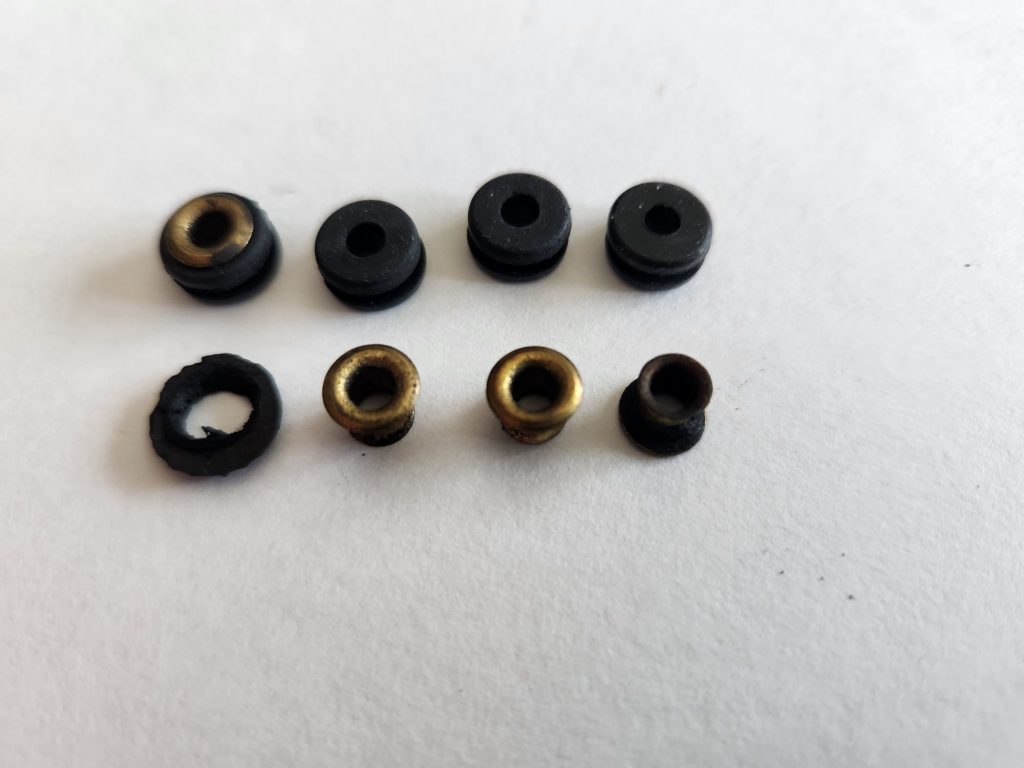 The top left is an original brass eyelet/new rubber grommet assembly next to three new rubber grommets. The bottom row features a desiccated rubber grommet next to three original brass eyelets.[/caption]
This weekend, I went foraging at the local Ace Hardware store to find some replacements for the originals.
The top left is an original brass eyelet/new rubber grommet assembly next to three new rubber grommets. The bottom row features a desiccated rubber grommet next to three original brass eyelets.[/caption]
This weekend, I went foraging at the local Ace Hardware store to find some replacements for the originals.
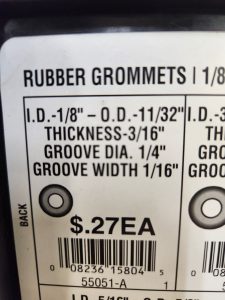
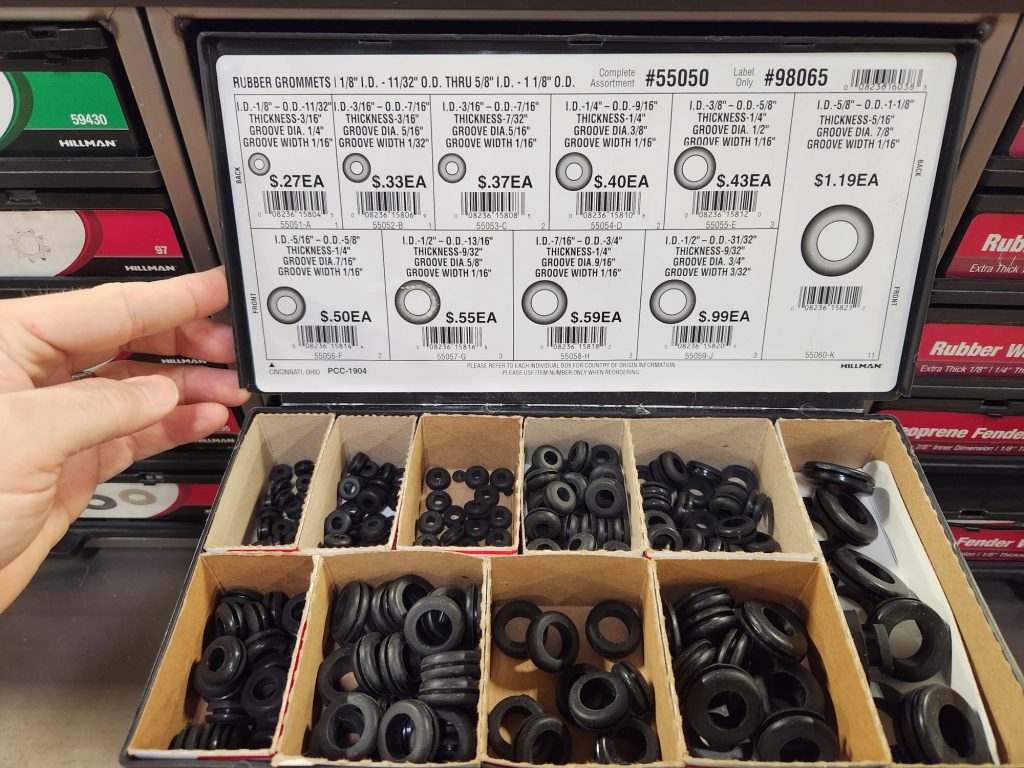 I took a reasonable guess and for 27 cents each I picked up six grommets which were the perfect size. If you're in the market for your own replacement rubber grommets, they were Hillman part number 55051-A with the following specifications: ID: 1/8"; OD: 11/32"; Thickness: 3/16"; Grove Diameter: 1/4"; Groove width: 1/16" .
 When I went to install them, I discovered that I was able to wiggle them into the holes in the side panels. I could also get the brass grommets back in with a bit of work. However, I couldn't discern for the life of me why they included the brass grommets from an engineering perspective. Leaving them off seems to allow a nice friction fit of the panels on the appropriate metal pins against the rubber. Further, without the brass grommets one seems to get not only a better fit, but the vibration dampening of the panels seems to work better. I also suspect the grommet life of the rubber will be better this way in the long run.
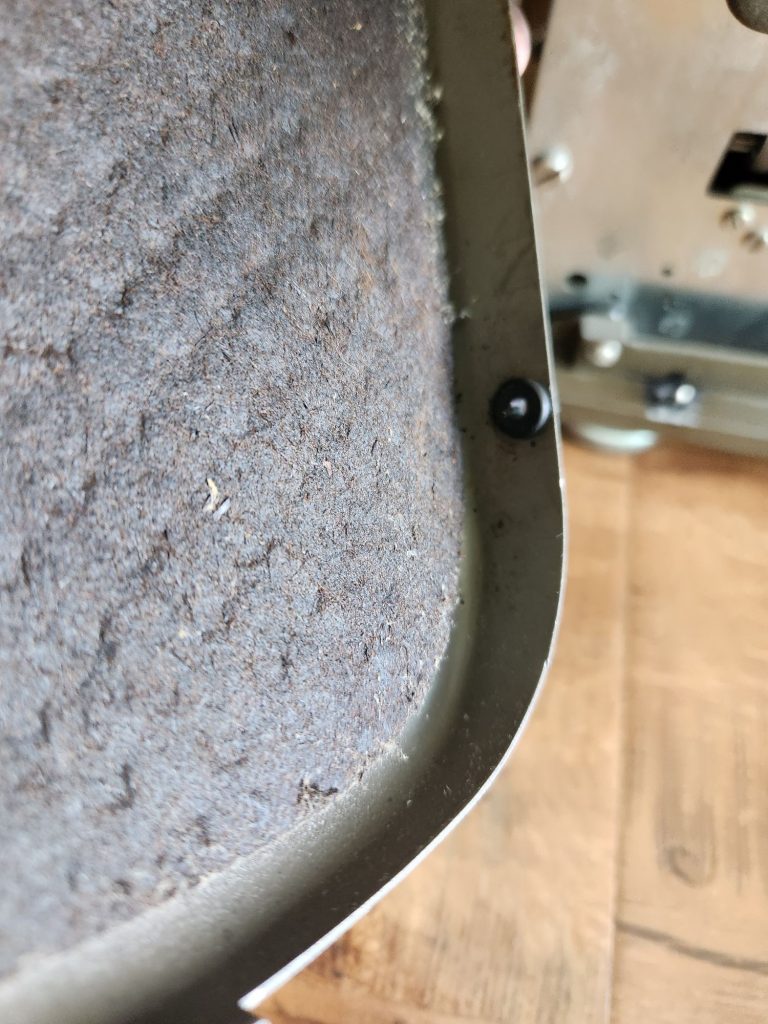 I notice that my later 1956 Remington Standard has a similar design for the side and rear panels, but in that case they'd switched to a single center pin and put two bare rubber grommets on each side of it, choosing to leave off the brass internal eyelets by this time—apparently they came to the same conclusion I had. This means that this same rubber grommet repair can be done on a variety of Remington standard typewriters made after World War II.
Editor's Note: If you're cleaning or repairing your own Remington Standard from this era, be sure to check and see if it's got the Fold-A-Matic feature for making your job much easier.
If for historical or consistency reasons, you insist on the brass gromets as part of the repair of your personal machine, you can certainly manage to use the originals with some care, however, if you've got your own eyelet tool (which many typewriter repair people may have for inserting eyelets into ribbon for the auto-reverse functionality of Smith-Corona typewriters) you can use it in combination with new 3/16" (or slightly smaller) metal eyelets to more permanently seat your rubber grommets into your metal panels.
Have you tried this restoration trick before? What did you use for replacements?
I notice that my later 1956 Remington Standard has a similar design for the side and rear panels, but in that case they'd switched to a single center pin and put two bare rubber grommets on each side of it, choosing to leave off the brass internal eyelets by this time—apparently they came to the same conclusion I had. This means that this same rubber grommet repair can be done on a variety of Remington standard typewriters made after World War II.
Editor's Note: If you're cleaning or repairing your own Remington Standard from this era, be sure to check and see if it's got the Fold-A-Matic feature for making your job much easier.
If for historical or consistency reasons, you insist on the brass gromets as part of the repair of your personal machine, you can certainly manage to use the originals with some care, however, if you've got your own eyelet tool (which many typewriter repair people may have for inserting eyelets into ribbon for the auto-reverse functionality of Smith-Corona typewriters) you can use it in combination with new 3/16" (or slightly smaller) metal eyelets to more permanently seat your rubber grommets into your metal panels.
Have you tried this restoration trick before? What did you use for replacements?
[caption id="attachment_55834713" align="aligncenter" width="660"] The top left is an original brass eyelet/new rubber grommet assembly next to three new rubber grommets. The bottom row features a desiccated rubber grommet next to three original brass eyelets.[/caption]
This weekend, I went foraging at the local Ace Hardware store to find some replacements for the originals.
I took a reasonable guess and for 27 cents each I picked up six grommets which were the perfect size. If you're in the market for your own replacement rubber grommets, they were Hillman part number 55051-A with the following specifications: ID: 1/8"; OD: 11/32"; Thickness: 3/16"; Grove Diameter: 1/4"; Groove width: 1/16" .
When I went to install them, I discovered that I was able to wiggle them into the holes in the side panels. I could also get the brass grommets back in with a bit of work. However, I couldn't discern for the life of me why they included the brass grommets from an engineering perspective. Leaving them off seems to allow a nice friction fit of the panels on the appropriate metal pins against the rubber. Further, without the brass grommets one seems to get not only a better fit, but the vibration dampening of the panels seems to work better. I also suspect the grommet life of the rubber will be better this way in the long run.
I notice that my later 1956 Remington Standard has a similar design for the side and rear panels, but in that case they'd switched to a single center pin and put two bare rubber grommets on each side of it, choosing to leave off the brass internal eyelets by this time—apparently they came to the same conclusion I had. This means that this same rubber grommet repair can be done on a variety of Remington standard typewriters made after World War II.
Editor's Note: If you're cleaning or repairing your own Remington Standard from this era, be sure to check and see if it's got the Fold-A-Matic feature for making your job much easier.
If for historical or consistency reasons, you insist on the brass gromets as part of the repair of your personal machine, you can certainly manage to use the originals with some care, however, if you've got your own eyelet tool (which many typewriter repair people may have for inserting eyelets into ribbon for the auto-reverse functionality of Smith-Corona typewriters) you can use it in combination with new 3/16" (or slightly smaller) metal eyelets to more permanently seat your rubber grommets into your metal panels.
Have you tried this restoration trick before? What did you use for replacements?