
I ran into this odd issue when trying to add two Yubico security keys to my Google account on a Windows machine. The process on myaccount.google.com keeps prompting to “Enroll Windows Hello” in order to create passkeys.
If you want to skip the preamble, jump directly to the steps.
Whenever I clicked the “Create a passkey” button in the middle of that page, it opened the special link ms-settings:signinoptions, which opens the Windows OS settings page for sign-in options. My best guess is that Google wants the machine itself to use one of those options, but I prefer not to at this point.

I did some clicking around between the security page, two factor authentication page, and the passkeys page, both with the security key plugged in and without. I don’t remember the exact steps, but I did eventually get to the “Use another device” prompt and was able to set up the passkey on the security key. At that point, I had my first security key and my phone listed as passkeys. I wanted to add my second security key (backups!), but no matter how I tried, I could not get back to that “Use another device” prompt.
I turned to the human internet and found some threads on Reddit. This one in particular had a comment suggesting signing up for Google’s Advanced Protection Program. It is free, so it was possible, but I persisted on mostly in spite because this shouldn’t be so hard!
Fast forward through several more clicking around adventures and here is how I got it to work:
- Visit https://myaccount.google.com/advanced-protection/onboarding and sign in
- Scroll down and expand the section “Passkeys and security keys”
- Select “Create passkey”
- In the popover, select “Use another device” (screenshot below)
- Another popover with a QR code instructs to scan with a phone or tablet. Ignore that prompt and click the “Back” button at the lower left of the popover
- The QR popover will go away and you should see the prompt “Choose where to save your passkey for google.com”. Select “Use an external security key” (screenshot below)
- From that point, follow the OS prompts to enter a PIN and touch the security key
- Done! The security key now shows up in the list of passkeys
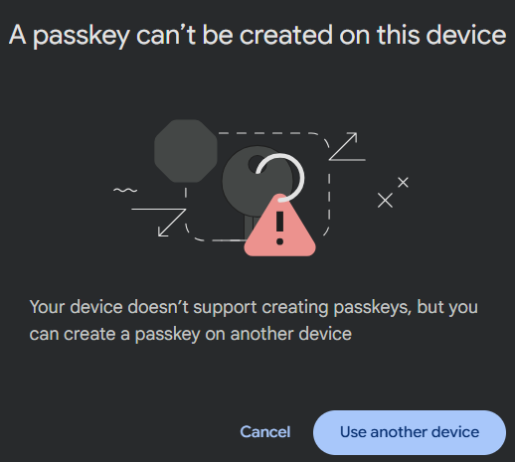 Screenshot for step 4
 Screenshot for step 6

Man, what a steal. Less than half original sticker, only 27k miles, still has a year left of original warranty, loan is “free money” level APR, cut our monthly cost by half.




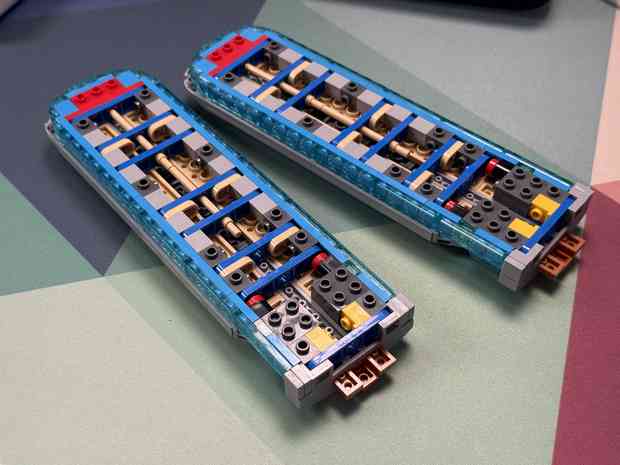



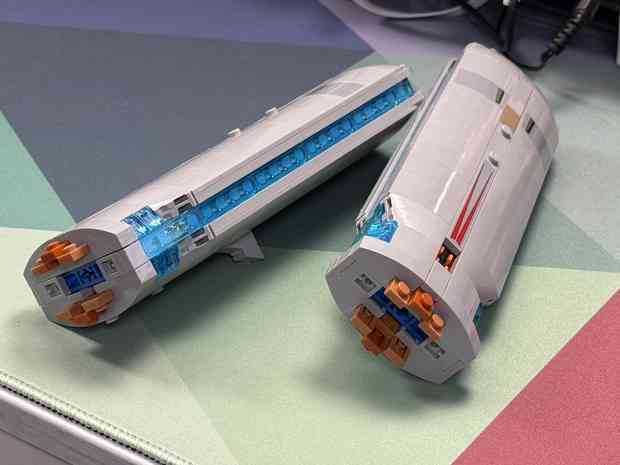
Got a crazy deal on a lightly used BMW iX to replace it and will be saving a ton, the car is far nicer inside and out, and I actually trust BMW’s engineering and service. Sad it didn’t work out with the Rivian, but excited for the new ride for Lacey.
We have decided to get rid of our Rivian. At the price we paid, it shouldn’t feel like we are driving a beta test where service appointments are multiple months out. Over it.


Spaceflight Now has the raw feed of Houston and Integrity comms and video:
https://www.youtube.com/watch?v=M8m9YdxgJ5g
The official NASA live stream (posted previously), has switched to a NASA spokesperson and interviews of folks on the sea/ground as part of splashdown recovery operations.
Choose your live stream:
* Houston, space, and astronauts talking: https://youtu.be/M8m9YdxgJ5g
* Spokespeople/interviews talking: https://youtu.be/m3kR2KK8TEs
or pull them both up on separate side-by-side monitors like they have on the desks at Mission Control.
About an hour left til splashdown!
#NASA #liveStream #Artemis #Artemis #Artemis2 #ArtemisII #Integrity #Earth #Houston #MissionControl #SpaceflightNow
https://www.youtube.com/watch?v=m3kR2KK8TEs
#NASA #liveStream #Artemis #Artemis #Artemis2 #ArtemisII #Earth
Also, For All Mankind always finds a way to become even more joyfully unhinged every single season.
Only halfway through the first episode of For All Mankind season five, and I’m calling it — they’re going to cryogenically freeze Ed Baldwin.
After the OpenClaw Anthropipocalypse, I have been struggling to find a suitable alternative. Started with OpenAI Codex, and while it matches Opus 4.6’s 1M token context window, it is just not well suited for the use case of orchestration and friendly assistant. It has a tendency to hallucinate and its projected demeanor is… weird. It’s like concentrated Mark Zuckerberg from a personality perspective. Decently good at technical tasks, tho.
I am currently using z.ai with their “Coding” plan, and I’m impressed. GLM-5.1 is remarkably similar to Opus 4.6 in my experience thus far. The 200k token window is tiny, unfortunately, but with some creative use of subagents, it’s manageable. I’ve also kept Codex around for now, modifying my standard operating procedures to encourage the use of Codex subagents for grunt work that requires a large token count.