#Events#Typewriters#Bob Marshall#Gregory Short#International Printing Museum#Joe Van Cleave#quality control#type-ins#typecasts#Typewriter Muse
{
    "type": "entry",
    "published": "2026-06-16T13:16:16-07:00",
    "url": "https://boffosocko.com/2026/06/16/typewriter-muse-2026-06-13-1/",
    "featured": "https://boffosocko.com/wp-content/uploads/2026/06/wp-17816382450732367463459747722494.jpg",
    "category": [
        "Events",
        "Typewriters",
        "Bob Marshall",
        "Gregory Short",
        "International Printing Museum",
        "Joe Van Cleave",
        "quality control",
        "type-ins",
        "typecasts",
        "Typewriter Muse"
    ],
    "content": {
        "text": "",
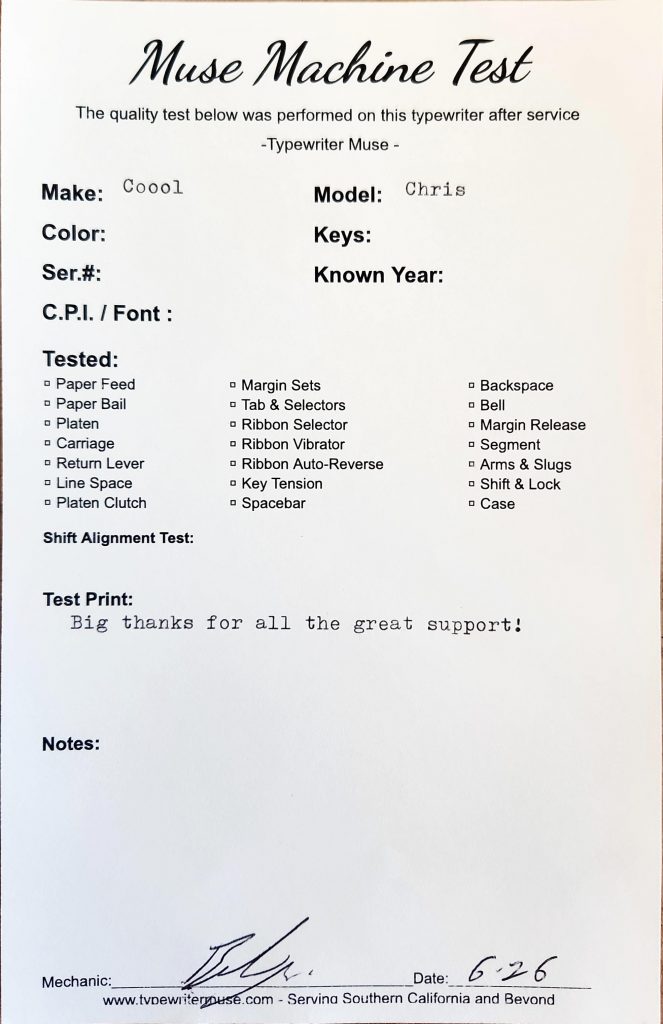
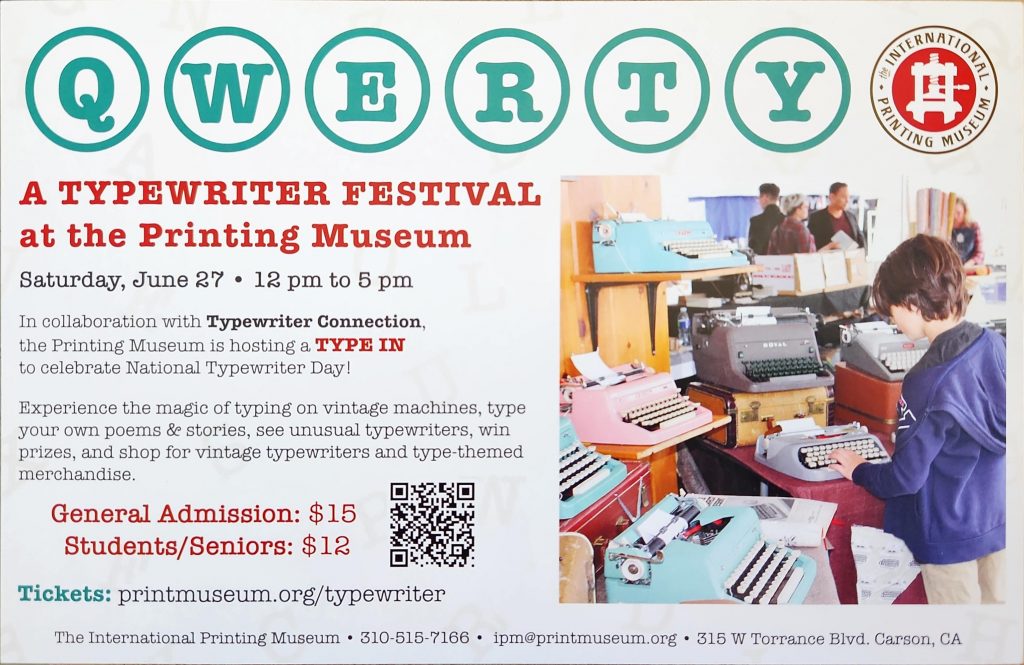
        "html": "<img src=\"https://boffosocko.com/wp-content/uploads/2026/06/Scan-2026-06-16-12_14_51-720x1024.jpeg\" alt=\"\" width=\"660\" height=\"939\" /><img src=\"https://boffosocko.com/wp-content/uploads/2026/06/Scan-2026-06-16-12_35_43-727x1024.jpeg\" alt=\"\" width=\"660\" height=\"930\" /><img src=\"https://boffosocko.com/wp-content/uploads/2026/06/wp-17816383173061279581512587654925-1024x768.jpg\" alt=\"Selfie of Chris Aldrich and Joe Van Cleave in the showroom at Typewriter Muse\" width=\"660\" height=\"495\" /><img src=\"https://boffosocko.com/wp-content/uploads/2026/06/wp-17816382895385612550909979281125-1024x768.jpg\" alt=\"Selfie of Chris Aldrich and Gregory Short at Typewriter Muse\" width=\"660\" height=\"495\" /><img src=\"https://boffosocko.com/wp-content/uploads/2026/06/wp-17816382640603947546630851479818-1024x768.jpg\" alt=\"Peach and cream Voss typewriter\" width=\"660\" height=\"495\" /><img src=\"https://boffosocko.com/wp-content/uploads/2026/06/Scan-2026-06-16-12_37_27-663x1024.jpeg\" alt=\"Muse Machine Test quality control sheet signed by Bob Marshall in June 2026\" width=\"660\" height=\"1019\" /><img src=\"https://boffosocko.com/wp-content/uploads/2026/06/Scan-2026-06-16-12_36_54-1024x665.jpeg\" alt=\"Post card advertisement for the QWERTY Typewriter Festival at the International Printing Museum on June 27th 2026\" width=\"660\" height=\"429\" />"
    },
    "author": {
        "type": "card",
        "name": null,
        "url": null,
        "photo": null
    },
    "post-type": "note",
    "_id": "48618472",
    "_source": "2785"
}
Tonight, I noticed you can't spell typewriter in German without IBM: SchreIBMaschinen. Surely that ran across someone's mind before in an advertising campaign, right?
{
    "type": "entry",
    "published": "2026-06-16T00:06:10-07:00",
    "summary": "Tonight, I noticed you can’t spell typewriter in German without IBM: SchreIBMaschinen. Surely that ran across someone’s mind before in an advertising campaign, right?",
    "url": "https://boffosocko.com/2026/06/16/schreibmaschinen/",
    "category": [
        "Social Stream",
        "Typewriters",
        "IBM",
        "IBM typewriters",
        "Schreibmaschinen"
    ],
    "content": {
        "text": "Tonight, I noticed you can't spell typewriter in German without IBM: SchreIBMaschinen. Surely that ran across someone's mind before in an advertising campaign, right?",
        "html": "Tonight, I noticed you can't spell typewriter in German without IBM: <em>SchreIBMaschinen</em>. Surely that ran across someone's mind before in an advertising campaign, right?"
    },
    "author": {
        "type": "card",
        "name": null,
        "url": null,
        "photo": null
    },
    "post-type": "note",
    "_id": "48610249",
    "_source": "2785"
}
{
    "type": "entry",
    "published": "2026-06-14T19:34:56.842561+00:00",
    "url": "https://cleverdevil.io/2026/sir-lewis-hamilton-is-a-ferrari-grand-pr",
    "syndication": [
        "https://cleverdevil.club/@jonathan/116750135914055524",
        "https://bsky.app/profile/cleverdevil.io/post/3mobjb3cta52i"
    ],
    "content": {
        "text": "Sir Lewis Hamilton is a Ferrari Grand Prix winner! LFG!  \ud83c\udfce\ufe0f\ud83d\udca8 #F1",
        "html": "<p>Sir Lewis Hamilton is a Ferrari Grand Prix winner! LFG!  \ud83c\udfce\ufe0f\ud83d\udca8 #F1</p>"
    },
    "author": {
        "type": "card",
        "name": "Jonathan LaCour",
        "url": "https://cleverdevil.io",
        "photo": "https://cleverdevil.io/profile/photo"
    },
    "post-type": "note",
    "_id": "48595385",
    "_source": "10"
}
How to add Google News, Google Books, and Google Scholar search directly in your browser, to search those sites with fewer steps, and less chance of being distracted.
One of my hobbies is contributing to Wikipedia, and more so, creating new Wikipedia articles. Citations of reliable sources are key to both good contributions, and new articles, especially in making them stick (not get reverted/deleted).
I use Google News to search for citations, and depending on the topic, sometimes Google Books and Google Scholar.
Unfortunately, to search Google News, you have to first go to Google News (news.google .com - deliberately unlinked here), upon which you are immediately shown distracting (if not dire) news photos, headlines etc. which present a non-trivial challenge to staying focused.
If only there was a way to directly search Google News from your browser search box / address bar (like you can search Wikipedia from your browser).
This is another technology I use for category 2 (defending focus) that I mentioned in my previous post on focus.
Steps to add a Google News search option to Firefox:
1. open Firefox Preferences ("Firefox" menu, "Preferences" item) 2. select "🔍 Search" from the left column 3. scroll down to "Search Shortcuts" 4. click the "Add" button under the list of search engines which opens a dialog 5. enter "Google News" into the Search engine name field (without quotes) 6. enter "https://news.google.com/search?q=%s" into the URL field (without quotes) 7. enter "gn" into the Keyword field (without quotes)
The dialog should look like this:
8. click (Add Engine)
Now you can go to your address bar, type in "gn " (without the quotes), your news search term or phrase, e.g. "Broken Arrow Skyrace", and press return to directly see search results.
Similarly for Google Books, follow the same steps except: 5. enter "Google Books" into the Search engine name field (without quotes) 6. enter "https://books.google.com/books?q=%s" into the URL field (without quotes) 7. enter "gb" into the Keyword field (without quotes)
And similarly for Google Scholar: 5. enter "Google Scholar" into the Search engine name field (without quotes) 6. enter "https://scholar.google.com/scholar?q=%s" into the URL field (without quotes) 7. enter "gs" into the Keyword field (without quotes)
Thanks to folks in the #indieweb informal chat who reminded me (when I complained about the distracting Google News home page) of this way to add new site-specific search capabilities to the browser even for sites (or subsites) without explicit OpenSearch support.
Looking forward to using these capabilities to more quickly find citations for updating and creating new Wikipedia articles.
{
    "type": "entry",
    "published": "2026-06-12 19:35-0700",
    "url": "https://tantek.com/2026/163/t1/google-news-books-scholar-search-in-browser",
    "category": [
        "indieweb",
        "focus",
        "Wikipedia",
        "Firefox",
        "GoogleNews",
        "GoogleBooks",
        "GoogleScholar",
        "search",
        "siteSearch",
        "AddSearchEngine",
        "searchEngine",
        "searchEngines",
        "OpenSearch",
        "webSearch",
        "SearchShortcuts",
        "browserTip",
        "FirefoxTip",
        "searchTip"
    ],
    "content": {
        "text": "How to add Google News, Google Books, and Google Scholar search directly in your browser, to search those sites with fewer steps, and less chance of being distracted.\n\nOne of my hobbies is contributing to Wikipedia, and more so, creating new Wikipedia articles. Citations of reliable sources are key to both good contributions, and new articles, especially in making them stick (not get reverted/deleted).\n\nI use Google News to search for citations, and depending on the topic, sometimes Google Books and Google Scholar.\n\nUnfortunately, to search Google News, you have to first go to Google News (news.google .com - deliberately unlinked here), upon which you are immediately shown distracting (if not dire) news photos, headlines etc. which present a non-trivial challenge to staying focused.\n\nIf only there was a way to directly search Google News from your browser search box / address bar (like you can search Wikipedia from your browser).\n\nUnfortunately, there is no site-specific search option for Google News (like there is for YouTube, e.g. see https://support.mozilla.org/en-US/kb/add-or-remove-search-engine-firefox#w_add-search-engines) that you can select an add to your browser in one click (enabled by OpenSearch support, link in footer).\n\nThis is another technology I use for category 2 (defending focus) that I mentioned in my previous post on focus.\n\nSteps to add a Google News search option to Firefox:\n\n1. open Firefox Preferences (\"Firefox\" menu, \"Preferences\" item)\n2. select \"\ud83d\udd0d Search\" from the left column\n3. scroll down to \"Search Shortcuts\"\n4. click the \"Add\" button under the list of search engines which opens a dialog\n5. enter \"Google News\" into the Search engine name field (without quotes)\n6. enter \"https://news.google.com/search?q=%s\" into the URL field (without quotes)\n7. enter \"gn\" into the Keyword field (without quotes)\n\nThe dialog should look like this:\n\n\n8. click (Add Engine)\n\nNow you can go to your address bar, type in \"gn \" (without the quotes), your news search term or phrase, e.g. \"Broken Arrow Skyrace\", and press return to directly see search results.\n\nSimilarly for Google Books, follow the same steps except:\n5. enter \"Google Books\" into the Search engine name field (without quotes)\n6. enter \"https://books.google.com/books?q=%s\" into the URL field (without quotes)\n7. enter \"gb\" into the Keyword field (without quotes)\n\nAnd similarly for Google Scholar:\n5. enter \"Google Scholar\" into the Search engine name field (without quotes)\n6. enter \"https://scholar.google.com/scholar?q=%s\" into the URL field (without quotes)\n7. enter \"gs\" into the Keyword field (without quotes)\n\nThanks to folks in the #indieweb informal chat who reminded me (when I complained about the distracting Google News home page) of this way to add new site-specific search capabilities to the browser even for sites (or subsites) without explicit OpenSearch support.\n\nLooking forward to using these capabilities to more quickly find citations for updating and creating new Wikipedia articles.\n\nPreviously:\n* https://tantek.com/2026/158/t2/three-insights-improving-focus\n* https://tantek.com/2024/287/t2/setup-search-shortcuts-firefox\n\nOpenSearch FYI:\n* https://developer.mozilla.org/en-US/docs/Web/XML/Guides/OpenSearch\n\n#focus #Wikipedia #Firefox #GoogleNews #GoogleBooks #GoogleScholar #search #siteSearch #AddSearchEngine #searchEngine #searchEngines #OpenSearch #webSearch #SearchShortcuts #browserTip #FirefoxTip #searchTip",
        "html": "How to add Google News, Google Books, and Google Scholar search directly in your browser, to search those sites with fewer steps, and less chance of being distracted.<br /><br />One of my hobbies is contributing to Wikipedia, and more so, creating new Wikipedia articles. Citations of reliable sources are key to both good contributions, and new articles, especially in making them stick (not get reverted/deleted).<br /><br />I use Google News to search for citations, and depending on the topic, sometimes Google Books and Google Scholar.<br /><br />Unfortunately, to search Google News, you have to first go to Google News (news.google .com - deliberately unlinked here), upon which you are immediately shown distracting (if not dire) news photos, headlines etc. which present a non-trivial challenge to staying focused.<br /><br />If only there was a way to directly search Google News from your browser search box / address bar (like you can search Wikipedia from your browser).<br /><br />Unfortunately, there is no site-specific search option for Google News (like there is for YouTube, e.g. see <a href=\"https://support.mozilla.org/en-US/kb/add-or-remove-search-engine-firefox#w_add-search-engines\">https://support.mozilla.org/en-US/kb/add-or-remove-search-engine-firefox#w_add-search-engines</a>) that you can select an add to your browser in one click (enabled by OpenSearch support, link in footer).<br /><br />This is another technology I use for category 2 (defending focus) that I mentioned in my previous post on focus.<br /><br />Steps to add a Google News search option to Firefox:<br /><br />1. open Firefox Preferences (\"Firefox\" menu, \"Preferences\" item)<br />2. select \"\ud83d\udd0d Search\" from the left column<br />3. scroll down to \"Search Shortcuts\"<br />4. click the \"Add\" button under the list of search engines which opens a dialog<br />5. enter \"Google News\" into the Search engine name field (without quotes)<br />6. enter \"https://news.google.com/search?q=%s\" into the URL field (without quotes)<br />7. enter \"gn\" into the Keyword field (without quotes)<br /><br />The dialog should look like this:<br /><br /><a href=\"https://indieweb.org/OpenSearch#Firefox\"><img alt=\"Screnshot of the Add Search Engine dialog in Firefox with fields pre-filled in.\" src=\"https://indieweb.org/images/3/38/2026-06-12-Firefox-add-search-engine-dialog.png\" /></a><br />8. click (Add Engine)<br /><br />Now you can go to your address bar, type in \"gn \" (without the quotes), your news search term or phrase, e.g. \"Broken Arrow Skyrace\", and press return to directly see search results.<br /><br />Similarly for Google Books, follow the same steps except:<br />5. enter \"Google Books\" into the Search engine name field (without quotes)<br />6. enter \"https://books.google.com/books?q=%s\" into the URL field (without quotes)<br />7. enter \"gb\" into the Keyword field (without quotes)<br /><br />And similarly for Google Scholar:<br />5. enter \"Google Scholar\" into the Search engine name field (without quotes)<br />6. enter \"https://scholar.google.com/scholar?q=%s\" into the URL field (without quotes)<br />7. enter \"gs\" into the Keyword field (without quotes)<br /><br />Thanks to folks in the #<span class=\"p-category\">indieweb</span> informal chat who reminded me (when I complained about the distracting Google News home page) of this way to add new site-specific search capabilities to the browser even for sites (or subsites) without explicit OpenSearch support.<br /><br />Looking forward to using these capabilities to more quickly find citations for updating and creating new Wikipedia articles.<br /><br />Previously:<br />* <a href=\"https://tantek.com/2026/158/t2/three-insights-improving-focus\">https://tantek.com/2026/158/t2/three-insights-improving-focus</a><br />* <a href=\"https://tantek.com/2024/287/t2/setup-search-shortcuts-firefox\">https://tantek.com/2024/287/t2/setup-search-shortcuts-firefox</a><br /><br />OpenSearch FYI:<br />* <a href=\"https://developer.mozilla.org/en-US/docs/Web/XML/Guides/OpenSearch\">https://developer.mozilla.org/en-US/docs/Web/XML/Guides/OpenSearch</a><br /><br />#<span class=\"p-category\">focus</span> #<span class=\"p-category\">Wikipedia</span> #<span class=\"p-category\">Firefox</span> #<span class=\"p-category\">GoogleNews</span> #<span class=\"p-category\">GoogleBooks</span> #<span class=\"p-category\">GoogleScholar</span> #<span class=\"p-category\">search</span> #<span class=\"p-category\">siteSearch</span> #<span class=\"p-category\">AddSearchEngine</span> #<span class=\"p-category\">searchEngine</span> #<span class=\"p-category\">searchEngines</span> #<span class=\"p-category\">OpenSearch</span> #<span class=\"p-category\">webSearch</span> #<span class=\"p-category\">SearchShortcuts</span> #<span class=\"p-category\">browserTip</span> #<span class=\"p-category\">FirefoxTip</span> #<span class=\"p-category\">searchTip</span>"
    },
    "author": {
        "type": "card",
        "name": "Tantek \u00c7elik",
        "url": "https://tantek.com/",
        "photo": "https://tantek.com/photo.jpg"
    },
    "post-type": "note",
    "_id": "48578979",
    "_source": "2460"
}
Indie developer Casey Liss of Accidental Tech Podcast fame recounted his experience using Claude Code on his app, Callsheet. With Claude Code, he was able to fix two bugs that had eluded him for months, and his take on the experience is unique.
I was struck; I was feeling something that was familiar, but distant. I felt like I had just worked together with a coworker to solve a technical problem. It felt like I was part of a team again.
I expect Casey to receive some negative feedback about this, but I totally understand the perspective. It’s okay to perceive a coding agent as an extension of your team. For indie developers, who are often a team of one, having an agent to bounce ideas off of, to experiment with, and to debug/fix code with is incredibly impactful.
{
    "type": "entry",
    "published": "2026-06-12T20:55:29.042755+00:00",
    "url": "https://cleverdevil.io/2026/casey-liss-has-a-new-teammate-claude",
    "syndication": [
        "https://cleverdevil.club/@jonathan/116739127991508194",
        "https://bsky.app/profile/cleverdevil.io/post/3mo4mtax3vc2g"
    ],
    "content": {
        "text": "Liss is More\n                    An Old, Familiar Feeling \u2014 Liss is More\n                    \n                    I had a not-too-unusual experience with AI yesterday, that had a not-at-all-normal impact.\n                    \n                \n            \n            \n            \nIndie developer Casey Liss of Accidental Tech Podcast fame recounted his experience using Claude Code on his app, Callsheet. With Claude Code, he was able to fix two bugs that had eluded him for months, and his take on the experience is unique.\n\nI was struck; I was feeling something that was familiar, but distant. I felt like I had just worked together with a coworker to solve a technical problem. It felt like I was part of a team again.\n\nI expect Casey to receive some negative feedback about this, but I totally understand the perspective. It\u2019s okay to perceive a coding agent as an extension of your team. For indie developers, who are often a team of one, having an agent to bounce ideas off of, to experiment with, and to debug/fix code with is incredibly impactful.",
        "html": "<a href=\"https://www.caseyliss.com/2026/6/12/an-old-familiar-feeling\">\n                \n                \n                    <img src=\"https://www.caseyliss.com/images/favicon.png\" alt=\"\" />\n                \n                \n                    <span>Liss is More</span>\n                    <span>An Old, Familiar Feeling \u2014 Liss is More</span>\n                    \n                    <span>I had a not-too-unusual experience with AI yesterday, that had a not-at-all-normal impact.</span>\n                    \n                \n            </a>\n            \n            \n<p>Indie developer <a href=\"https://www.caseyliss.com\">Casey Liss</a> of <a href=\"https://atp.fm\">Accidental Tech Podcast</a> fame recounted his experience using Claude Code on his app, <a href=\"https://callsheetapp.com/\">Callsheet</a>. With Claude Code, he was able to fix two bugs that had eluded him for months, and his take on the experience is unique.</p>\n<blockquote>\n<p>I was struck; I was feeling something that was familiar, but distant. I felt like I had just worked together with a coworker to solve a technical problem. It felt like I was part of a team again.</p>\n</blockquote>\n<p>I expect Casey to receive some negative feedback about this, but I totally understand the perspective. It\u2019s okay to perceive a coding agent as an extension of your team. For indie developers, who are often a team of one, having an agent to bounce ideas off of, to experiment with, and to debug/fix code with is incredibly impactful.</p>"
    },
    "author": {
        "type": "card",
        "name": "Jonathan LaCour",
        "url": "https://cleverdevil.io",
        "photo": "https://cleverdevil.io/profile/photo"
    },
    "post-type": "note",
    "_id": "48576078",
    "_source": "10"
}
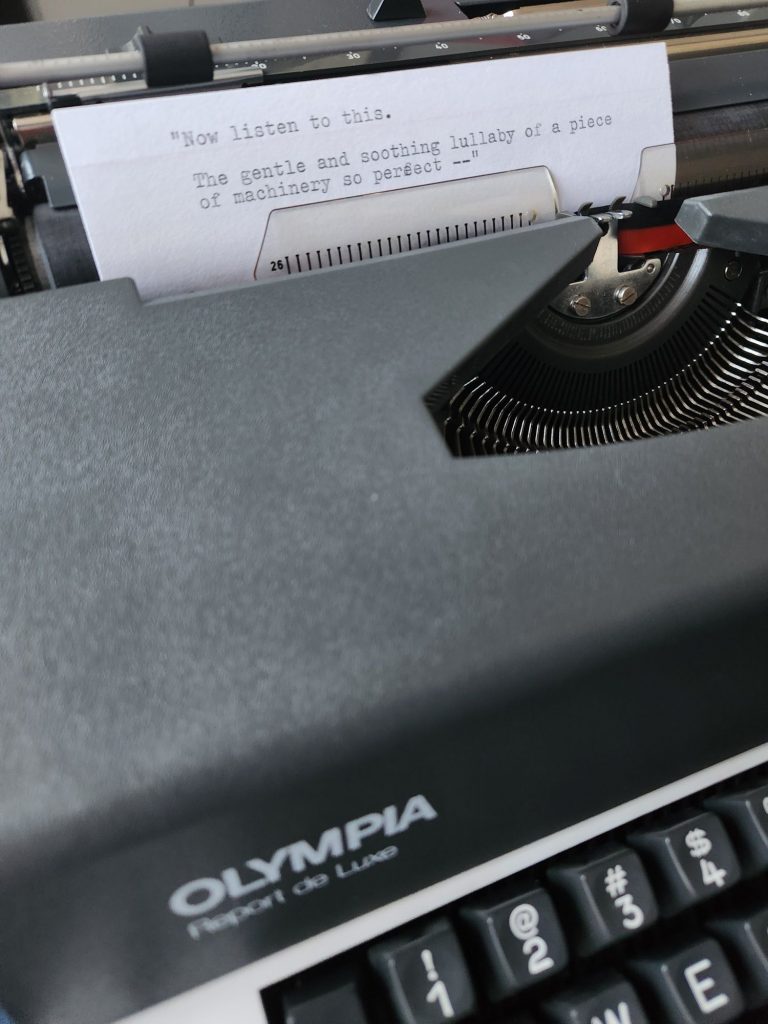
#Typewriters#Frank Navasky#Olympia Report De Luxe#You've Got Mail
{
"type": "entry",
"published": "2026-06-12T09:50:56-07:00",
"url": "https://boffosocko.com/2026/06/12/55835846/",
"category": [
"Typewriters",
"Frank Navasky",
"Olympia Report De Luxe",
"You've Got Mail"
],
"content": {
"text": "",
"html": "<img src=\"https://boffosocko.com/wp-content/uploads/2026/06/wp-17812805007093887062811227926847-768x1024.jpg\" alt=\"A 1977 Olympia Report de Luxe electric typebar typewriter with an index card in the carriage that reads: "Now listen to this. The gentle and soothing lullaby of a piece of machinery so perfect--"\" width=\"660\" height=\"880\" />"
},
"author": {
"type": "card",
"name": null,
"url": null,
"photo": null
},
"post-type": "note",
"_id": "48574170",
"_source": "2785"
}
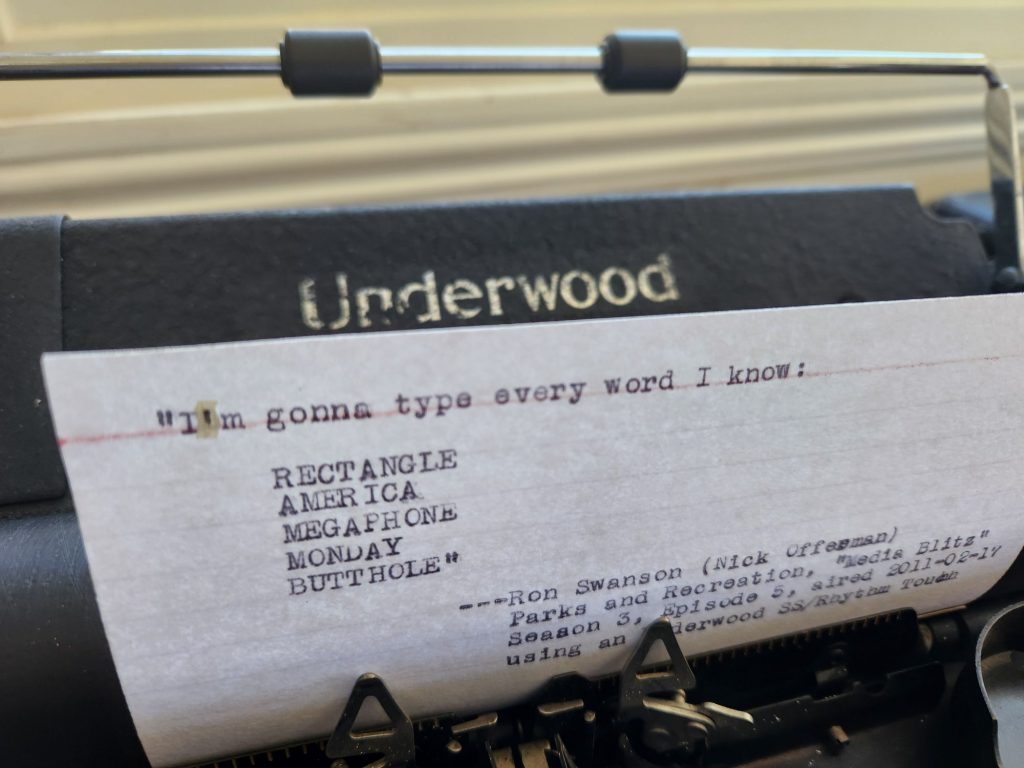
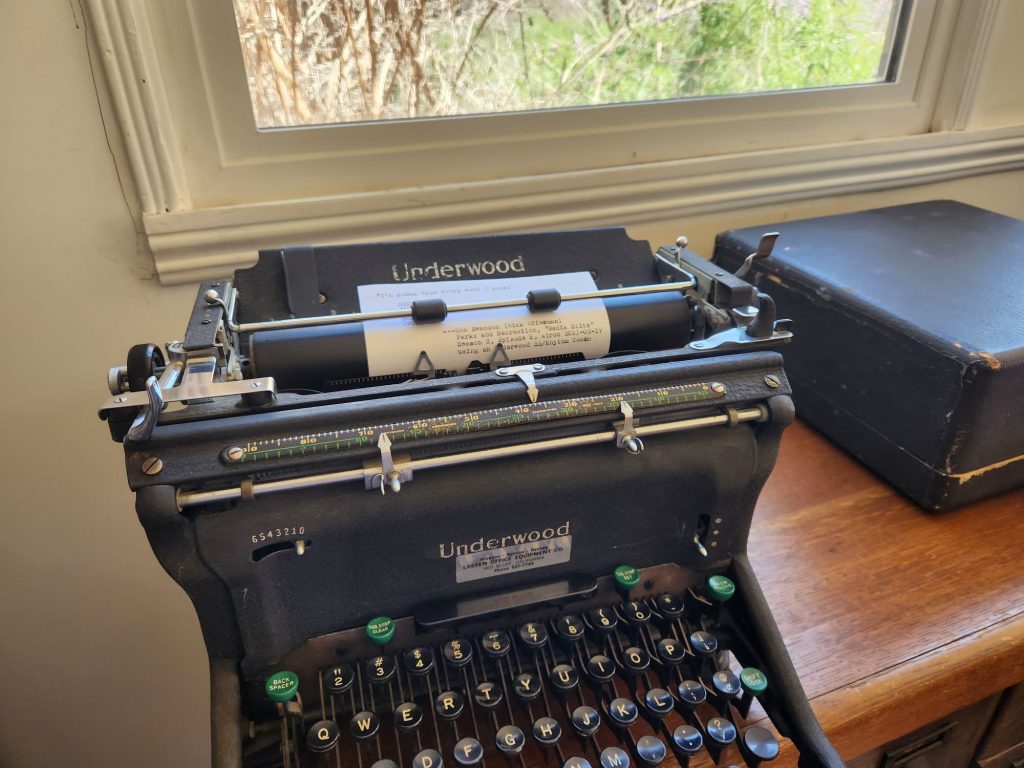
#Photo#Social Stream#Typewriters#one typed quote#Parks and Recreation#typewriters in media#Underwood SS#Underwood typewriters
{
"type": "entry",
"published": "2026-06-11T22:49:05-07:00",
"url": "https://boffosocko.com/2026/06/11/im-gonna-type-every-word-i-know/",
"category": [
"Photo",
"Social Stream",
"Typewriters",
"one typed quote",
"Parks and Recreation",
"typewriters in media",
"Underwood SS",
"Underwood typewriters"
],
"content": {
"text": "",
"html": "<img src=\"https://boffosocko.com/wp-content/uploads/2026/06/wp-17812035942178512310305501088334-1024x768.jpg\" alt=\"Index card in the carriage of a black Underwood SS Rhythm Touch typewriter that reads: "I'm gonna type every word I know: RECTANGLE, AMERICA, MEGAPHONE, MONDAY, BUTTHOLE" \u2014Ron Swanson (Nick Offerman), Parks and Recreation "Media Blitz", Season 3, Episode 5, aired 2011-02-17 using an Underwood SS/Rhythm Touch\" width=\"660\" height=\"495\" /><img src=\"https://boffosocko.com/wp-content/uploads/2026/06/wp-17812035943334811438640244886900-1024x768.jpg\" alt=\"Black Underwood SS standard typewriter sitting on a wooden desktop in front of a window with greenery outside. There is a typed index card in the carriage.\" width=\"660\" height=\"495\" />"
},
"author": {
"type": "card",
"name": null,
"url": null,
"photo": null
},
"post-type": "note",
"_id": "48574171",
"_source": "2785"
}










 Liss is More
An Old, Familiar Feeling — Liss is More
I had a not-too-unusual experience with AI yesterday, that had a not-at-all-normal impact.
Liss is More
An Old, Familiar Feeling — Liss is More
I had a not-too-unusual experience with AI yesterday, that had a not-at-all-normal impact.