{
"type": "entry",
"author": {
"name": "Neil Mather",
"url": "https://doubleloop.net/",
"photo": null
},
"url": "https://doubleloop.net/2019/05/10/5395/",
"published": "2019-05-10T22:13:11+00:00",
"content": {
"html": "<p>I feel like Solid, ActivityPub with a generic server and C2S, and Indieweb, are all kind of chipping away at the same thing. You have all your data in one place (either self-hosted or someone-else-hosted) and you decide which apps you want to let interact with it.</p>\n<p>The post <a href=\"https://doubleloop.net/2019/05/10/5395/\">#5395</a> appeared first on <a href=\"https://doubleloop.net/\">doubleloop</a>.</p>",
"text": "I feel like Solid, ActivityPub with a generic server and C2S, and Indieweb, are all kind of chipping away at the same thing. You have all your data in one place (either self-hosted or someone-else-hosted) and you decide which apps you want to let interact with it.\nThe post #5395 appeared first on doubleloop."
},
"name": "#5395",
"post-type": "note",
"_id": "3400288",
"_source": "1895",
"_is_read": true
}
{
"type": "entry",
"author": {
"name": "Neil Mather",
"url": "https://doubleloop.net/",
"photo": null
},
"url": "https://doubleloop.net/2019/05/10/5392/",
"published": "2019-05-10T21:09:59+00:00",
"content": {
"html": "<p>A first attempt at a sketch of what\u2019s going on with my Indieweb setup.</p>\n<p><a href=\"https://doubleloop.net/wp-content/uploads/2019/05/indieweb-sketch.png\"><img src=\"https://aperture-proxy.p3k.io/76126e20187f13e71e3676a06ae60043225e341e/68747470733a2f2f646f75626c656c6f6f702e6e65742f77702d636f6e74656e742f75706c6f6164732f323031392f30352f696e6469657765622d736b657463682d31303234783634302e706e67\" alt=\"\" /></a></p>\n<p>The post <a href=\"https://doubleloop.net/2019/05/10/5392/\">#5392</a> appeared first on <a href=\"https://doubleloop.net/\">doubleloop</a>.</p>",
"text": "A first attempt at a sketch of what\u2019s going on with my Indieweb setup.\n\nThe post #5392 appeared first on doubleloop."
},
"name": "#5392",
"post-type": "note",
"_id": "3399612",
"_source": "1895",
"_is_read": true
}
{
"type": "entry",
"author": {
"name": "Neil Mather",
"url": "https://doubleloop.net/",
"photo": null
},
"url": "https://doubleloop.net/2019/05/10/5391/",
"published": "2019-05-10T19:14:17+00:00",
"content": {
"html": "<p>Hey <a href=\"https://prismo.xyz/\">prismo.xyz</a> sends webmentions when you have an article submitted, nice!</p>\n<p>The post <a href=\"https://doubleloop.net/2019/05/10/5391/\">#5391</a> appeared first on <a href=\"https://doubleloop.net/\">doubleloop</a>.</p>",
"text": "Hey prismo.xyz sends webmentions when you have an article submitted, nice!\nThe post #5391 appeared first on doubleloop."
},
"name": "#5391",
"post-type": "note",
"_id": "3398020",
"_source": "1895",
"_is_read": true
}
Let’s try a Saturday afternoon!
From 1-3pm, join us for an IndieWeb Meetup at Think Coffee on 8th Av at 14th St in Manhattan!
Come work on your personal website, whether it exists yet or not!
{
"type": "entry",
"published": "2019-05-10T13:13:55-0400",
"rsvp": "yes",
"url": "https://martymcgui.re/2019/05/10/131355/",
"in-reply-to": [
"https://indieweb.org/events/2019-05-11-homebrew-website-club-nyc"
],
"content": {
"text": "I'm going!Let\u2019s try a Saturday afternoon!\n\nFrom 1-3pm, join us for an IndieWeb Meetup at Think Coffee on 8th Av at 14th St in Manhattan!\n\nCome work on your personal website, whether it exists yet or not!",
"html": "I'm going!<p>Let\u2019s try a Saturday afternoon!</p>\n\n<p>From 1-3pm, join us for an IndieWeb Meetup at Think Coffee on 8th Av at 14th St in Manhattan!</p>\n\n<p>Come work on your personal website, whether it exists yet or not!</p>"
},
"author": {
"type": "card",
"name": "Marty McGuire",
"url": "https://martymcgui.re/",
"photo": "https://aperture-proxy.p3k.io/8275f85e3a389bd0ae69f209683436fc53d8bad9/68747470733a2f2f6d617274796d636775692e72652f696d616765732f6c6f676f2e6a7067"
},
"post-type": "rsvp",
"refs": {
"https://indieweb.org/events/2019-05-11-homebrew-website-club-nyc": {
"type": "entry",
"summary": "Join us for an afternoon of IndieWeb personal site demos and discussions!",
"url": "https://indieweb.org/events/2019-05-11-homebrew-website-club-nyc",
"photo": [
"https://res.cloudinary.com/schmarty/image/fetch/w_960,c_fill/https://indieweb.org/images/b/b1/2017-hwc-80s-retro.jpg"
],
"name": "\ud83d\uddfd Homebrew Website Club NYC",
"author": {
"type": "card",
"name": "indieweb.org",
"url": "http://indieweb.org",
"photo": null
},
"post-type": "photo"
}
},
"_id": "3396940",
"_source": "175",
"_is_read": true
}
This post from Calum finally brought out the FOMO I had been suppressing for IndieWebCamp Berlin.
Really looking forward to the 2019 IndieWeb Summit June 29-30th in Portland!
{
"type": "entry",
"published": "2019-05-10T13:01:42-0400",
"url": "https://martymcgui.re/2019/05/10/130142/",
"content": {
"text": "This post from Calum finally brought out the FOMO I had been suppressing for IndieWebCamp Berlin.\n\nReally looking forward to the 2019 IndieWeb Summit June 29-30th in Portland!\n\nhttps://calumryan.com/blog/indiewebcamp-berlin-2019/",
"html": "<p>This post from <a href=\"https://calumryan.com/\">Calum</a> finally brought out the FOMO I had been suppressing for IndieWebCamp Berlin.</p>\n\n<p>Really looking forward to <a href=\"https://2019.indieweb.org/summit\">the 2019 IndieWeb Summit</a> June 29-30th in Portland!</p>\n\n<p><a href=\"https://calumryan.com/blog/indiewebcamp-berlin-2019/\">https://calumryan.com/blog/indiewebcamp-berlin-2019/</a></p>"
},
"author": {
"type": "card",
"name": "Marty McGuire",
"url": "https://martymcgui.re/",
"photo": "https://aperture-proxy.p3k.io/8275f85e3a389bd0ae69f209683436fc53d8bad9/68747470733a2f2f6d617274796d636775692e72652f696d616765732f6c6f676f2e6a7067"
},
"post-type": "note",
"_id": "3396942",
"_source": "175",
"_is_read": true
}
{
"type": "entry",
"published": "2019-05-10T16:17:44+10:00",
"url": "https://unicyclic.com/mal/2019-05-10-There_was_something_else_I_wanted_to_mention_in_my",
"category": [
"indieweb"
],
"content": {
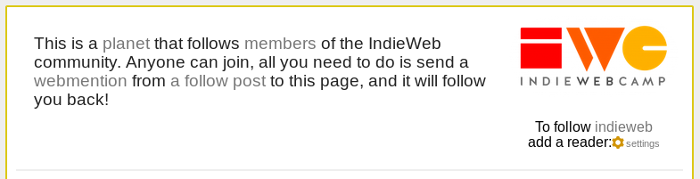
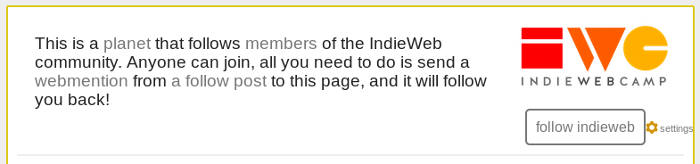
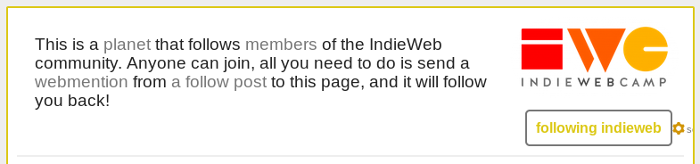
"text": "There was something else I wanted to mention in my post the other day, but left it out because it was getting a bit long. The first screenshot contains the unexplained piece of text: \"To follow indieweb add a reader\" followed by a settings link. (Here it is again...)\n\n\n\n\nI added this because it's an easy way to add a rel=feed to the page. It's a separate module in Dobrado that allows setting some values for the account. One of the options allows specifying what feeds you want to make discoverable, so in this case I have it set to indieweb/directory which is the microformats feed list for all the feeds shown on that page.\n\n\nThe module renders that link, marked up with rel=feed, along with the logo and account name as an h-card for the account. The other thing it does is provide a webaction, which is why rather than just being a link it mentions adding a reader. Clicking the settings link opens a dialog that lets you specify your web action config. If the dialog finds a valid config it will trigger an update to any indie-action tags it finds on the page. There just happens to be one in the module I've just mentioned, so it will now looks like this:\n\n\n\n\nThe link \"follow indieweb\" is now using my config! It's pointing at my own reader with a follow action set, so if I click on that link all I have to do is click ok in my reader to add the feed. As it turns out I'm already following the indieweb directory on unicyclic.com, and my webaction config has checked this too!\n\n\nOne of the options set in my config is status and it happens to work a little differently from the other actions. This config option supports CORS requests, and will provide information about urls when I'm logged in. The request is made during the config check mentioned above, so the page actually looks like this for me:\n\n\n\n\nThe status endpoint supports multiple urls at a time, so it gets called for all indie-action tags on a page, and returns information for other actions too such as likes, replies and reposts. When it finds an action set for a url, that action will also be highlighted on the page.",
"html": "There was something else I wanted to mention <a href=\"https://unicyclic.com/mal/2019-05-07-On_planets_and_reading_lists\">in my post the other day</a>, but left it out because it was getting a bit long. The first screenshot contains the unexplained piece of text: \"To follow indieweb add a reader\" followed by a settings link. (Here it is again...)<br /><br /><img alt=\"\" src=\"https://aperture-proxy.p3k.io/4474127354a9495ab68e2b2a43e3b8674b8b5d37/68747470733a2f2f756e696379636c69632e636f6d2f6d616c2f7075626c69632f706c616e6574312e706e67\" /><br /><br />\nI added this because it's an easy way to add a <strong>rel=feed</strong> to the page. It's a separate module in <a href=\"https://dobrado.net\">Dobrado</a> that allows setting some values for the account. One of the options allows specifying what feeds you want to make discoverable, so in this case I have it set to <a href=\"https://unicyclic.com/indieweb/directory\">indieweb/directory</a> which is the microformats feed list for all the feeds shown on that page.<br /><br />\nThe module renders that link, marked up with rel=feed, along with the logo and account name as an h-card for the account. The other thing it does is provide a <a href=\"https://indieweb.org/webactions\">webaction</a>, which is why rather than just being a link it mentions adding a reader. Clicking the settings link opens a dialog that lets you specify your <a href=\"https://indieweb.org/webaction_handler\">web action config</a>. If the dialog finds a valid config it will trigger an update to any indie-action tags it finds on the page. There just happens to be one in the module I've just mentioned, so it will now looks like this:<br /><br /><img alt=\"\" src=\"https://aperture-proxy.p3k.io/65aa5fac3f7ede37dfc6f89aa35fc6497acbe517/68747470733a2f2f756e696379636c69632e636f6d2f6d616c2f7075626c69632f706c616e6574322e706e67\" /><br /><br />\nThe link \"follow indieweb\" is now using my config! It's pointing at my own reader with a follow action set, so if I click on that link all I have to do is click ok in my reader to add the feed. As it turns out I'm already following the indieweb directory on unicyclic.com, and my webaction config has checked this too!<br /><br />\nOne of the options set in my config is <strong>status</strong> and it happens to work a little differently from the other actions. This config option supports CORS requests, and will provide information about urls when I'm logged in. The request is made during the config check mentioned above, so the page actually looks like this for me:<br /><br /><img alt=\"\" src=\"https://aperture-proxy.p3k.io/f567d90c2edde15b3bd3c5b8faf1cb2e9f826c7e/68747470733a2f2f756e696379636c69632e636f6d2f6d616c2f7075626c69632f706c616e6574332e706e67\" /><br /><br />\nThe status endpoint supports multiple urls at a time, so it gets called for all indie-action tags on a page, and returns information for other actions too such as likes, replies and reposts. When it finds an action set for a url, that action will also be highlighted on the page."
},
"author": {
"type": "card",
"name": "Malcolm Blaney",
"url": "https://unicyclic.com/mal",
"photo": "https://aperture-proxy.p3k.io/4f46272c0027449ced0d7cf8de31ea1bec37210e/68747470733a2f2f756e696379636c69632e636f6d2f6d616c2f7075626c69632f70726f66696c655f736d616c6c5f7468756d622e706e67"
},
"post-type": "note",
"_id": "3390965",
"_source": "243",
"_is_read": true
}
{
"type": "entry",
"author": {
"name": "Will Norris",
"url": "https://willnorris.com/",
"photo": null
},
"url": "https://willnorris.com/2016/06/indieweb-summit-2016-demo/",
"published": "2016-06-04T11:44:49-07:00",
"content": {
"html": "<p>Demoing my simple publishing workflow at IndieWeb Summit 2016.</p>",
"text": "Demoing my simple publishing workflow at IndieWeb Summit 2016."
},
"name": "IndieWeb Summit 2016 Demo",
"post-type": "article",
"_id": "3388757",
"_source": "248",
"_is_read": true
}
{
"type": "entry",
"author": {
"name": "Will Norris",
"url": "https://willnorris.com/",
"photo": null
},
"url": "https://willnorris.com/2016/05/attending-indieweb-summit-2016/",
"published": "2016-05-25T12:44:41-07:00",
"content": {
"html": "<img src=\"https://aperture-proxy.p3k.io/c2bd1089c8424fe31151017db09e85f6d2c44b5f/68747470733a2f2f77696c6c6e6f727269732e636f6d2f696e64696577656263616d702d6c6f676f2d6c6f636b75702d636f6c6f722e737667\" alt=\"\" /><p>I\u2019ll be attending <a href=\"http://2016.indieweb.org/\">IndieWeb Summit</a> in Portland next week, probably working on the\n<a href=\"https://willnorris.com/go/microformats\">go microformats library</a> which I started focusing on a few weeks ago as part of a\nwebmention service I\u2019ve been thinking about lately. As I\u2019ve been working on that library though,\nI\u2019ve found a few discrepancies between the different popular microformat libraries, so there\u2019s a\npretty good chance I\u2019ll spend at least a little time building a little service to compare the\nresults from those.</p>",
"text": "I\u2019ll be attending IndieWeb Summit in Portland next week, probably working on the\ngo microformats library which I started focusing on a few weeks ago as part of a\nwebmention service I\u2019ve been thinking about lately. As I\u2019ve been working on that library though,\nI\u2019ve found a few discrepancies between the different popular microformat libraries, so there\u2019s a\npretty good chance I\u2019ll spend at least a little time building a little service to compare the\nresults from those."
},
"name": "Attending IndieWeb Summit 2016",
"post-type": "article",
"_id": "3388758",
"_source": "248",
"_is_read": true
}
{
"type": "entry",
"author": {
"name": "Will Norris",
"url": "https://willnorris.com/",
"photo": null
},
"url": "https://willnorris.com/2015/10/attending-indiewebcamp-sf-2015/",
"published": "2015-10-23T09:28:15-07:00",
"content": {
"html": "<p>I\u2019m looking forward to attending <a href=\"https://kylewm.com/2015/12/indiewebcamp-sf-2015\">IndieWebCamp SF 2015</a> this year. I\u2019ve missed the last couple of events for\nvarious reasons, and really want to get back into things. I\u2019m thinking about maybe hacking on <a href=\"https://camlistore.org/\">Camlistore</a> a bit this year, perhaps doing some <a href=\"https://github.com/camlistore/camlistore/commits?author=willnorris\">more work</a> on\ndocumentation.</p>",
"text": "I\u2019m looking forward to attending IndieWebCamp SF 2015 this year. I\u2019ve missed the last couple of events for\nvarious reasons, and really want to get back into things. I\u2019m thinking about maybe hacking on Camlistore a bit this year, perhaps doing some more work on\ndocumentation."
},
"name": "Attending IndieWebCamp SF 2015",
"post-type": "article",
"_id": "3388761",
"_source": "248",
"_is_read": true
}
{
"type": "entry",
"published": "2019-05-09 11:19-0700",
"url": "http://tantek.com/2019/129/t2/try-css-custom-properties-theming",
"category": [
"CSS",
"CSSVariables"
],
"in-reply-to": [
"https://tantek.com/2019/128/t2/under-hood-simple-maintainable"
],
"content": {
"text": "My #CSS tip for tonight: Learn & try out CSS Custom Properties (AKA #CSSVariables)!\n\nSimple examples on MDN:\n* https://developer.mozilla.org/en-US/docs/Web/CSS/var\n\nUsed them to implement theming on my site @IndieWebCamp Berlin, felt like they made my CSS more maintainable too!",
"html": "My #<span class=\"p-category\">CSS</span> tip for tonight: Learn & try out CSS Custom Properties (AKA #<span class=\"p-category\">CSSVariables</span>)!<br /><br />Simple examples on MDN:<br />* <a href=\"https://developer.mozilla.org/en-US/docs/Web/CSS/var\">https://developer.mozilla.org/en-US/docs/Web/CSS/var</a><br /><br />Used them to implement theming on my site <a class=\"h-cassis-username\" href=\"https://twitter.com/IndieWebCamp\">@IndieWebCamp</a> Berlin, felt like they made my CSS more maintainable too!"
},
"author": {
"type": "card",
"name": "Tantek \u00c7elik",
"url": "http://tantek.com/",
"photo": "https://aperture-media.p3k.io/tantek.com/acfddd7d8b2c8cf8aa163651432cc1ec7eb8ec2f881942dca963d305eeaaa6b8.jpg"
},
"post-type": "reply",
"refs": {
"https://tantek.com/2019/128/t2/under-hood-simple-maintainable": {
"type": "entry",
"url": "https://tantek.com/2019/128/t2/under-hood-simple-maintainable",
"name": "Tantek\u2019s note",
"post-type": "article"
}
},
"_id": "3382024",
"_source": "1",
"_is_read": true
}
{
"type": "entry",
"published": "2019-05-08 12:37-0700",
"url": "http://tantek.com/2019/128/t4/minimum-viable-ops-indieweb",
"category": [
"indieweb"
],
"in-reply-to": [
"https://tantek.com/2019/128/t3/good-minimization-tech-dependencies"
],
"content": {
"text": "Prioritizing simple & maintainable is perhaps most in contrast to enterprise systems, or any system that requires a separate IT person. Minimum viable ops.\n#indieweb features & systems should be as easy (easier!) to setup & maintain than smartphones (which have sadly regressed in simplicity & maintainability over the years).",
"html": "Prioritizing simple & maintainable is perhaps most in contrast to enterprise systems, or any system that requires a separate IT person. Minimum viable ops.<br />#<span class=\"p-category\">indieweb</span> features & systems should be as easy (easier!) to setup & maintain than smartphones (which have sadly regressed in simplicity & maintainability over the years)."
},
"author": {
"type": "card",
"name": "Tantek \u00c7elik",
"url": "http://tantek.com/",
"photo": "https://aperture-media.p3k.io/tantek.com/acfddd7d8b2c8cf8aa163651432cc1ec7eb8ec2f881942dca963d305eeaaa6b8.jpg"
},
"post-type": "reply",
"refs": {
"https://tantek.com/2019/128/t3/good-minimization-tech-dependencies": {
"type": "entry",
"url": "https://tantek.com/2019/128/t3/good-minimization-tech-dependencies",
"name": "Tantek\u2019s note",
"post-type": "article"
}
},
"_id": "3368996",
"_source": "1",
"_is_read": true
}
{
"type": "entry",
"published": "2019-05-08 12:20-0700",
"url": "http://tantek.com/2019/128/t3/good-minimization-tech-dependencies",
"category": [
"microformats2"
],
"in-reply-to": [
"https://twitter.com/doriantaylor/status/1126203836966658048"
],
"content": {
"text": "@doriantaylor sounds like a good minimization of tech dependencies, I think we align on principles there.\n\nI have found XSLT hard to \u201ccome back to\u201d, e.g. maintaining @H2VX, compared to PHP. #microformats2 is a good alternative to RDFa. v2 syntax has vocabulary independence (and a well defined and tested parsing specification) with the ability to create & use your own custom terms, but simpler, prefixing like HTML5\u2019s \"data-*\" attributes without worrying about explicit URL based namespaces and fragile qnames.\n\nWe can likely do even better. Good to see multiple approaches to the principles of simpler setup & maintenance, plenty of learning opportunities I\u2019m sure.",
"html": "<a class=\"h-cassis-username\" href=\"https://twitter.com/doriantaylor\">@doriantaylor</a> sounds like a good minimization of tech dependencies, I think we align on principles there.<br /><br />I have found XSLT hard to \u201ccome back to\u201d, e.g. maintaining <a class=\"h-cassis-username\" href=\"https://twitter.com/H2VX\">@H2VX</a>, compared to PHP. #<span class=\"p-category\">microformats2</span> is a good alternative to RDFa. v2 syntax has vocabulary independence (and a well defined and tested parsing specification) with the ability to create & use your own custom terms, but simpler, prefixing like HTML5\u2019s \"data-*\" attributes without worrying about explicit URL based namespaces and fragile qnames.<br /><br />We can likely do even better. Good to see multiple approaches to the principles of simpler setup & maintenance, plenty of learning opportunities I\u2019m sure."
},
"author": {
"type": "card",
"name": "Tantek \u00c7elik",
"url": "http://tantek.com/",
"photo": "https://aperture-media.p3k.io/tantek.com/acfddd7d8b2c8cf8aa163651432cc1ec7eb8ec2f881942dca963d305eeaaa6b8.jpg"
},
"post-type": "reply",
"refs": {
"https://twitter.com/doriantaylor/status/1126203836966658048": {
"type": "entry",
"url": "https://twitter.com/doriantaylor/status/1126203836966658048",
"name": "@doriantaylor\u2019s tweet",
"post-type": "article"
}
},
"_id": "3368997",
"_source": "1",
"_is_read": true
}
{
"type": "entry",
"published": "2019-05-08 11:43-0700",
"url": "http://tantek.com/2019/128/t2/under-hood-simple-maintainable",
"category": [
"indieweb"
],
"in-reply-to": [
"https://tantek.com/2019/128/t1/goals-theme-switcher"
],
"content": {
"text": "Under the hood I wanted theming that is simple & maintainble. Perhaps implicit #indieweb pragmatic design principles, since we are creating features & systems that individuals can understand & maintain, likely those with less time (e.g. future selves).",
"html": "Under the hood I wanted theming that is simple & maintainble. Perhaps implicit #<span class=\"p-category\">indieweb</span> pragmatic design principles, since we are creating features & systems that individuals can understand & maintain, likely those with less time (e.g. future selves)."
},
"author": {
"type": "card",
"name": "Tantek \u00c7elik",
"url": "http://tantek.com/",
"photo": "https://aperture-media.p3k.io/tantek.com/acfddd7d8b2c8cf8aa163651432cc1ec7eb8ec2f881942dca963d305eeaaa6b8.jpg"
},
"post-type": "reply",
"refs": {
"https://tantek.com/2019/128/t1/goals-theme-switcher": {
"type": "entry",
"url": "https://tantek.com/2019/128/t1/goals-theme-switcher",
"name": "Tantek\u2019s note",
"post-type": "article"
}
},
"_id": "3365929",
"_source": "1",
"_is_read": true
}
{
"type": "entry",
"author": {
"name": "Colin Devroe",
"url": "http://cdevroe.com/author/cdevroe/",
"photo": "http://0.gravatar.com/avatar/c248217e9cdc83ce95acc615199ce57f?s=512&d=http://cdevroe.com/wp-content/plugins/semantic-linkbacks/img/mm.jpg&r=g"
},
"url": "http://cdevroe.com/2019/05/08/bokeh-kickstarter/",
"name": "Bokeh: Private, independent, and user-funded photo sharing",
"content": {
"html": "<p><a href=\"https://brightpixels.blog/2019/05/bokeh-is-on-kickstarter\">Timothy Smith</a>, on trying to promote <a href=\"https://www.kickstarter.com/projects/timothybsmith/bokeh-private-independent-and-user-funded-photo-sh\">his Kickstarter for Bokeh</a>:</p>\n\n\n\n<blockquote><p>I hate doing this type of stuff, but I feel like this idea is so important it\u2019d be foolish of me not to try. Even if this Kickstarter ends up being unsuccessful, I won\u2019t be able to live with myself if I didn\u2019t do everything in my power.</p></blockquote>\n\n\n\n<p>We can help him. We have blogs, accounts on Twitter, Micro.blog, Mastodon etc. Take two minutes to review Bokeh\u2019s Kickstarter, back it if you\u2019d like, but please write a short post to help him spread the word. And perhaps directly message a few people you know that could help as well.</p>\n\n\n\n<p>As a community we can all help each other with our audiences \u2013 even if they are tiny. I always try to promote things people are building with my blog and even if I only help move the needle a very small amount \u2013 together perhaps we can make a difference for Tim and Bokeh and for others in our community building things and putting them out into the world.</p>",
"text": "Timothy Smith, on trying to promote his Kickstarter for Bokeh:\n\n\n\nI hate doing this type of stuff, but I feel like this idea is so important it\u2019d be foolish of me not to try. Even if this Kickstarter ends up being unsuccessful, I won\u2019t be able to live with myself if I didn\u2019t do everything in my power.\n\n\n\nWe can help him. We have blogs, accounts on Twitter, Micro.blog, Mastodon etc. Take two minutes to review Bokeh’s Kickstarter, back it if you’d like, but please write a short post to help him spread the word. And perhaps directly message a few people you know that could help as well.\n\n\n\nAs a community we can all help each other with our audiences – even if they are tiny. I always try to promote things people are building with my blog and even if I only help move the needle a very small amount – together perhaps we can make a difference for Tim and Bokeh and for others in our community building things and putting them out into the world."
},
"published": "2019-05-08T09:27:45-04:00",
"updated": "2019-05-08T09:27:47-04:00",
"category": [
"bokeh",
"indieweb",
"kickstarter",
"photography",
"timothy smith"
],
"post-type": "article",
"_id": "3362477",
"_source": "236",
"_is_read": true
}
{
"type": "entry",
"published": "2019-05-08T14:22:19Z",
"url": "https://adactio.com/journal/15122",
"category": [
"serviceworkers",
"javascript",
"frontend",
"development",
"liefi",
"goingoffline",
"code",
"performance",
"timeout"
],
"name": "Timing out",
"content": {
"text": "Service workers are great for creating a good user experience when someone is offline. Heck, the book I wrote about service workers is literally called Going Offline.\n\nBut in some ways, the offline experience is relatively easy to handle. It\u2019s a binary situation; either you\u2019re online or you\u2019re offline. What\u2019s more challenging\u2014and probably more common\u2014is the situation that Jake calls Lie-Fi. That\u2019s when technically you\u2019ve got a network connection \u2026but it\u2019s a shitty connection, like one bar of mobile signal. In that situation, because there\u2019s technically a connection, the user gets a slow frustrating experience. Whatever code you\u2019ve got in your service worker for handling offline situations will never get triggered. When you\u2019re handling fetch events inside a service worker, there\u2019s no automatic time-out.\n\nBut you can make one.\n\nThat\u2019s what I\u2019ve done recently here on adactio.com. Before showing you what I added to my service worker script to make that happen, let me walk you through my existing strategy for handling offline situations.\n\nService worker strategies\n\nAlright, so in my service worker script, I\u2019ve got a block of code for handling requests from fetch events:\n\naddEventListener('fetch', fetchEvent => {\n const request = fetchEvent.request;\n // Do something with this request.\n});\n\nI\u2019ve got two strategies in my code. One is for dealing with requests for pages:\n\nif (request.headers.get('Accept').includes('text/html')) {\n // Code for handling page requests.\n}\n\nBy adding an else clause I can have a different strategy for dealing with requests for anything else\u2014images, style sheets, scripts, and so on:\n\nif (request.headers.get('Accept').includes('text/html')) {\n // Code for handling page requests.\n} else {\n // Code for handling everthing else.\n}\n\nFor page requests, I\u2019m going to try to go the network first:\n\nfetchEvent.respondWith(\n fetch(request)\n .then( responseFromFetch => {\n return responseFromFetch;\n })\n\nMy logic is:\n\n\nWhen someone requests a page, try to fetch it from the network.\n\n\nIf that doesn\u2019t work, we\u2019re in an offline situation. That triggers the catch clause. That\u2019s where I have my offline strategy: show a custom offline page that I\u2019ve previously cached (during the install event):\n\n.catch( fetchError => {\n return caches.match('/offline');\n})\n\nNow my logic has been expanded to this:\n\n\nWhen someone requests a page, try to fetch it from the network, but if that doesn\u2019t work, show a custom offline page instead.\n\n\nSo my overall code for dealing with requests for pages looks like this:\n\nif (request.headers.get('Accept').includes('text/html')) {\n fetchEvent.respondWith(\n fetch(request)\n .then( responseFromFetch => {\n return responseFromFetch;\n })\n .catch( fetchError => {\n return caches.match('/offline');\n })\n );\n}\n\nNow I can fill in the else statement that handles everything else\u2014images, style sheets, scripts, and so on. Here my strategy is different. I\u2019m looking in my caches first, and I only fetch the file from network if the file can\u2019t be found in any cache:\n\ncaches.match(request)\n.then( responseFromCache => {\n return responseFromCache || fetch(request);\n})\n\nHere\u2019s all that fetch-handling code put together:\n\naddEventListener('fetch', fetchEvent => {\n const request = fetchEvent.request;\n if (request.headers.get('Accept').includes('text/html')) {\n fetchEvent.respondWith(\n fetch(request)\n .then( responseFromFetch => {\n return responseFromFetch;\n })\n .catch( fetchError => {\n return caches.match('/offline');\n })\n );\n } else {\n caches.match(request)\n .then( responseFromCache => {\n return responseFromCache || fetch(request);\n })\n }\n});\n\nGood.\n\nCache as you go\n\nNow I want to introduce an extra step in the part of the code where I deal with requests for pages. Whenever I fetch a page from the network, I\u2019m going to take the opportunity to squirrel it away in a cache. I\u2019m calling that cache \u201cpages\u201d. I\u2019m imaginative like that.\n\nfetchEvent.respondWith(\n fetch(request)\n .then( responseFromFetch => {\n const copy = responseFromFetch.clone();\n try {\n fetchEvent.waitUntil(\n caches.open('pages')\n .then( pagesCache => {\n pagesCache.put(request, copy);\n })\n )\n } catch(error) {\n console.error(error);\n }\n return responseFromFetch;\n })\n\nYou\u2019ll notice that I can\u2019t put the response itself (responseFromCache) into the cache. That\u2019s a stream that I only get to use once. Instead I need to make a copy:\n\nconst copy = responseFromFetch.clone();\n\nThat\u2019s what gets put in the pages cache:\n\nfetchEvent.waitUntil(\n caches.open('pages')\n .then( pagesCache => {\n pagesCache.put(request, copy);\n })\n)\n\nNow my logic for page requests has an extra piece to it:\n\n\nWhen someone requests a page, try to fetch it from the network and store a copy in a cache, but if that doesn\u2019t work, show a custom offline page instead.\n\n\nHere\u2019s my updated fetch-handling code:\n\naddEventListener('fetch', fetchEvent => {\n const request = fetchEvent.request;\n if (request.headers.get('Accept').includes('text/html')) {\n fetchEvent.respondWith(\n fetch(request)\n .then( responseFromFetch => {\n const copy = responseFromFetch.clone();\n try {\n fetchEvent.waitUntil(\n caches.open('pages')\n .then( pagesCache => {\n pagesCache.put(request, copy);\n })\n )\n } catch(error) {\n console.error(error);\n }\n return responseFromFetch;\n })\n .catch( fetchError => {\n return caches.match('/offline');\n })\n );\n } else {\n caches.match(request)\n .then( responseFromCache => {\n return responseFromCache || fetch(request);\n })\n }\n});\n\nI call this the cache-as-you-go pattern. The more pages someone views on my site, the more pages they\u2019ll have cached.\n\nNow that there\u2019s an ever-growing cache of previously visited pages, I can update my offline fallback. Currently, I reach straight for the custom offline page:\n\n.catch( fetchError => {\n return caches.match('/offline');\n})\n\nBut now I can try looking for a cached copy of the requested page first:\n\n.catch( fetchError => {\n caches.match(request)\n .then( responseFromCache => {\n return responseFromCache || caches.match('/offline');\n })\n});\n\nNow my offline logic is expanded:\n\n\nWhen someone requests a page, try to fetch it from the network and store a copy in a cache, but if that doesn\u2019t work, first look for an existing copy in a cache, and otherwise show a custom offline page instead.\n\n\nI can also access this ever-growing cache of pages from my custom offline page to show people which pages they can revisit, even if there\u2019s no internet connection.\n\nSo far, so good. Everything I\u2019ve outlined so far is a good robust strategy for handling offline situations. Now I\u2019m going to deal with the lie-fi situation, and it\u2019s that cache-as-you-go strategy that sets me up nicely.\n\nTiming out\n\nI want to throw this addition into my logic:\n\n\nWhen someone requests a page, try to fetch it from the network and store a copy in a cache, but if that doesn\u2019t work, first look for an existing copy in a cache, and otherwise show a custom offline page instead (but if the request is taking too long, try to show a cached version of the page).\n\n\nThe first thing I\u2019m going to do is rewrite my code a bit. If the fetch event is for a page, I\u2019m going to respond with a promise:\n\nif (request.headers.get('Accept').includes('text/html')) {\n fetchEvent.respondWith(\n new Promise( resolveWithResponse => {\n // Code for handling page requests.\n })\n );\n}\n\nPromises are kind of weird things to get your head around. They\u2019re tailor-made for doing things asynchronously. You can set up two parameters; a success condition and a failure condition. If the success condition is executed, then we say the promise has resolved. If the failure condition is executed, then the promise rejects.\n\nIn my re-written code, I\u2019m calling the success condition resolveWithResponse (and I haven\u2019t bothered with a failure condition, tsk, tsk). I\u2019m going to use resolveWithResponse in my promise everywhere that I used to have a return statement:\n\naddEventListener('fetch', fetchEvent => {\n const request = fetchEvent.request;\n if (request.headers.get('Accept').includes('text/html')) {\n fetchEvent.respondWith(\n new Promise( resolveWithResponse => {\n fetch(request)\n .then( responseFromFetch => {\n const copy = responseFromFetch.clone();\n try {\n fetchEvent.waitUntil(\n caches.open('pages')\n then( pagesCache => {\n pagesCache.put(request, copy);\n })\n )\n } catch(error) {\n console.error(error);\n }\n resolveWithResponse(responseFromFetch);\n })\n .catch( fetchError => {\n caches.match(request)\n .then( responseFromCache => {\n resolveWithResponse(\n responseFromCache || caches.match('/offline')\n );\n })\n })\n })\n );\n } else {\n caches.match(request)\n .then( responseFromCache => {\n return responseFromCache || fetch(request);\n })\n }\n});\n\nBy itself, rewriting my code as a promise doesn\u2019t change anything. Everything\u2019s working the same as it did before. But now I can introduce the time-out logic. I\u2019m going to put this inside my promise:\n\nconst timer = setTimeout( () => {\n caches.match(request)\n .then( responseFromCache => {\n if (responseFromCache) {\n resolveWithResponse(responseFromCache);\n }\n })\n}, 3000);\n\nIf a request takes three seconds (3000 milliseconds), then that code will execute. At that point, the promise attempts to resolve with a response from the cache instead of waiting for the network. If there is a cached response, that\u2019s what the user now gets. If there isn\u2019t, then the wait continues for the network.\n\nThe last thing left for me to do is cancel the countdown to timing out if a network response does return within three seconds. So I put this in the then clause that\u2019s triggered by a successful network response:\n\nclearTimeout(timer);\n\nI also add the clearTimeout statement to the catch clause that handles offline situations. Here\u2019s the final code:\n\naddEventListener('fetch', fetchEvent => {\n const request = fetchEvent.request;\n if (request.headers.get('Accept').includes('text/html')) {\n fetchEvent.respondWith(\n new Promise( resolveWithResponse => {\n const timer = setTimeout( () => {\n caches.match(request)\n .then( responseFromCache => {\n if (responseFromCache) {\n resolveWithResponse(responseFromCache);\n }\n })\n }, 3000);\n fetch(request)\n .then( responseFromFetch => {\n clearTimeout(timer);\n const copy = responseFromFetch.clone();\n try {\n fetchEvent.waitUntil(\n caches.open('pages')\n then( pagesCache => {\n pagesCache.put(request, copy);\n })\n )\n } catch(error) {\n console.error(error);\n }\n resolveWithResponse(responseFromFetch);\n })\n .catch( fetchError => {\n clearTimeout(timer);\n caches.match(request)\n .then( responseFromCache => {\n resolveWithResponse(\n responseFromCache || caches.match('/offline')\n );\n })\n })\n })\n );\n } else {\n caches.match(request)\n .then( responseFromCache => {\n return responseFromCache || fetch(request)\n })\n }\n});\n\nThat\u2019s the JavaScript translation of this logic:\n\n\nWhen someone requests a page, try to fetch it from the network and store a copy in a cache, but if that doesn\u2019t work, first look for an existing copy in a cache, and otherwise show a custom offline page instead (but if the request is taking too long, try to show a cached version of the page).\n\nFor everything else, try finding a cached version first, otherwise fetch it from the network.\n\n\nPros and cons\n\nAs with all service worker enhancements to a website, this strategy will do absolutely nothing for first-time visitors. If you\u2019ve never visited my site before, you\u2019ve got nothing cached. But the more you return to the site, the more your cache is primed for speedy retrieval.\n\nI think that serving up a cached copy of a page when the network connection is flaky is a pretty good strategy \u2026most of the time. If we\u2019re talking about a blog post on this site, then sure, there won\u2019t be much that the reader is missing out on\u2014a fixed typo or ten; maybe some additional webmentions at the end of a post. But if we\u2019re talking about the home page, then a reader with a flaky network connection might think there\u2019s nothing new to read when they\u2019re served up a stale version.\n\nWhat I\u2019d really like is some way to know\u2014on the client side\u2014whether or not the currently-loaded page came from a cache or from a network. Then I could add some kind of interface element that says, \"Hey, this page might be stale\u2014click here if you want to check for a fresher version.\" I\u2019d also need some way in the service worker to identify any requests originating from that interface element and make sure they always go out to the network.\n\nI think that should be doable somehow. If you can think of a way to do it, please share it. Write a blog post and send me the link.\n\nBut even without the option to over-ride the time-out, I\u2019m glad that I\u2019m at least doing something to handle the lie-fi situation. Perhaps I should write a sequel to Going Offline called Still Online But Only In Theory Because The Connection Sucks.",
"html": "<p>Service workers are great for creating a good user experience when someone is offline. Heck, the book I wrote about service workers is literally called <a href=\"https://abookapart.com/products/going-offline\">Going Offline</a>.</p>\n\n<p>But in some ways, the offline experience is relatively easy to handle. It\u2019s a binary situation; either you\u2019re online or you\u2019re offline. What\u2019s more challenging\u2014and probably more common\u2014is the situation that <a href=\"https://jakearchibald.com/\">Jake</a> calls <a href=\"https://www.urbandictionary.com/define.php?term=lie-fi\">Lie-Fi</a>. That\u2019s when technically you\u2019ve got a network connection \u2026but it\u2019s a shitty connection, like one bar of mobile signal. In that situation, because there\u2019s <em>technically</em> a connection, the user gets a slow frustrating experience. Whatever code you\u2019ve got in your service worker for handling offline situations will never get triggered. When you\u2019re handling <code>fetch</code> events inside a service worker, there\u2019s no automatic time-out.</p>\n\n<p>But you can make one.</p>\n\n<p>That\u2019s what I\u2019ve done recently here on <a href=\"https://adactio.com/\">adactio.com</a>. Before showing you what I <em>added</em> to my service worker script to make that happen, let me walk you through my existing strategy for handling offline situations.</p>\n\n<h3>Service worker strategies</h3>\n\n<p>Alright, so in <a href=\"https://adactio.com/serviceworker.js\">my service worker script</a>, I\u2019ve got a block of code for handling requests from <code>fetch</code> events:</p>\n\n<pre><code>addEventListener('fetch', fetchEvent => {\n const request = fetchEvent.request;\n // Do something with this request.\n});</code></pre>\n\n<p>I\u2019ve got two strategies in my code. One is for dealing with requests for <em>pages</em>:</p>\n\n<pre><code>if (request.headers.get('Accept').includes('text/html')) {\n // Code for handling page requests.\n}</code></pre>\n\n<p>By adding an <code>else</code> clause I can have a different strategy for dealing with requests for anything else\u2014images, style sheets, scripts, and so on:</p>\n\n<pre><code>if (request.headers.get('Accept').includes('text/html')) {\n // Code for handling page requests.\n} else {\n // Code for handling everthing else.\n}</code></pre>\n\n<p>For page requests, I\u2019m going to try to go the network first:</p>\n\n<pre><code>fetchEvent.respondWith(\n fetch(request)\n .then( responseFromFetch => {\n return responseFromFetch;\n })</code></pre>\n\n<p>My logic is:</p>\n\n<blockquote>\n<p>When someone requests a page, try to fetch it from the network.</p>\n</blockquote>\n\n<p>If that doesn\u2019t work, we\u2019re in an offline situation. That triggers the <code>catch</code> clause. That\u2019s where I have my offline strategy: show a custom offline page that I\u2019ve previously cached (during the <code>install</code> event):</p>\n\n<pre><code>.catch( fetchError => {\n return caches.match('/offline');\n})</code></pre>\n\n<p>Now my logic has been expanded to this:</p>\n\n<blockquote>\n<p>When someone requests a page, try to fetch it from the network, <strong>but if that doesn\u2019t work, show a custom offline page instead</strong>.</p>\n</blockquote>\n\n<p>So my overall code for dealing with requests for pages looks like this:</p>\n\n<pre><code>if (request.headers.get('Accept').includes('text/html')) {\n fetchEvent.respondWith(\n fetch(request)\n .then( responseFromFetch => {\n return responseFromFetch;\n })\n .catch( fetchError => {\n return caches.match('/offline');\n })\n );\n}</code></pre>\n\n<p>Now I can fill in the <code>else</code> statement that handles everything else\u2014images, style sheets, scripts, and so on. Here my strategy is different. I\u2019m looking in my caches <em>first</em>, and I only fetch the file from network if the file can\u2019t be found in any cache:</p>\n\n<pre><code>caches.match(request)\n.then( responseFromCache => {\n return responseFromCache || fetch(request);\n})</code></pre>\n\n<p>Here\u2019s all that fetch-handling code put together:</p>\n\n<pre><code>addEventListener('fetch', fetchEvent => {\n const request = fetchEvent.request;\n if (request.headers.get('Accept').includes('text/html')) {\n fetchEvent.respondWith(\n fetch(request)\n .then( responseFromFetch => {\n return responseFromFetch;\n })\n .catch( fetchError => {\n return caches.match('/offline');\n })\n );\n } else {\n caches.match(request)\n .then( responseFromCache => {\n return responseFromCache || fetch(request);\n })\n }\n});</code></pre>\n\n<p>Good.</p>\n\n<h3>Cache as you go</h3>\n\n<p>Now I want to introduce an extra step in the part of the code where I deal with requests for pages. Whenever I fetch a page from the network, I\u2019m going to take the opportunity to squirrel it away in a cache. I\u2019m calling that cache \u201c<code>pages</code>\u201d. I\u2019m imaginative like that.</p>\n\n<pre><code>fetchEvent.respondWith(\n fetch(request)\n .then( responseFromFetch => {\n const copy = responseFromFetch.clone();\n try {\n fetchEvent.waitUntil(\n caches.open('pages')\n .then( pagesCache => {\n pagesCache.put(request, copy);\n })\n )\n } catch(error) {\n console.error(error);\n }\n return responseFromFetch;\n })</code></pre>\n\n<p>You\u2019ll notice that I can\u2019t put the response itself (<code>responseFromCache</code>) into the cache. That\u2019s a stream that I only get to use once. Instead I need to make a copy:</p>\n\n<pre><code>const copy = responseFromFetch.clone();</code></pre>\n\n<p><em>That\u2019s</em> what gets put in the <code>pages</code> cache:</p>\n\n<pre><code>fetchEvent.waitUntil(\n caches.open('pages')\n .then( pagesCache => {\n pagesCache.put(request, copy);\n })\n)</code></pre>\n\n<p>Now my logic for page requests has an extra piece to it:</p>\n\n<blockquote>\n<p>When someone requests a page, try to fetch it from the network <strong>and store a copy in a cache</strong>, but if that doesn\u2019t work, show a custom offline page instead.</p>\n</blockquote>\n\n<p>Here\u2019s my updated <code>fetch</code>-handling code:</p>\n\n<pre><code>addEventListener('fetch', fetchEvent => {\n const request = fetchEvent.request;\n if (request.headers.get('Accept').includes('text/html')) {\n fetchEvent.respondWith(\n fetch(request)\n .then( responseFromFetch => {\n <b>const copy = responseFromFetch.clone();\n try {\n fetchEvent.waitUntil(\n caches.open('pages')\n .then( pagesCache => {\n pagesCache.put(request, copy);\n })\n )\n } catch(error) {\n console.error(error);\n }</b>\n return responseFromFetch;\n })\n .catch( fetchError => {\n return caches.match('/offline');\n })\n );\n } else {\n caches.match(request)\n .then( responseFromCache => {\n return responseFromCache || fetch(request);\n })\n }\n});</code></pre>\n\n<p>I call this the cache-as-you-go pattern. The more pages someone views on my site, the more pages they\u2019ll have cached.</p>\n\n<p>Now that there\u2019s an ever-growing cache of previously visited pages, I can update my offline fallback. Currently, I reach straight for the custom offline page:</p>\n\n<pre><code>.catch( fetchError => {\n return caches.match('/offline');\n})</code></pre>\n\n<p>But now I can try looking for a cached copy of the requested page first:</p>\n\n<pre><code>.catch( fetchError => {\n caches.match(request)\n .then( responseFromCache => {\n return responseFromCache || caches.match('/offline');\n })\n});</code></pre>\n\n<p>Now my offline logic is expanded:</p>\n\n<blockquote>\n<p>When someone requests a page, try to fetch it from the network and store a copy in a cache, but if that doesn\u2019t work, <strong>first look for an existing copy in a cache</strong>, and otherwise show a custom offline page instead.</p>\n</blockquote>\n\n<p>I can also access this ever-growing cache of pages from <a href=\"https://adactio.com/offline\">my custom offline page</a> to show people which pages they can revisit, even if there\u2019s no internet connection.</p>\n\n<p>So far, so good. Everything I\u2019ve outlined so far is a good robust strategy for handling offline situations. Now I\u2019m going to deal with the lie-fi situation, and it\u2019s that cache-as-you-go strategy that sets me up nicely.</p>\n\n<h3>Timing out</h3>\n\n<p>I want to throw this addition into my logic:</p>\n\n<blockquote>\n<p>When someone requests a page, try to fetch it from the network and store a copy in a cache, but if that doesn\u2019t work, first look for an existing copy in a cache, and otherwise show a custom offline page instead <strong>(but if the request is taking too long, try to show a cached version of the page)</strong>.</p>\n</blockquote>\n\n<p>The first thing I\u2019m going to do is rewrite my code a bit. If the <code>fetch</code> event is for a page, I\u2019m going to respond with a promise:</p>\n\n<pre><code>if (request.headers.get('Accept').includes('text/html')) {\n fetchEvent.respondWith(\n new Promise( resolveWithResponse => {\n // Code for handling page requests.\n })\n );\n}</code></pre>\n\n<p>Promises are kind of weird things to get your head around. They\u2019re tailor-made for doing things asynchronously. You can set up two parameters; a success condition and a failure condition. If the success condition is executed, then we say the promise has <em>resolved</em>. If the failure condition is executed, then the promise <em>rejects</em>.</p>\n\n<p>In my re-written code, I\u2019m calling the success condition <code>resolveWithResponse</code> (and I haven\u2019t bothered with a failure condition, tsk, tsk). I\u2019m going to use <code>resolveWithResponse</code> in my promise everywhere that I used to have a <code>return</code> statement:</p>\n\n<pre><code>addEventListener('fetch', fetchEvent => {\n const request = fetchEvent.request;\n if (request.headers.get('Accept').includes('text/html')) {\n fetchEvent.respondWith(\n new Promise( resolveWithResponse => {\n fetch(request)\n .then( responseFromFetch => {\n const copy = responseFromFetch.clone();\n try {\n fetchEvent.waitUntil(\n caches.open('pages')\n then( pagesCache => {\n pagesCache.put(request, copy);\n })\n )\n } catch(error) {\n console.error(error);\n }\n <b>resolveWithResponse(responseFromFetch);</b>\n })\n .catch( fetchError => {\n caches.match(request)\n .then( responseFromCache => {\n <b>resolveWithResponse(\n responseFromCache || caches.match('/offline')\n );</b>\n })\n })\n })\n );\n } else {\n caches.match(request)\n .then( responseFromCache => {\n return responseFromCache || fetch(request);\n })\n }\n});</code></pre>\n\n<p>By itself, rewriting my code as a promise doesn\u2019t change anything. Everything\u2019s working the same as it did before. But now I can introduce the time-out logic. I\u2019m going to put this inside my promise:</p>\n\n<pre><code>const timer = setTimeout( () => {\n caches.match(request)\n .then( responseFromCache => {\n if (responseFromCache) {\n resolveWithResponse(responseFromCache);\n }\n })\n}, 3000);</code></pre>\n\n<p>If a request takes three seconds (3000 milliseconds), then that code will execute. At that point, the promise attempts to resolve with a response from the cache instead of waiting for the network. If there is a cached response, that\u2019s what the user now gets. If there isn\u2019t, then the wait continues for the network.</p>\n\n<p>The last thing left for me to do is cancel the countdown to timing out if a network response <em>does</em> return within three seconds. So I put this in the <code>then</code> clause that\u2019s triggered by a successful network response:</p>\n\n<pre><code>clearTimeout(timer);</code></pre>\n\n<p>I also add the <code>clearTimeout</code> statement to the <code>catch</code> clause that handles offline situations. Here\u2019s the final code:</p>\n\n<pre><code>addEventListener('fetch', fetchEvent => {\n const request = fetchEvent.request;\n if (request.headers.get('Accept').includes('text/html')) {\n fetchEvent.respondWith(\n new Promise( resolveWithResponse => {\n <b>const timer = setTimeout( () => {\n caches.match(request)\n .then( responseFromCache => {\n if (responseFromCache) {\n resolveWithResponse(responseFromCache);\n }\n })\n }, 3000);</b>\n fetch(request)\n .then( responseFromFetch => {\n <b>clearTimeout(timer);</b>\n const copy = responseFromFetch.clone();\n try {\n fetchEvent.waitUntil(\n caches.open('pages')\n then( pagesCache => {\n pagesCache.put(request, copy);\n })\n )\n } catch(error) {\n console.error(error);\n }\n resolveWithResponse(responseFromFetch);\n })\n .catch( fetchError => {\n <b>clearTimeout(timer);</b>\n caches.match(request)\n .then( responseFromCache => {\n resolveWithResponse(\n responseFromCache || caches.match('/offline')\n );\n })\n })\n })\n );\n } else {\n caches.match(request)\n .then( responseFromCache => {\n return responseFromCache || fetch(request)\n })\n }\n});</code></pre>\n\n<p>That\u2019s the JavaScript translation of this logic:</p>\n\n<blockquote>\n<p>When someone requests a page, try to fetch it from the network and store a copy in a cache, but if that doesn\u2019t work, first look for an existing copy in a cache, and otherwise show a custom offline page instead (but if the request is taking too long, try to show a cached version of the page).</p>\n\n<p>For everything else, try finding a cached version first, otherwise fetch it from the network.</p>\n</blockquote>\n\n<h3>Pros and cons</h3>\n\n<p>As with all service worker enhancements to a website, this strategy will do absolutely nothing for first-time visitors. If you\u2019ve never visited my site before, you\u2019ve got nothing cached. But the more you return to the site, the more your cache is primed for speedy retrieval.</p>\n\n<p>I think that serving up a cached copy of a page when the network connection is flaky is a pretty good strategy \u2026most of the time. If we\u2019re talking about a blog post on this site, then sure, there won\u2019t be much that the reader is missing out on\u2014a fixed typo or ten; maybe some additional webmentions at the end of a post. But if we\u2019re talking about the home page, then a reader with a flaky network connection might think there\u2019s nothing new to read when they\u2019re served up a stale version.</p>\n\n<p>What I\u2019d <em>really</em> like is some way to know\u2014on the client side\u2014whether or not the currently-loaded page came from a cache or from a network. Then I could add some kind of interface element that says, \"Hey, this page might be stale\u2014click here if you want to check for a fresher version.\" I\u2019d also need some way in the service worker to identify any requests originating from that interface element and make sure they <em>always</em> go out to the network.</p>\n\n<p>I think that should be doable somehow. If you can think of a way to do it, please share it. Write a blog post and <a href=\"https://adactio.com/contact\">send me the link</a>.</p>\n\n<p>But even without the option to over-ride the time-out, I\u2019m glad that I\u2019m at least doing <em>something</em> to handle the lie-fi situation. Perhaps I should write a sequel to <a href=\"https://abookapart.com/products/going-offline\">Going Offline</a> called Still Online But Only In Theory Because The Connection Sucks.</p>"
},
"author": {
"type": "card",
"name": "Jeremy Keith",
"url": "https://adactio.com/",
"photo": "https://aperture-proxy.p3k.io/bbbacdf0a064621004f2ce9026a1202a5f3433e0/68747470733a2f2f6164616374696f2e636f6d2f696d616765732f70686f746f2d3135302e6a7067"
},
"post-type": "note",
"_id": "3361482",
"_source": "2",
"_is_read": true
}
{
"type": "entry",
"published": "2019-05-07 17:45-0700",
"url": "http://tantek.com/2019/127/t1/indiewebcamp-berlin-built-theme-switcher",
"category": [
"IndieWebCamp",
"Berlin",
"indieweb"
],
"content": {
"text": "During #IndieWebCamp #Berlin I built a simple theme switcher for my site!\nhyperlinks -> URL query param -> PHP to add class to <body> & query param to local links -> CSS class selectors -> CSS variables -> colors & font. No cookies, no JS. #indieweb",
"html": "During #<span class=\"p-category\">IndieWebCamp</span> #<span class=\"p-category\">Berlin</span> I built a simple theme switcher for my site!<br />hyperlinks -> URL query param -> PHP to add class to <body> & query param to local links -> CSS class selectors -> CSS variables -> colors & font. No cookies, no JS. #<span class=\"p-category\">indieweb</span>"
},
"author": {
"type": "card",
"name": "Tantek \u00c7elik",
"url": "http://tantek.com/",
"photo": "https://aperture-media.p3k.io/tantek.com/acfddd7d8b2c8cf8aa163651432cc1ec7eb8ec2f881942dca963d305eeaaa6b8.jpg"
},
"post-type": "note",
"_id": "3355053",
"_source": "1",
"_is_read": true
}
Fixed an issue in the new Micro.blog themes for IndieWeb-related tags and custom CSS. The great thing about all these themes is that they are completely customizable. Very powerful. But with great power comes… great ability for me to forget important HTML tags.
{
"type": "entry",
"author": {
"name": "Manton Reece",
"url": "https://www.manton.org/",
"photo": "https://aperture-proxy.p3k.io/907926e361383204bd1bc913c143c23e70ae69bb/68747470733a2f2f6d6963726f2e626c6f672f6d616e746f6e2f6176617461722e6a7067"
},
"url": "https://www.manton.org/2019/05/07/fixed-an-issue.html",
"content": {
"html": "<p>Fixed an issue in the new Micro.blog themes for IndieWeb-related tags and custom CSS. The great thing about all these themes is that they are <em>completely</em> customizable. Very powerful. But with great power comes\u2026 great ability for me to forget important HTML tags.</p>",
"text": "Fixed an issue in the new Micro.blog themes for IndieWeb-related tags and custom CSS. The great thing about all these themes is that they are completely customizable. Very powerful. But with great power comes\u2026 great ability for me to forget important HTML tags."
},
"published": "2019-05-07T14:51:32-05:00",
"post-type": "note",
"_id": "3349976",
"_source": "12",
"_is_read": true
}
{
"type": "entry",
"published": "2019-05-07T14:38:32+10:00",
"url": "https://unicyclic.com/mal/2019-05-07-On_planets_and_reading_lists",
"category": [
"https://news.indieweb.org/en"
],
"syndication": [
"https://twitter.com/malcolmblaney/status/1125620969261928449"
],
"name": "On planets and reading lists",
"content": {
"text": "This is going to be a long one, so the short version is summed up in this screenshot:\n\n\n\n\nThat's from the top of this page: unicyclic.com/indieweb, which is a feed combined from different sources, commonly referred to as a planet. Up until now I've been adding new feeds to that page as people join the IndieWeb community, but I've now automated that process using follow webmentions.\n\n\nWhat is a follow webmention? Well you start by writing a post on your own website containing a link to someone you've started following in your reader, with an extra bit of microformats in the markup of the link: class=\"u-follow-of\". Then you would send webmentions for the post, so that the recipient can check your content and discover that you have indeed started following them.\n\n\nThat is what the indieweb account on unicyclic.com is now looking for, but with one extra step. When it receives a follow webmention, it will follow you back by adding you to the planet it manages. It does this by looking at the author of the post, and then doing feed discovery based on that URL. If it all works out you will be notified in the response to your webmention.\n\n\nIf you don't want to be listed in the planet you can unfollow the indieweb account too, no hard feelings! This is done by removing your follow post and re-sending webmentions, which should result in a 410 Gone status code from your site.\n\n\nSo that's how this planet now works, but what is really fun is connecting this to reading lists. I'm not sure what the right terminology is here... reading lists are also known as subscriptions lists, or dynamic OPML files. Whatever they are Dobrado now supports them, so you can subscribe to unicyclic.com/indieweb and stay up to date with the feeds of whoever happens to have joined.\n\n\nBoth OPML and microformats versions are available to subscribe to and are linked from that page for discovery. Since microformats is just HTML it is also a nice web page to browse, and adds to the growing list of directories in a year that is widely regarded as the year of the indieweb directory. If you parse the microformats on that page you will notice the reading list is an h-feed of h-cards. Whichever version you subscribe to, if your reader supports this type of subscription it should add feeds to your reader when they are added to the list, and remove the feed when they are taken off.\n\n\nWhen thinking about implementing this I realised I didn't always want to stop following people just because they were removed from a reading list, so I added an extra option to manually add feeds that you're automatically subscribed to. Dobrado now provides a dialog that looks like this when viewing a reading list:\n\n\n\n\nEvery feed allows setting a channel, the new bit here is the description at the bottom of the dialog that mentions manually adding the feeds below. Scrolling down allows you to go through the feeds you've been subscribed to and manually add them, which just means they won't be removed from your reader if they are removed from the reading list or if you unsubscribe from that list completely. If you're already following a feed that just happens to be on a reading list you subscribe to, this also means your original subscription will be kept.\n\n\nUp until now I've been reading feeds from some indieweb members in my own reader, and then also visiting the indieweb page to check out the rest, which of course meant reading things twice! Pretty happy that I can now just set a channel for it and also provide a version for others to check out or subscribe to themselves.",
"html": "This is going to be a long one, so the short version is summed up in this screenshot:<br /><br /><img alt=\"\" src=\"https://aperture-proxy.p3k.io/4474127354a9495ab68e2b2a43e3b8674b8b5d37/68747470733a2f2f756e696379636c69632e636f6d2f6d616c2f7075626c69632f706c616e6574312e706e67\" /><br /><br />\nThat's from the top of this page: <a href=\"https://unicyclic.com/indieweb\">unicyclic.com/indieweb</a>, which is a feed combined from different sources, commonly referred to as a <em>planet</em>. Up until now I've been adding new feeds to that page as people join the <a href=\"https://indieweb.org\">IndieWeb community</a>, but I've now automated that process using <em>follow webmentions</em>.<br /><br />\nWhat is a follow webmention? Well you start by writing a post on your own website containing a link to someone you've started following in your reader, with an extra bit of microformats in the markup of the link: <strong>class=\"u-follow-of\"</strong>. Then you would send webmentions for the post, so that the recipient can check your content and discover that you have indeed started following them.<br /><br />\nThat is what the indieweb account on <a href=\"https://unicyclic.com\">unicyclic.com</a> is now looking for, but with one extra step. When it receives a follow webmention, it will follow you back by adding you to the planet it manages. It does this by looking at the author of the post, and then doing feed discovery based on that URL. If it all works out you will be notified in the response to your webmention.<br /><br />\nIf you don't want to be listed in the planet you can unfollow the indieweb account too, no hard feelings! This is done by removing your follow post and re-sending webmentions, which should result in a <strong>410 Gone</strong> status code from your site.<br /><br />\nSo that's how this planet now works, but what is really fun is connecting this to <em>reading lists</em>. I'm not sure what the right terminology is here... reading lists are also known as subscriptions lists, or dynamic OPML files. Whatever they are <a href=\"https://dobrado.net\">Dobrado</a> now supports them, so you can subscribe to <a href=\"https://unicyclic.com/indieweb\">unicyclic.com/indieweb</a> and stay up to date with the feeds of whoever happens to have joined.<br /><br />\nBoth OPML and microformats versions are available to subscribe to and are linked from that page for discovery. Since microformats is just HTML it is also <a href=\"https://unicyclic.com/indieweb/directory\">a nice web page to browse</a>, and adds to the growing list of directories in a year that is widely regarded as <em>the year of the indieweb directory</em>. If you parse the microformats on that page you will notice the reading list is an <strong>h-feed</strong> of <strong>h-cards</strong>. Whichever version you subscribe to, if your reader supports this type of subscription it should add feeds to your reader when they are added to the list, and remove the feed when they are taken off.<br /><br />\nWhen thinking about implementing this I realised I didn't always want to stop following people just because they were removed from a reading list, so I added an extra option to manually add feeds that you're automatically subscribed to. Dobrado now provides a dialog that looks like this when viewing a reading list:<br /><br /><img alt=\"\" src=\"https://aperture-proxy.p3k.io/13ea918fb94b5c1b1d53e9dd70619c8f367fe24d/68747470733a2f2f756e696379636c69632e636f6d2f6d616c2f7075626c69632f6368616e6e656c5f6c6973742e706e67\" /><br /><br />\nEvery feed allows setting a channel, the new bit here is the description at the bottom of the dialog that mentions manually adding the feeds below. Scrolling down allows you to go through the feeds you've been subscribed to and manually add them, which just means they won't be removed from your reader if they are removed from the reading list or if you unsubscribe from that list completely. If you're already following a feed that just happens to be on a reading list you subscribe to, this also means your original subscription will be kept.<br /><br />\nUp until now I've been reading feeds from some indieweb members in my own reader, and then also visiting the indieweb page to check out the rest, which of course meant reading things twice! Pretty happy that I can now just set a channel for it and also provide a version for others to check out or subscribe to themselves.<a href=\"https://brid.gy/publish/twitter\"></a><a href=\"https://twitter.com/malcolmblaney/status/1125620969261928449\" class=\"u-syndication\"></a>"
},
"author": {
"type": "card",
"name": "Malcolm Blaney",
"url": "https://unicyclic.com/mal",
"photo": "https://aperture-proxy.p3k.io/4f46272c0027449ced0d7cf8de31ea1bec37210e/68747470733a2f2f756e696379636c69632e636f6d2f6d616c2f7075626c69632f70726f66696c655f736d616c6c5f7468756d622e706e67"
},
"post-type": "article",
"_id": "3338713",
"_source": "243",
"_is_read": true
}
{
"type": "entry",
"author": {
"name": "Neil Mather",
"url": "https://doubleloop.net/",
"photo": null
},
"url": "https://doubleloop.net/2019/05/04/5360/",
"published": "2019-05-04T23:27:26+00:00",
"content": {
"html": "<p>Hmm, will definitely give WordPress ActivityPub a try next. Wondering how it will work with posts made via Micropub. Bridgy Fed will work fine, as it\u2019s just technically another syndication target. Given WP AP is by Matthias though I\u2019m pretty sure it\u2019ll play nicely with the other Indieweb plugins. <a href=\"https://wordpress.org/plugins/activitypub/\">wordpress.org/plugins/activitypub/</a></p>\n<p>#IndieWeb</p>\n<p>The post <a href=\"https://doubleloop.net/2019/05/04/5360/\">#5360</a> appeared first on <a href=\"https://doubleloop.net/\">doubleloop</a>.</p>",
"text": "Hmm, will definitely give WordPress ActivityPub a try next. Wondering how it will work with posts made via Micropub. Bridgy Fed will work fine, as it\u2019s just technically another syndication target. Given WP AP is by Matthias though I\u2019m pretty sure it\u2019ll play nicely with the other Indieweb plugins. wordpress.org/plugins/activitypub/\n#IndieWeb\nThe post #5360 appeared first on doubleloop."
},
"name": "#5360",
"post-type": "note",
"_id": "3309746",
"_source": "1895",
"_is_read": true
}
{
"type": "entry",
"author": {
"name": "Neil Mather",
"url": "https://doubleloop.net/",
"photo": null
},
"url": "https://doubleloop.net/2019/05/04/5357/",
"published": "2019-05-04T20:36:17+00:00",
"content": {
"html": "Liked <a href=\"https://boffosocko.com/2019/05/04/indieweb-book-club-ruined-by-design/\">IndieWeb Book Club: Ruined By Design</a> <em>(BoffoSocko)</em>\n<blockquote>Join an experimental distributed and open web book club to read Mike Monteiro's Ruined by Design.</blockquote>\n\n<p>The post <a href=\"https://doubleloop.net/2019/05/04/5357/\">#5357</a> appeared first on <a href=\"https://doubleloop.net/\">doubleloop</a>.</p>",
"text": "Liked IndieWeb Book Club: Ruined By Design (BoffoSocko)\nJoin an experimental distributed and open web book club to read Mike Monteiro's Ruined by Design.\n\nThe post #5357 appeared first on doubleloop."
},
"name": "#5357",
"post-type": "note",
"_id": "3308414",
"_source": "1895",
"_is_read": true
}