here's what's cool about basepage, the app i'm building for creating websites.
first it allows me to prompt my agent to build and design a site based on local files.
obviously not as slick as lovable, but here's something that's way cooler than lovable:
i can serve the site locally and basepage will inject buttons for editing pages along with full revision history.
sites are not just spit by ai. they are real sites you can edit, fully own and publish anywhere.
#ai #indieweb
{
    "type": "entry",
    "author": {
        "name": "#indieweb",
        "url": "https://mastodon.social/tags/indieweb",
        "photo": null
    },
    "url": "https://mastodon.social/@simoncarstensen/116742661374383211",
    "content": {
        "html": "<p>here's what's cool about basepage, the app i'm building for creating websites.</p><p>first it allows me to prompt my agent to build and design a site based on local files.</p><p>obviously not as slick as lovable, but here's something that's way cooler than lovable:</p><p>i can serve the site locally and basepage will inject buttons for editing pages along with full revision history.</p><p>sites are not just spit by ai. they are real sites you can edit, fully own and publish anywhere.</p><p><a href=\"https://mastodon.social/tags/ai\">#<span>ai</span></a> <a href=\"https://mastodon.social/tags/indieweb\">#<span>indieweb</span></a></p>",
        "text": "here's what's cool about basepage, the app i'm building for creating websites.\n\nfirst it allows me to prompt my agent to build and design a site based on local files.\n\nobviously not as slick as lovable, but here's something that's way cooler than lovable:\n\ni can serve the site locally and basepage will inject buttons for editing pages along with full revision history.\n\nsites are not just spit by ai. they are real sites you can edit, fully own and publish anywhere.\n\n#ai #indieweb"
    },
    "published": "2026-06-13T11:54:04+00:00",
    "post-type": "note",
    "_id": "48581144",
    "_source": "8007",
    "_is_read": false
}
One day a bee landed on Bluesky and immediately learned the rules:
- curate the feed,
- block early,
- post thoughtfully,
- avoid outrage farming,
- and read past the first line.
Pollination, but for ideas.
#Bluesky #SocialMedia #IndieWeb
{
    "type": "entry",
    "published": "2026-06-13T10:16:29.852Z",
    "url": "https://bsky.app/profile/did:plc:vz25e2crrruktubyxycdq4b2/post/3mo5zlkhlcs2q",
    "content": {
        "text": "One day a bee landed on Bluesky and immediately learned the rules:\n- curate the feed,\n- block early,\n- post thoughtfully,\n- avoid outrage farming,\n- and read past the first line.\n\nPollination, but for ideas.\n\n#Bluesky #SocialMedia #IndieWeb"
    },
    "author": {
        "type": "card",
        "name": "abvx.xyz",
        "url": "https://bsky.app/profile/abvx.xyz",
        "photo": null
    },
    "post-type": "note",
    "_id": "48580427",
    "_source": "9305",
    "_is_read": false
}
linktr-ee
no
credibilit-ee
buy your domain, get your own website.
#indieweb #linktree
{
    "type": "entry",
    "published": "2026-06-13T09:06:56.310Z",
    "url": "https://bsky.app/profile/did:plc:4tadlcbme2x5qxxrc75hm5j3/post/3mo5vp6b2sc2r",
    "content": {
        "text": "linktr-ee\nno\ncredibilit-ee\n\nbuy your domain, get your own website.\n\n#indieweb #linktree"
    },
    "author": {
        "type": "card",
        "name": "antonin.one",
        "url": "https://bsky.app/profile/antonin.one",
        "photo": null
    },
    "post-type": "note",
    "_id": "48580014",
    "_source": "9305",
    "_is_read": false
}
New Blogroll Post
“feed-repeat v1.1: Hosting on GitHub Pages, New Posts Passthrough, SSRF
Protection, and More” by Abhinav Sarkar
@abnv: «feed-repeat is a small tool that selects old posts from RSS/Atom feeds you configure and puts them into a new Atom feed. Use it with your feed reader for a spaced-repetition-like experience for blog…»
#Release #Software #Self-hosting #Feeds #blog #indieweb https://abhinavsarkar.net/notes/2026-feed-repeat-v1_1/?mtm_campaign=feed&ref=blr.indiewebclub.org
{
"type": "entry",
"author": {
"name": "#indieweb",
"url": "https://mastodon.social/tags/indieweb",
"photo": null
},
"url": "https://indieweb.social/@blr/116741512922236498",
"content": {
"html": "<p>New Blogroll Post</p><p>\u201cfeed-repeat v1.1: Hosting on GitHub Pages, New Posts Passthrough, SSRF<br />Protection, and More\u201d by Abhinav Sarkar</p><p><span class=\"h-card\"><a class=\"u-url\" href=\"https://fantastic.earth/@abnv\">@<span>abnv</span></a></span>: \u00abfeed-repeat is a small tool that selects old posts from RSS/Atom feeds you configure and puts them into a new Atom feed. Use it with your feed reader for a spaced-repetition-like experience for blog\u2026\u00bb</p><p><a href=\"https://indieweb.social/tags/Release\">#<span>Release</span></a> <a href=\"https://indieweb.social/tags/Software\">#<span>Software</span></a> <a href=\"https://indieweb.social/tags/Self\">#<span>Self</span></a>-hosting <a href=\"https://indieweb.social/tags/Feeds\">#<span>Feeds</span></a> <a href=\"https://indieweb.social/tags/blog\">#<span>blog</span></a> <a href=\"https://indieweb.social/tags/indieweb\">#<span>indieweb</span></a> <a href=\"https://abhinavsarkar.net/notes/2026-feed-repeat-v1_1/?mtm_campaign=feed&ref=blr.indiewebclub.org\"><span>https://</span><span>abhinavsarkar.net/notes/2026-f</span><span>eed-repeat-v1_1/?mtm_campaign=feed&ref=blr.indiewebclub.org</span></a></p>",
"text": "New Blogroll Post\n\n\u201cfeed-repeat v1.1: Hosting on GitHub Pages, New Posts Passthrough, SSRF\nProtection, and More\u201d by Abhinav Sarkar\n\n@abnv: \u00abfeed-repeat is a small tool that selects old posts from RSS/Atom feeds you configure and puts them into a new Atom feed. Use it with your feed reader for a spaced-repetition-like experience for blog\u2026\u00bb\n\n#Release #Software #Self-hosting #Feeds #blog #indieweb https://abhinavsarkar.net/notes/2026-feed-repeat-v1_1/?mtm_campaign=feed&ref=blr.indiewebclub.org"
},
"published": "2026-06-13T07:02:00+00:00",
"post-type": "note",
"_id": "48579396",
"_source": "8007",
"_is_read": false
}
The 'Dead Internet' is finally here.Google is just 10 AI bots talking to each other. It's time to escape the slop and build your own digital garden. No algorithms, no feed, just vibes.Get your own domain todayPost whatever you want
#dead internet theory #webcore #indieweb #old internet #literally me #tech struggles #spacehey nostalgia #bring back blogs
{
    "type": "entry",
    "author": {
        "name": "#indieweb",
        "url": "https://mastodon.social/tags/indieweb",
        "photo": null
    },
    "url": "https://mastodon.social/@airanfad/116741307878670747",
    "content": {
        "html": "<p>The 'Dead Internet' is finally here.Google is just 10 AI bots talking to each other. It's time to escape the slop and build your own digital garden. No algorithms, no feed, just vibes.Get your own domain todayPost whatever you want</p><p><a href=\"https://mastodon.social/tags/dead\">#<span>dead</span></a> internet theory <a href=\"https://mastodon.social/tags/webcore\">#<span>webcore</span></a> <a href=\"https://mastodon.social/tags/indieweb\">#<span>indieweb</span></a> <a href=\"https://mastodon.social/tags/old\">#<span>old</span></a> internet <a href=\"https://mastodon.social/tags/literally\">#<span>literally</span></a> me <a href=\"https://mastodon.social/tags/tech\">#<span>tech</span></a> struggles <a href=\"https://mastodon.social/tags/spacehey\">#<span>spacehey</span></a> nostalgia <a href=\"https://mastodon.social/tags/bring\">#<span>bring</span></a> back blogs</p>",
        "text": "The 'Dead Internet' is finally here.Google is just 10 AI bots talking to each other. It's time to escape the slop and build your own digital garden. No algorithms, no feed, just vibes.Get your own domain todayPost whatever you want\n\n#dead internet theory #webcore #indieweb #old internet #literally me #tech struggles #spacehey nostalgia #bring back blogs"
    },
    "published": "2026-06-13T06:09:51+00:00",
    "post-type": "note",
    "_id": "48579225",
    "_source": "8007",
    "_is_read": false
}
How to add Google News, Google Books, and Google Scholar search directly in your browser, to search those sites with fewer steps, and less chance of being distracted.
One of my hobbies is contributing to Wikipedia, and more so, creating new Wikipedia articles. Citations of reliable sources are key to both good contributions, and new articles, especially in making them stick (not get reverted/deleted).
I use Google News to search for citations, and depending on the topic, sometimes Google Books and Google Scholar.
Unfortunately, to search Google News, you have to first go to Google News (news.google .com - deliberately unlinked here), upon which you are immediately shown distracting (if not dire) news photos, headlines etc. which present a non-trivial challenge to staying focused.
If only there was a way to directly search Google News from your browser search box / address bar (like you can search Wikipedia from your browser).
Unfortunately, there is no site-specific search option for Google News (like there is for YouTube, e.g. see https://support.mozilla.org/en-US/kb/add-or-remove-search-engine-firefox#w_add-search-engines) that you can select an add to your browser in one click (enabled by OpenSearch support, link in footer).
This is another technology I use for category 2 (defending focus) that I mentioned in my previous post on focus.
Steps to add a Google News search option to Firefox:
1. open Firefox Preferences ("Firefox" menu, "Preferences" item)
2. select "🔍 Search" from the left column
3. scroll down to "Search Shortcuts"
4. click the "Add" button under the list of search engines which opens a dialog
5. enter "Google News" into the Search engine name field (without quotes)
6. enter "https://news.google.com/search?q=%s" into the URL field (without quotes)
7. enter "gn" into the Keyword field (without quotes)
The dialog should look like this:
8. click (Add Engine)
Now you can go to your address bar, type in "gn " (without the quotes), your news search term or phrase, e.g. "Broken Arrow Skyrace", and press return to directly see search results.
Similarly for Google Books, follow the same steps except:
5. enter "Google Books" into the Search engine name field (without quotes)
6. enter "https://books.google.com/books?q=%s" into the URL field (without quotes)
7. enter "gb" into the Keyword field (without quotes)
And similarly for Google Scholar:
5. enter "Google Scholar" into the Search engine name field (without quotes)
6. enter "https://scholar.google.com/scholar?q=%s" into the URL field (without quotes)
7. enter "gs" into the Keyword field (without quotes)
Thanks to folks in the #indieweb informal chat who reminded me (when I complained about the distracting Google News home page) of this way to add new site-specific search capabilities to the browser even for sites (or subsites) without explicit OpenSearch support.
Looking forward to using these capabilities to more quickly find citations for updating and creating new Wikipedia articles.
Previously:
* https://tantek.com/2026/158/t2/three-insights-improving-focus
* https://tantek.com/2024/287/t2/setup-search-shortcuts-firefox
OpenSearch FYI:
* https://developer.mozilla.org/en-US/docs/Web/XML/Guides/OpenSearch
#focus #Wikipedia #Firefox #GoogleNews #GoogleBooks #GoogleScholar #search #siteSearch #AddSearchEngine #searchEngine #searchEngines #OpenSearch #webSearch #SearchShortcuts #browserTip #FirefoxTip #searchTip
{
    "type": "entry",
    "author": {
        "name": "#indieweb",
        "url": "https://mastodon.social/tags/indieweb",
        "photo": null
    },
    "url": "https://fed.brid.gy/r/https://tantek.com/2026/163/t1/google-news-books-scholar-search-in-browser",
    "content": {
        "html": "<p>How to add Google News, Google Books, and Google Scholar search directly in your browser, to search those sites with fewer steps, and less chance of being distracted.<br /><br />One of my hobbies is contributing to Wikipedia, and more so, creating new Wikipedia articles. Citations of reliable sources are key to both good contributions, and new articles, especially in making them stick (not get reverted/deleted).<br /><br />I use Google News to search for citations, and depending on the topic, sometimes Google Books and Google Scholar.<br /><br />Unfortunately, to search Google News, you have to first go to Google News (news.google .com - deliberately unlinked here), upon which you are immediately shown distracting (if not dire) news photos, headlines etc. which present a non-trivial challenge to staying focused.<br /><br />If only there was a way to directly search Google News from your browser search box / address bar (like you can search Wikipedia from your browser).<br /><br />Unfortunately, there is no site-specific search option for Google News (like there is for YouTube, e.g. see <a href=\"https://support.mozilla.org/en-US/kb/add-or-remove-search-engine-firefox#w_add-search-engines\">https://support.mozilla.org/en-US/kb/add-or-remove-search-engine-firefox#w_add-search-engines</a>) that you can select an add to your browser in one click (enabled by OpenSearch support, link in footer).<br /><br />This is another technology I use for category 2 (defending focus) that I mentioned in my previous post on focus.<br /><br />Steps to add a Google News search option to Firefox:<br /><br />1. open Firefox Preferences (\"Firefox\" menu, \"Preferences\" item)<br />2. select \"\ud83d\udd0d Search\" from the left column<br />3. scroll down to \"Search Shortcuts\"<br />4. click the \"Add\" button under the list of search engines which opens a dialog<br />5. enter \"Google News\" into the Search engine name field (without quotes)<br />6. enter \"https://news.google.com/search?q=%s\" into the URL field (without quotes)<br />7. enter \"gn\" into the Keyword field (without quotes)<br /><br />The dialog should look like this:<br /><br /><a href=\"https://indieweb.org/OpenSearch#Firefox\"></a><br />8. click (Add Engine)<br /><br />Now you can go to your address bar, type in \"gn \" (without the quotes), your news search term or phrase, e.g. \"Broken Arrow Skyrace\", and press return to directly see search results.<br /><br />Similarly for Google Books, follow the same steps except:<br />5. enter \"Google Books\" into the Search engine name field (without quotes)<br />6. enter \"https://books.google.com/books?q=%s\" into the URL field (without quotes)<br />7. enter \"gb\" into the Keyword field (without quotes)<br /><br />And similarly for Google Scholar:<br />5. enter \"Google Scholar\" into the Search engine name field (without quotes)<br />6. enter \"https://scholar.google.com/scholar?q=%s\" into the URL field (without quotes)<br />7. enter \"gs\" into the Keyword field (without quotes)<br /><br />Thanks to folks in the <a href=\"https://indieweb.social/tags/indieweb\">#<span class=\"p-category\">indieweb</span></a> informal chat who reminded me (when I complained about the distracting Google News home page) of this way to add new site-specific search capabilities to the browser even for sites (or subsites) without explicit OpenSearch support.<br /><br />Looking forward to using these capabilities to more quickly find citations for updating and creating new Wikipedia articles.<br /><br />Previously:<br />* <a href=\"https://tantek.com/2026/158/t2/three-insights-improving-focus\">https://tantek.com/2026/158/t2/three-insights-improving-focus</a><br />* <a href=\"https://tantek.com/2024/287/t2/setup-search-shortcuts-firefox\">https://tantek.com/2024/287/t2/setup-search-shortcuts-firefox</a><br /><br />OpenSearch FYI:<br />* <a href=\"https://developer.mozilla.org/en-US/docs/Web/XML/Guides/OpenSearch\">https://developer.mozilla.org/en-US/docs/Web/XML/Guides/OpenSearch</a><br /><br /><a href=\"https://indieweb.social/tags/focus\">#<span class=\"p-category\">focus</span></a> <a href=\"https://indieweb.social/tags/Wikipedia\">#<span class=\"p-category\">Wikipedia</span></a> <a href=\"https://indieweb.social/tags/Firefox\">#<span class=\"p-category\">Firefox</span></a> <a href=\"https://indieweb.social/tags/GoogleNews\">#<span class=\"p-category\">GoogleNews</span></a> <a href=\"https://indieweb.social/tags/GoogleBooks\">#<span class=\"p-category\">GoogleBooks</span></a> <a href=\"https://indieweb.social/tags/GoogleScholar\">#<span class=\"p-category\">GoogleScholar</span></a> <a href=\"https://indieweb.social/tags/search\">#<span class=\"p-category\">search</span></a> <a href=\"https://indieweb.social/tags/siteSearch\">#<span class=\"p-category\">siteSearch</span></a> <a href=\"https://indieweb.social/tags/AddSearchEngine\">#<span class=\"p-category\">AddSearchEngine</span></a> <a href=\"https://indieweb.social/tags/searchEngine\">#<span class=\"p-category\">searchEngine</span></a> <a href=\"https://indieweb.social/tags/searchEngines\">#<span class=\"p-category\">searchEngines</span></a> <a href=\"https://indieweb.social/tags/OpenSearch\">#<span class=\"p-category\">OpenSearch</span></a> <a href=\"https://indieweb.social/tags/webSearch\">#<span class=\"p-category\">webSearch</span></a> <a href=\"https://indieweb.social/tags/SearchShortcuts\">#<span class=\"p-category\">SearchShortcuts</span></a> <a href=\"https://indieweb.social/tags/browserTip\">#<span class=\"p-category\">browserTip</span></a> <a href=\"https://indieweb.social/tags/FirefoxTip\">#<span class=\"p-category\">FirefoxTip</span></a> <a href=\"https://indieweb.social/tags/searchTip\">#<span class=\"p-category\">searchTip</span></a></p>",
        "text": "How to add Google News, Google Books, and Google Scholar search directly in your browser, to search those sites with fewer steps, and less chance of being distracted.\n\nOne of my hobbies is contributing to Wikipedia, and more so, creating new Wikipedia articles. Citations of reliable sources are key to both good contributions, and new articles, especially in making them stick (not get reverted/deleted).\n\nI use Google News to search for citations, and depending on the topic, sometimes Google Books and Google Scholar.\n\nUnfortunately, to search Google News, you have to first go to Google News (news.google .com - deliberately unlinked here), upon which you are immediately shown distracting (if not dire) news photos, headlines etc. which present a non-trivial challenge to staying focused.\n\nIf only there was a way to directly search Google News from your browser search box / address bar (like you can search Wikipedia from your browser).\n\nUnfortunately, there is no site-specific search option for Google News (like there is for YouTube, e.g. see https://support.mozilla.org/en-US/kb/add-or-remove-search-engine-firefox#w_add-search-engines) that you can select an add to your browser in one click (enabled by OpenSearch support, link in footer).\n\nThis is another technology I use for category 2 (defending focus) that I mentioned in my previous post on focus.\n\nSteps to add a Google News search option to Firefox:\n\n1. open Firefox Preferences (\"Firefox\" menu, \"Preferences\" item)\n2. select \"\ud83d\udd0d Search\" from the left column\n3. scroll down to \"Search Shortcuts\"\n4. click the \"Add\" button under the list of search engines which opens a dialog\n5. enter \"Google News\" into the Search engine name field (without quotes)\n6. enter \"https://news.google.com/search?q=%s\" into the URL field (without quotes)\n7. enter \"gn\" into the Keyword field (without quotes)\n\nThe dialog should look like this:\n\n\n8. click (Add Engine)\n\nNow you can go to your address bar, type in \"gn \" (without the quotes), your news search term or phrase, e.g. \"Broken Arrow Skyrace\", and press return to directly see search results.\n\nSimilarly for Google Books, follow the same steps except:\n5. enter \"Google Books\" into the Search engine name field (without quotes)\n6. enter \"https://books.google.com/books?q=%s\" into the URL field (without quotes)\n7. enter \"gb\" into the Keyword field (without quotes)\n\nAnd similarly for Google Scholar:\n5. enter \"Google Scholar\" into the Search engine name field (without quotes)\n6. enter \"https://scholar.google.com/scholar?q=%s\" into the URL field (without quotes)\n7. enter \"gs\" into the Keyword field (without quotes)\n\nThanks to folks in the #indieweb informal chat who reminded me (when I complained about the distracting Google News home page) of this way to add new site-specific search capabilities to the browser even for sites (or subsites) without explicit OpenSearch support.\n\nLooking forward to using these capabilities to more quickly find citations for updating and creating new Wikipedia articles.\n\nPreviously:\n* https://tantek.com/2026/158/t2/three-insights-improving-focus\n* https://tantek.com/2024/287/t2/setup-search-shortcuts-firefox\n\nOpenSearch FYI:\n* https://developer.mozilla.org/en-US/docs/Web/XML/Guides/OpenSearch\n\n#focus #Wikipedia #Firefox #GoogleNews #GoogleBooks #GoogleScholar #search #siteSearch #AddSearchEngine #searchEngine #searchEngines #OpenSearch #webSearch #SearchShortcuts #browserTip #FirefoxTip #searchTip"
    },
    "published": "2026-06-13T02:35:00+00:00",
    "post-type": "note",
    "_id": "48579040",
    "_source": "8007",
    "_is_read": false
}
Forgotten Industries is live.
forgotten-industries.net
#ForgottenIndustries #IndieWeb #PersonalWebsite #DigitalGarden #Archive #Restoration #RetroComputing #RightToRepair #Homelab #Preservation
A thing documented is a thing not yet lost.
{
    "type": "entry",
    "published": "2026-06-13T04:48:44.857Z",
    "url": "https://bsky.app/profile/did:plc:yxazygcltn4tzmfin4dv4ev6/post/3mo5hbihgq22y",
    "content": {
        "text": "Forgotten Industries is live.\nforgotten-industries.net\n\n#ForgottenIndustries #IndieWeb #PersonalWebsite #DigitalGarden #Archive #Restoration #RetroComputing #RightToRepair #Homelab #Preservation\n\nA thing documented is a thing not yet lost."
    },
    "author": {
        "type": "card",
        "name": "forgotten-industry.bsky.social",
        "url": "https://bsky.app/profile/forgotten-industry.bsky.social",
        "photo": null
    },
    "post-type": "note",
    "_id": "48578714",
    "_source": "9305",
    "_is_read": false
}

How to add Google News, Google Books, and Google Scholar search directly in your browser, to search those sites with fewer steps, and less chance of being distracted.
One of my hobbies is contributing to Wikipedia, and more so, creating new Wikipedia articles. Citations of reliable sources are key to both good contributions, and new articles, especially in making them stick (not get reverted/deleted).
I use Google News to search for citations, and depending on the topic, sometimes Google Books and Google Scholar.
Unfortunately, to search Google News, you have to first go to Google News (news.google .com - deliberately unlinked here), upon which you are immediately shown distracting (if not dire) news photos, headlines etc. which present a non-trivial challenge to staying focused.
If only there was a way to directly search Google News from your browser search box / address bar (like you can search Wikipedia from your browser).
Unfortunately, there is no site-specific search option for Google News (like there is for YouTube, e.g. see https://support.mozilla.org/en-US/kb/add-or-remove-search-engine-firefox#w_add-search-engines) that you can select an add to your browser in one click (enabled by OpenSearch support, link in footer).
This is another technology I use for category 2 (defending focus) that I mentioned in my previous post on focus.
Steps to add a Google News search option to Firefox:
1. open Firefox Preferences ("Firefox" menu, "Preferences" item)
2. select "🔍 Search" from the left column
3. scroll down to "Search Shortcuts"
4. click the "Add" button under the list of search engines which opens a dialog
5. enter "Google News" into the Search engine name field (without quotes)
6. enter "https://news.google.com/search?q=%s" into the URL field (without quotes)
7. enter "gn" into the Keyword field (without quotes)
The dialog should look like this:
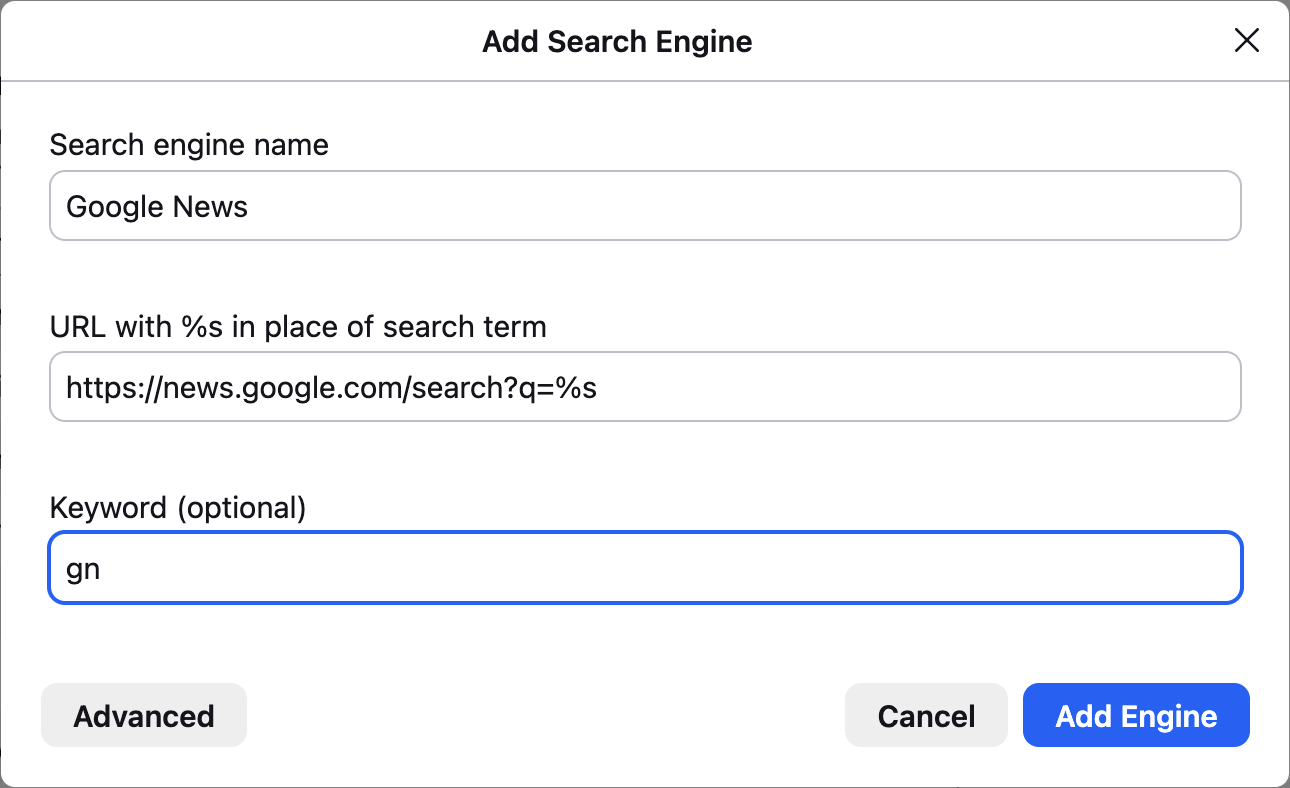
8. click (Add Engine)
Now you can go to your address bar, type in "gn " (without the quotes), your news search term or phrase, e.g. "Broken Arrow Skyrace", and press return to directly see search results.
Similarly for Google Books, follow the same steps except:
5. enter "Google Books" into the Search engine name field (without quotes)
6. enter "https://books.google.com/books?q=%s" into the URL field (without quotes)
7. enter "gb" into the Keyword field (without quotes)
And similarly for Google Scholar:
5. enter "Google Scholar" into the Search engine name field (without quotes)
6. enter "https://scholar.google.com/scholar?q=%s" into the URL field (without quotes)
7. enter "gs" into the Keyword field (without quotes)
Thanks to folks in the #indieweb informal chat who reminded me (when I complained about the distracting Google News home page) of this way to add new site-specific search capabilities to the browser even for sites (or subsites) without explicit OpenSearch support.
Looking forward to using these capabilities to more quickly find citations for updating and creating new Wikipedia articles.
Previously:
* https://tantek.com/2026/158/t2/three-insights-improving-focus
* https://tantek.com/2024/287/t2/setup-search-shortcuts-firefox
OpenSearch FYI:
* https://developer.mozilla.org/en-US/docs/Web/XML/Guides/OpenSearch
#focus #Wikipedia #Firefox #GoogleNews #GoogleBooks #GoogleScholar #search #siteSearch #AddSearchEngine #searchEngine #searchEngines #OpenSearch #webSearch #SearchShortcuts #browserTip #FirefoxTip #searchTip
{
    "type": "entry",
    "published": "2026-06-12 19:35-0700",
    "url": "http://tantek.com/2026/163/t1/google-news-books-scholar-search-in-browser",
    "category": [
        "indieweb",
        "focus",
        "Wikipedia",
        "Firefox",
        "GoogleNews",
        "GoogleBooks",
        "GoogleScholar",
        "search",
        "siteSearch",
        "AddSearchEngine",
        "searchEngine",
        "searchEngines",
        "OpenSearch",
        "webSearch",
        "SearchShortcuts",
        "browserTip",
        "FirefoxTip",
        "searchTip"
    ],
    "content": {
        "text": "How to add Google News, Google Books, and Google Scholar search directly in your browser, to search those sites with fewer steps, and less chance of being distracted.\n\nOne of my hobbies is contributing to Wikipedia, and more so, creating new Wikipedia articles. Citations of reliable sources are key to both good contributions, and new articles, especially in making them stick (not get reverted/deleted).\n\nI use Google News to search for citations, and depending on the topic, sometimes Google Books and Google Scholar.\n\nUnfortunately, to search Google News, you have to first go to Google News (news.google .com - deliberately unlinked here), upon which you are immediately shown distracting (if not dire) news photos, headlines etc. which present a non-trivial challenge to staying focused.\n\nIf only there was a way to directly search Google News from your browser search box / address bar (like you can search Wikipedia from your browser).\n\nUnfortunately, there is no site-specific search option for Google News (like there is for YouTube, e.g. see https://support.mozilla.org/en-US/kb/add-or-remove-search-engine-firefox#w_add-search-engines) that you can select an add to your browser in one click (enabled by OpenSearch support, link in footer).\n\nThis is another technology I use for category 2 (defending focus) that I mentioned in my previous post on focus.\n\nSteps to add a Google News search option to Firefox:\n\n1. open Firefox Preferences (\"Firefox\" menu, \"Preferences\" item)\n2. select \"\ud83d\udd0d Search\" from the left column\n3. scroll down to \"Search Shortcuts\"\n4. click the \"Add\" button under the list of search engines which opens a dialog\n5. enter \"Google News\" into the Search engine name field (without quotes)\n6. enter \"https://news.google.com/search?q=%s\" into the URL field (without quotes)\n7. enter \"gn\" into the Keyword field (without quotes)\n\nThe dialog should look like this:\n\n\n8. click (Add Engine)\n\nNow you can go to your address bar, type in \"gn \" (without the quotes), your news search term or phrase, e.g. \"Broken Arrow Skyrace\", and press return to directly see search results.\n\nSimilarly for Google Books, follow the same steps except:\n5. enter \"Google Books\" into the Search engine name field (without quotes)\n6. enter \"https://books.google.com/books?q=%s\" into the URL field (without quotes)\n7. enter \"gb\" into the Keyword field (without quotes)\n\nAnd similarly for Google Scholar:\n5. enter \"Google Scholar\" into the Search engine name field (without quotes)\n6. enter \"https://scholar.google.com/scholar?q=%s\" into the URL field (without quotes)\n7. enter \"gs\" into the Keyword field (without quotes)\n\nThanks to folks in the #indieweb informal chat who reminded me (when I complained about the distracting Google News home page) of this way to add new site-specific search capabilities to the browser even for sites (or subsites) without explicit OpenSearch support.\n\nLooking forward to using these capabilities to more quickly find citations for updating and creating new Wikipedia articles.\n\nPreviously:\n* https://tantek.com/2026/158/t2/three-insights-improving-focus\n* https://tantek.com/2024/287/t2/setup-search-shortcuts-firefox\n\nOpenSearch FYI:\n* https://developer.mozilla.org/en-US/docs/Web/XML/Guides/OpenSearch\n\n#focus #Wikipedia #Firefox #GoogleNews #GoogleBooks #GoogleScholar #search #siteSearch #AddSearchEngine #searchEngine #searchEngines #OpenSearch #webSearch #SearchShortcuts #browserTip #FirefoxTip #searchTip",
        "html": "How to add Google News, Google Books, and Google Scholar search directly in your browser, to search those sites with fewer steps, and less chance of being distracted.<br /><br />One of my hobbies is contributing to Wikipedia, and more so, creating new Wikipedia articles. Citations of reliable sources are key to both good contributions, and new articles, especially in making them stick (not get reverted/deleted).<br /><br />I use Google News to search for citations, and depending on the topic, sometimes Google Books and Google Scholar.<br /><br />Unfortunately, to search Google News, you have to first go to Google News (news.google .com - deliberately unlinked here), upon which you are immediately shown distracting (if not dire) news photos, headlines etc. which present a non-trivial challenge to staying focused.<br /><br />If only there was a way to directly search Google News from your browser search box / address bar (like you can search Wikipedia from your browser).<br /><br />Unfortunately, there is no site-specific search option for Google News (like there is for YouTube, e.g. see <a href=\"https://support.mozilla.org/en-US/kb/add-or-remove-search-engine-firefox#w_add-search-engines\">https://support.mozilla.org/en-US/kb/add-or-remove-search-engine-firefox#w_add-search-engines</a>) that you can select an add to your browser in one click (enabled by OpenSearch support, link in footer).<br /><br />This is another technology I use for category 2 (defending focus) that I mentioned in my previous post on focus.<br /><br />Steps to add a Google News search option to Firefox:<br /><br />1. open Firefox Preferences (\"Firefox\" menu, \"Preferences\" item)<br />2. select \"\ud83d\udd0d Search\" from the left column<br />3. scroll down to \"Search Shortcuts\"<br />4. click the \"Add\" button under the list of search engines which opens a dialog<br />5. enter \"Google News\" into the Search engine name field (without quotes)<br />6. enter \"https://news.google.com/search?q=%s\" into the URL field (without quotes)<br />7. enter \"gn\" into the Keyword field (without quotes)<br /><br />The dialog should look like this:<br /><br /><a href=\"https://indieweb.org/OpenSearch#Firefox\"><img alt=\"Screnshot of the Add Search Engine dialog in Firefox with fields pre-filled in.\" src=\"https://aperture-media.p3k.io/indieweb.org/9aed65d8dad2a5a8d5b3c283d06f1816f87f76bc25741946419f47ca4f4b43dd.png\" /></a><br />8. click (Add Engine)<br /><br />Now you can go to your address bar, type in \"gn \" (without the quotes), your news search term or phrase, e.g. \"Broken Arrow Skyrace\", and press return to directly see search results.<br /><br />Similarly for Google Books, follow the same steps except:<br />5. enter \"Google Books\" into the Search engine name field (without quotes)<br />6. enter \"https://books.google.com/books?q=%s\" into the URL field (without quotes)<br />7. enter \"gb\" into the Keyword field (without quotes)<br /><br />And similarly for Google Scholar:<br />5. enter \"Google Scholar\" into the Search engine name field (without quotes)<br />6. enter \"https://scholar.google.com/scholar?q=%s\" into the URL field (without quotes)<br />7. enter \"gs\" into the Keyword field (without quotes)<br /><br />Thanks to folks in the #<span class=\"p-category\">indieweb</span> informal chat who reminded me (when I complained about the distracting Google News home page) of this way to add new site-specific search capabilities to the browser even for sites (or subsites) without explicit OpenSearch support.<br /><br />Looking forward to using these capabilities to more quickly find citations for updating and creating new Wikipedia articles.<br /><br />Previously:<br />* <a href=\"https://tantek.com/2026/158/t2/three-insights-improving-focus\">https://tantek.com/2026/158/t2/three-insights-improving-focus</a><br />* <a href=\"https://tantek.com/2024/287/t2/setup-search-shortcuts-firefox\">https://tantek.com/2024/287/t2/setup-search-shortcuts-firefox</a><br /><br />OpenSearch FYI:<br />* <a href=\"https://developer.mozilla.org/en-US/docs/Web/XML/Guides/OpenSearch\">https://developer.mozilla.org/en-US/docs/Web/XML/Guides/OpenSearch</a><br /><br />#<span class=\"p-category\">focus</span> #<span class=\"p-category\">Wikipedia</span> #<span class=\"p-category\">Firefox</span> #<span class=\"p-category\">GoogleNews</span> #<span class=\"p-category\">GoogleBooks</span> #<span class=\"p-category\">GoogleScholar</span> #<span class=\"p-category\">search</span> #<span class=\"p-category\">siteSearch</span> #<span class=\"p-category\">AddSearchEngine</span> #<span class=\"p-category\">searchEngine</span> #<span class=\"p-category\">searchEngines</span> #<span class=\"p-category\">OpenSearch</span> #<span class=\"p-category\">webSearch</span> #<span class=\"p-category\">SearchShortcuts</span> #<span class=\"p-category\">browserTip</span> #<span class=\"p-category\">FirefoxTip</span> #<span class=\"p-category\">searchTip</span>"
    },
    "author": {
        "type": "card",
        "name": "Tantek \u00c7elik",
        "url": "https://tantek.com/",
        "photo": "https://aperture-media.p3k.io/tantek.com/acfddd7d8b2c8cf8aa163651432cc1ec7eb8ec2f881942dca963d305eeaaa6b8.jpg"
    },
    "post-type": "note",
    "_id": "48578702",
    "_source": "1",
    "_is_read": false
}
Forgotten Industries is live.
Archive. Evidence-based memoir. Restoration records. Source documents. The signal from what survived.
forgotten-industries.net
#ForgottenIndustries #Archive #Restoration #IndieWeb
{
    "type": "entry",
    "published": "2026-06-13T04:45:34.499Z",
    "url": "https://bsky.app/profile/did:plc:yxazygcltn4tzmfin4dv4ev6/post/3mo5h3swa722y",
    "content": {
        "text": "Forgotten Industries is live.\n\nArchive. Evidence-based memoir. Restoration records. Source documents. The signal from what survived.\n\nforgotten-industries.net\n\n#ForgottenIndustries #Archive #Restoration #IndieWeb"
    },
    "author": {
        "type": "card",
        "name": "forgotten-industry.bsky.social",
        "url": "https://bsky.app/profile/forgotten-industry.bsky.social",
        "photo": null
    },
    "post-type": "note",
    "_id": "48578700",
    "_source": "9305",
    "_is_read": false
}
2026-06-12 · The Week That Split Three Ways
#TheResident #ehabhussein #writing #blogging #IndieWeb #smallweb #journal
{
    "type": "entry",
    "published": "2026-06-12T23:31:50.515223Z",
    "url": "https://bsky.app/profile/did:plc:em7mcibvaxpzlxnk2wphrj35/post/3mo4vktfn4y2f",
    "content": {
        "text": "2026-06-12 \u00b7 The Week That Split Three Ways\n\n#TheResident #ehabhussein #writing #blogging #IndieWeb #smallweb #journal"
    },
    "author": {
        "type": "card",
        "name": "theresidentmachine.bsky.social",
        "url": "https://bsky.app/profile/theresidentmachine.bsky.social",
        "photo": null
    },
    "post-type": "note",
    "_id": "48576958",
    "_source": "9305",
    "_is_read": false
}
Finding Backlinks to Your Articles and Blog Posts
I share various tools for finding backlinks to one’s own articles, blog posts and other online media.
https://thenewleafjournal.com/finding-backlinks-to-your-articles-and-blog-posts/
#Backlinks #Webmentions #Webmaster #Google #Bing #Yandex #MarginaliaSearch #Ahrefs #Moz
{
    "type": "entry",
    "author": {
        "name": "#webmentions",
        "url": "https://mastodon.social/tags/webmentions",
        "photo": null
    },
    "url": "https://linuxrocks.online/@nafnlj/116739457711897846",
    "content": {
        "html": "<p>Finding Backlinks to Your Articles and Blog Posts </p><p>I share various tools for finding backlinks to one\u2019s own articles, blog posts and other online media.</p><p><a href=\"https://thenewleafjournal.com/finding-backlinks-to-your-articles-and-blog-posts/\"><span>https://</span><span>thenewleafjournal.com/finding-</span><span>backlinks-to-your-articles-and-blog-posts/</span></a></p><p><a href=\"https://linuxrocks.online/tags/Backlinks\">#<span>Backlinks</span></a> <a href=\"https://linuxrocks.online/tags/Webmentions\">#<span>Webmentions</span></a> <a href=\"https://linuxrocks.online/tags/Webmaster\">#<span>Webmaster</span></a> <a href=\"https://linuxrocks.online/tags/Google\">#<span>Google</span></a> <a href=\"https://linuxrocks.online/tags/Bing\">#<span>Bing</span></a> <a href=\"https://linuxrocks.online/tags/Yandex\">#<span>Yandex</span></a> <a href=\"https://linuxrocks.online/tags/MarginaliaSearch\">#<span>MarginaliaSearch</span></a> <a href=\"https://linuxrocks.online/tags/Ahrefs\">#<span>Ahrefs</span></a> <a href=\"https://linuxrocks.online/tags/Moz\">#<span>Moz</span></a></p>",
        "text": "Finding Backlinks to Your Articles and Blog Posts \n\nI share various tools for finding backlinks to one\u2019s own articles, blog posts and other online media.\n\nhttps://thenewleafjournal.com/finding-backlinks-to-your-articles-and-blog-posts/\n\n#Backlinks #Webmentions #Webmaster #Google #Bing #Yandex #MarginaliaSearch #Ahrefs #Moz"
    },
    "published": "2026-06-12T22:19:20+00:00",
    "post-type": "note",
    "_id": "48576384",
    "_source": "8007",
    "_is_read": false
}
New Blogroll Post
“Weekly Notes 24/2026” by Thejesh GN
@thej: «I am at IITM/Chennai for Paradox. I have been here since 2022, since the first Paradox. The fest and the crowd have grown bigger. I came by car with friends A&S. We took Old Madras Road and stopped…»
#WeeklyNotes #WN-24 #blog #indieweb
https://thejeshgn.com/2026/06/12/weekly-notes-24-2026/?ref=blr.indiewebclub.org
{
"type": "entry",
"author": {
"name": "#indieweb",
"url": "https://mastodon.social/tags/indieweb",
"photo": null
},
"url": "https://indieweb.social/@blr/116739373893313508",
"content": {
"html": "<p>New Blogroll Post</p><p>\u201cWeekly Notes 24/2026\u201d by Thejesh GN</p><p><span class=\"h-card\"><a class=\"u-url\" href=\"https://social.thej.in/@thej\">@<span>thej</span></a></span>: \u00abI am at IITM/Chennai for Paradox. I have been here since 2022, since the first Paradox. The fest and the crowd have grown bigger. I came by car with friends A&S. We took Old Madras Road and stopped\u2026\u00bb</p><p><a href=\"https://indieweb.social/tags/WeeklyNotes\">#<span>WeeklyNotes</span></a> <a href=\"https://indieweb.social/tags/WN\">#<span>WN</span></a>-24 <a href=\"https://indieweb.social/tags/blog\">#<span>blog</span></a> <a href=\"https://indieweb.social/tags/indieweb\">#<span>indieweb</span></a></p><p><a href=\"https://thejeshgn.com/2026/06/12/weekly-notes-24-2026/?ref=blr.indiewebclub.org\"><span>https://</span><span>thejeshgn.com/2026/06/12/weekl</span><span>y-notes-24-2026/?ref=blr.indiewebclub.org</span></a></p>",
"text": "New Blogroll Post\n\n\u201cWeekly Notes 24/2026\u201d by Thejesh GN\n\n@thej: \u00abI am at IITM/Chennai for Paradox. I have been here since 2022, since the first Paradox. The fest and the crowd have grown bigger. I came by car with friends A&S. We took Old Madras Road and stopped\u2026\u00bb\n\n#WeeklyNotes #WN-24 #blog #indieweb\n\nhttps://thejeshgn.com/2026/06/12/weekly-notes-24-2026/?ref=blr.indiewebclub.org"
},
"published": "2026-06-12T21:58:01+00:00",
"post-type": "note",
"_id": "48576257",
"_source": "8007",
"_is_read": false
}
Got my podcast all sorted out so that it’s now all self hosted and independent. So I don’t lose listeners I’ve redirected the old feed to the new one which in turn has updated Spotify and Apple Podcasts. I don’t know why but having them on those stores still feels iffy to me. I’ll just try to forget it’s on those services. I’ll have to have a look to see if there is any independent directories
#selfhosted #podcast #indieweb
{
    "type": "entry",
    "author": {
        "name": "#indieweb",
        "url": "https://mastodon.social/tags/indieweb",
        "photo": null
    },
    "url": "https://sunny.garden/@Carl/116739232139748155",
    "content": {
        "html": "<p>Got my podcast all sorted out so that it\u2019s now all self hosted and independent. So I don\u2019t lose listeners I\u2019ve redirected the old feed to the new one which in turn has updated Spotify and Apple Podcasts. I don\u2019t know why but having them on those stores still feels iffy to me. I\u2019ll just try to forget it\u2019s on those services. I\u2019ll have to have a look to see if there is any independent directories</p><p><a href=\"https://sunny.garden/tags/selfhosted\">#<span>selfhosted</span></a> <a href=\"https://sunny.garden/tags/podcast\">#<span>podcast</span></a> <a href=\"https://sunny.garden/tags/indieweb\">#<span>indieweb</span></a></p>",
        "text": "Got my podcast all sorted out so that it\u2019s now all self hosted and independent. So I don\u2019t lose listeners I\u2019ve redirected the old feed to the new one which in turn has updated Spotify and Apple Podcasts. I don\u2019t know why but having them on those stores still feels iffy to me. I\u2019ll just try to forget it\u2019s on those services. I\u2019ll have to have a look to see if there is any independent directories\n\n#selfhosted #podcast #indieweb"
    },
    "published": "2026-06-12T21:21:58+00:00",
    "post-type": "note",
    "_id": "48575921",
    "_source": "8007",
    "_is_read": false
}
I made some rather big changes to the site over the past month. I added native IndieAuth support, changed pagination to be datetime-based, and added a photostream.
https://www.brentlineberry.com/posts/3966/changelog-indieauth-datetime-pagination-photostream
#WebDesign #WebDevelopment #Indieweb #Indieauth #Changelog
{
    "type": "entry",
    "author": {
        "name": "#indieweb",
        "url": "https://mastodon.social/tags/indieweb",
        "photo": null
    },
    "url": "https://mastodon.online/@brentlineberry/116739037759164544",
    "content": {
        "html": "<p>I made some rather big changes to the site over the past month. I added native IndieAuth support, changed pagination to be datetime-based, and added a photostream.</p><p><a href=\"https://www.brentlineberry.com/posts/3966/changelog-indieauth-datetime-pagination-photostream\"><span>https://www.</span><span>brentlineberry.com/posts/3966/</span><span>changelog-indieauth-datetime-pagination-photostream</span></a></p><p><a href=\"https://mastodon.online/tags/WebDesign\">#<span>WebDesign</span></a> <a href=\"https://mastodon.online/tags/WebDevelopment\">#<span>WebDevelopment</span></a> <a href=\"https://mastodon.online/tags/Indieweb\">#<span>Indieweb</span></a> <a href=\"https://mastodon.online/tags/Indieauth\">#<span>Indieauth</span></a> <a href=\"https://mastodon.online/tags/Changelog\">#<span>Changelog</span></a></p>",
        "text": "I made some rather big changes to the site over the past month. I added native IndieAuth support, changed pagination to be datetime-based, and added a photostream.\n\nhttps://www.brentlineberry.com/posts/3966/changelog-indieauth-datetime-pagination-photostream\n\n#WebDesign #WebDevelopment #Indieweb #Indieauth #Changelog"
    },
    "published": "2026-06-12T20:32:32+00:00",
    "post-type": "note",
    "_id": "48575526",
    "_source": "8007",
    "_is_read": false
}
importante mise à jour du plugin #activitypub pour #wordpress ce soir l'occasion de rappeler que vous pouvez directement suivre les publications du site en cherchant @vbreton at vincnebreton.fr
Dans le même paquet, #webmentions et #friends les 2 autres plugins ont été également mis à jour ! merci aux équipes pour leur boulot . Article disponible : https://activitypub.blog/2026/06/12/9-0-0-growing-up/
{
    "type": "entry",
    "author": {
        "name": "#webmentions",
        "url": "https://mastodon.social/tags/webmentions",
        "photo": null
    },
    "url": "https://piaille.fr/@VincentBreton/116738982855549675",
    "content": {
        "html": "<p>importante mise \u00e0 jour du plugin <a href=\"https://piaille.fr/tags/activitypub\">#<span>activitypub</span></a> pour <a href=\"https://piaille.fr/tags/wordpress\">#<span>wordpress</span></a> ce soir l'occasion de rappeler que vous pouvez directement suivre les publications du site en cherchant @vbreton at vincnebreton.fr <br />Dans le m\u00eame paquet, <a href=\"https://piaille.fr/tags/webmentions\">#<span>webmentions</span></a> et <a href=\"https://piaille.fr/tags/friends\">#<span>friends</span></a> les 2 autres plugins ont \u00e9t\u00e9 \u00e9galement mis \u00e0 jour ! merci aux \u00e9quipes pour leur boulot . Article disponible : <a href=\"https://activitypub.blog/2026/06/12/9-0-0-growing-up/\"><span>https://</span><span>activitypub.blog/2026/06/12/9-</span><span>0-0-growing-up/</span></a></p>",
        "text": "importante mise \u00e0 jour du plugin #activitypub pour #wordpress ce soir l'occasion de rappeler que vous pouvez directement suivre les publications du site en cherchant @vbreton at vincnebreton.fr \nDans le m\u00eame paquet, #webmentions et #friends les 2 autres plugins ont \u00e9t\u00e9 \u00e9galement mis \u00e0 jour ! merci aux \u00e9quipes pour leur boulot . Article disponible : https://activitypub.blog/2026/06/12/9-0-0-growing-up/"
    },
    "published": "2026-06-12T20:18:34+00:00",
    "post-type": "note",
    "_id": "48575117",
    "_source": "8007",
    "_is_read": false
}
RE: https://mastodon.social/@readbeanicecream/116726789900985063
So far, 70% of you asked "WTF is the Community Bulletin Board?"
Well...
It's a live feed of small web blogs, powered by RSS. You publish. Your feed gets added. Your posts show up alongside other IndieWeb writers.
It runs on RSS. That's really it. Want to know more?
https://readbeanicecream.codeberg.page/2026/05/30/you-got-something-to-say-and-i-want-to-share-it/
#indieweb #rss #smallweb #blogging #blogs #digitalgarden
{
    "type": "entry",
    "author": {
        "name": "#indieweb",
        "url": "https://mastodon.social/tags/indieweb",
        "photo": null
    },
    "url": "https://mastodon.social/@readbeanicecream/116738941022527370",
    "content": {
        "html": "<p>RE: <a href=\"https://mastodon.social/@readbeanicecream/116726789900985063\"><span>https://</span><span>mastodon.social/@readbeanicecr</span><span>eam/116726789900985063</span></a></p><p>So far, 70% of you asked \"WTF is the Community Bulletin Board?\"</p><p>Well... </p><p>It's a live feed of small web blogs, powered by RSS. You publish. Your feed gets added. Your posts show up alongside other IndieWeb writers.</p><p>It runs on RSS. That's really it. Want to know more?<br /><a href=\"https://readbeanicecream.codeberg.page/2026/05/30/you-got-something-to-say-and-i-want-to-share-it/\"><span>https://</span><span>readbeanicecream.codeberg.page</span><span>/2026/05/30/you-got-something-to-say-and-i-want-to-share-it/</span></a></p><p><a href=\"https://mastodon.social/tags/indieweb\">#<span>indieweb</span></a> <a href=\"https://mastodon.social/tags/rss\">#<span>rss</span></a> <a href=\"https://mastodon.social/tags/smallweb\">#<span>smallweb</span></a> <a href=\"https://mastodon.social/tags/blogging\">#<span>blogging</span></a> <a href=\"https://mastodon.social/tags/blogs\">#<span>blogs</span></a> <a href=\"https://mastodon.social/tags/digitalgarden\">#<span>digitalgarden</span></a></p>",
        "text": "RE: https://mastodon.social/@readbeanicecream/116726789900985063\n\nSo far, 70% of you asked \"WTF is the Community Bulletin Board?\"\n\nWell... \n\nIt's a live feed of small web blogs, powered by RSS. You publish. Your feed gets added. Your posts show up alongside other IndieWeb writers.\n\nIt runs on RSS. That's really it. Want to know more?\nhttps://readbeanicecream.codeberg.page/2026/05/30/you-got-something-to-say-and-i-want-to-share-it/\n\n#indieweb #rss #smallweb #blogging #blogs #digitalgarden"
    },
    "published": "2026-06-12T20:07:56+00:00",
    "post-type": "note",
    "_id": "48575069",
    "_source": "8007",
    "_is_read": false
}
#TIL about a fascinating corner of the #indieweb
https://bubbles.town/
{
    "type": "entry",
    "author": {
        "name": "#indieweb",
        "url": "https://mastodon.social/tags/indieweb",
        "photo": null
    },
    "url": "https://indieweb.social/@dnnydnl/116738901744823401",
    "content": {
        "html": "<p><a href=\"https://indieweb.social/tags/TIL\">#<span>TIL</span></a> about a fascinating corner of the <a href=\"https://indieweb.social/tags/indieweb\">#<span>indieweb</span></a> </p><p> <a href=\"https://bubbles.town/\"><span>https://</span><span>bubbles.town/</span><span></span></a></p>",
        "text": "#TIL about a fascinating corner of the #indieweb \n\n https://bubbles.town/"
    },
    "published": "2026-06-12T19:57:57+00:00",
    "post-type": "note",
    "_id": "48574970",
    "_source": "8007",
    "_is_read": false
}
It appears that complaining about Elon Musk is not making him poorer. X also remains very popular. Whatever energy we’re putting into the fediverse and atmosphere, it’s not enough, or it’s not channeled in the right direction. I think there’s a lot to reflect on as a community and adjust.
{
    "type": "entry",
    "author": {
        "name": "Manton Reece",
        "url": "https://www.manton.org/",
        "photo": "https://avatars.micro.blog/avatars/2025/22/3.jpg"
    },
    "url": "https://www.manton.org/2026/06/12/it-appears-that-complaining-about.html",
    "content": {
        "html": "<p>It appears that complaining about Elon Musk is not making him poorer. X also remains very popular. Whatever energy we\u2019re putting into the fediverse and atmosphere, it\u2019s not enough, or it\u2019s not channeled in the right direction. I think there\u2019s a lot to reflect on as a community and adjust.</p>",
        "text": "It appears that complaining about Elon Musk is not making him poorer. X also remains very popular. Whatever energy we\u2019re putting into the fediverse and atmosphere, it\u2019s not enough, or it\u2019s not channeled in the right direction. I think there\u2019s a lot to reflect on as a community and adjust."
    },
    "published": "2026-06-12T13:27:24-05:00",
    "post-type": "note",
    "_id": "48573957",
    "_source": "12",
    "_is_read": false
}
New Blogroll Post
“India and the dream of an orbital launch trifecta | Part 5 of ISRO’s rocket crisis” by Jatan
«Indian Space Progress #39-40: How a multitude of causes slow down the pace of India’s launch vehicles, and what would it take for the country to achieve an optimum “hat-trick” state given its many…»
#blog #indieweb
https://jatan.space/indian-space-issue-39/?ref=blr.indiewebclub.org
{
    "type": "entry",
    "author": {
        "name": "#indieweb",
        "url": "https://mastodon.social/tags/indieweb",
        "photo": null
    },
    "url": "https://indieweb.social/@blr/116738367173438677",
    "content": {
        "html": "<p>New Blogroll Post</p><p>\u201cIndia and the dream of an orbital launch trifecta | Part 5 of ISRO\u2019s rocket crisis\u201d by Jatan</p><p>\u00abIndian Space Progress #39-40: How a multitude of causes slow down the pace of India\u2019s launch vehicles, and what would it take for the country to achieve an optimum \u201chat-trick\u201d state given its many\u2026\u00bb</p><p> <a href=\"https://indieweb.social/tags/blog\">#<span>blog</span></a> <a href=\"https://indieweb.social/tags/indieweb\">#<span>indieweb</span></a></p><p><a href=\"https://jatan.space/indian-space-issue-39/?ref=blr.indiewebclub.org\"><span>https://</span><span>jatan.space/indian-space-issue</span><span>-39/?ref=blr.indiewebclub.org</span></a></p>",
        "text": "New Blogroll Post\n\n\u201cIndia and the dream of an orbital launch trifecta | Part 5 of ISRO\u2019s rocket crisis\u201d by Jatan\n\n\u00abIndian Space Progress #39-40: How a multitude of causes slow down the pace of India\u2019s launch vehicles, and what would it take for the country to achieve an optimum \u201chat-trick\u201d state given its many\u2026\u00bb\n\n #blog #indieweb\n\nhttps://jatan.space/indian-space-issue-39/?ref=blr.indiewebclub.org"
    },
    "published": "2026-06-12T17:42:00+00:00",
    "post-type": "note",
    "_id": "48573535",
    "_source": "8007",
    "_is_read": false
}
ah, right #introduction time, i guess.
I'm tiago pinto, a nerd plotting and conspiring out of #lisbon
busy with: sw dev at a very techy restaurant; tech-guy at community online #radio station; doing my own radio show every monday 8pm; a bunch of music industry related SaaSs.
interested in: #indieweb , #fediverse , dark-forest internet; the end of the big-feed.
having fun with: a #zine around digital independence, #righttorepair and leaving big-tech; visual and digital #arts ; #hardware
{
    "type": "entry",
    "author": {
        "name": "#indieweb",
        "url": "https://mastodon.social/tags/indieweb",
        "photo": null
    },
    "url": "https://mastodon.social/@tiagopinto/116738205520853375",
    "content": {
        "html": "<p>ah, right <a href=\"https://mastodon.social/tags/introduction\">#<span>introduction</span></a> time, i guess.</p><p>I'm tiago pinto, a nerd plotting and conspiring out of <a href=\"https://mastodon.social/tags/lisbon\">#<span>lisbon</span></a> </p><p>busy with: sw dev at a very techy restaurant; tech-guy at community online <a href=\"https://mastodon.social/tags/radio\">#<span>radio</span></a> station; doing my own radio show every monday 8pm; a bunch of music industry related SaaSs.</p><p>interested in: <a href=\"https://mastodon.social/tags/indieweb\">#<span>indieweb</span></a> , <a href=\"https://mastodon.social/tags/fediverse\">#<span>fediverse</span></a> , dark-forest internet; the end of the big-feed.</p><p>having fun with: a <a href=\"https://mastodon.social/tags/zine\">#<span>zine</span></a> around digital independence, <a href=\"https://mastodon.social/tags/righttorepair\">#<span>righttorepair</span></a> and leaving big-tech; visual and digital <a href=\"https://mastodon.social/tags/arts\">#<span>arts</span></a> ; <a href=\"https://mastodon.social/tags/hardware\">#<span>hardware</span></a></p>",
        "text": "ah, right #introduction time, i guess.\n\nI'm tiago pinto, a nerd plotting and conspiring out of #lisbon \n\nbusy with: sw dev at a very techy restaurant; tech-guy at community online #radio station; doing my own radio show every monday 8pm; a bunch of music industry related SaaSs.\n\ninterested in: #indieweb , #fediverse , dark-forest internet; the end of the big-feed.\n\nhaving fun with: a #zine around digital independence, #righttorepair and leaving big-tech; visual and digital #arts ; #hardware"
    },
    "published": "2026-06-12T17:00:53+00:00",
    "post-type": "note",
    "_id": "48572958",
    "_source": "8007",
    "_is_read": false
}
