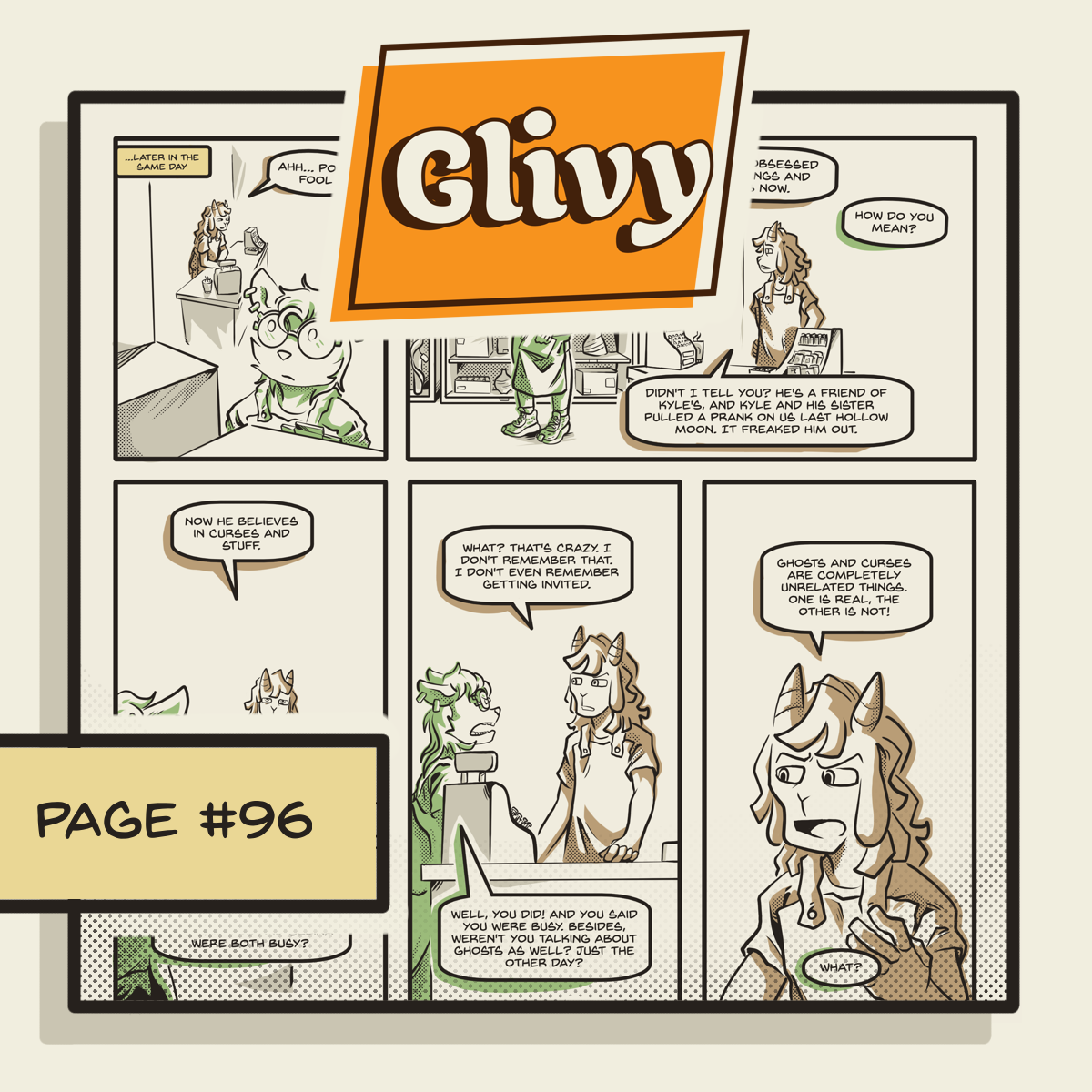
Page 96 is out !
https://glivy.webcomic.ws/comics/96/
feeling confident about the 1 page a week format, its really slow but better then having no schedule
#art #furry #comic #indieweb #indiecomics #oc #originalCharacter #original_character #glivy
{
    "type": "entry",
    "author": {
        "name": "#indieweb",
        "url": "https://mastodon.social/tags/indieweb",
        "photo": null
    },
    "url": "https://woof.tech/@Finix/116744960499530109",
    "content": {
        "html": "<p>Page 96 is out !<br /><a href=\"https://glivy.webcomic.ws/comics/96/\"><span>https://</span><span>glivy.webcomic.ws/comics/96/</span><span></span></a></p><p>feeling confident about the 1 page a week format, its really slow but better then having no schedule </p><p><a href=\"https://woof.tech/tags/art\">#<span>art</span></a> <a href=\"https://woof.tech/tags/furry\">#<span>furry</span></a> <a href=\"https://woof.tech/tags/comic\">#<span>comic</span></a> <a href=\"https://woof.tech/tags/indieweb\">#<span>indieweb</span></a> <a href=\"https://woof.tech/tags/indiecomics\">#<span>indiecomics</span></a> <a href=\"https://woof.tech/tags/oc\">#<span>oc</span></a> <a href=\"https://woof.tech/tags/originalCharacter\">#<span>originalCharacter</span></a> <a href=\"https://woof.tech/tags/original_character\">#<span>original_character</span></a>  <a href=\"https://woof.tech/tags/glivy\">#<span>glivy</span></a></p>",
        "text": "Page 96 is out !\nhttps://glivy.webcomic.ws/comics/96/\n\nfeeling confident about the 1 page a week format, its really slow but better then having no schedule \n\n#art #furry #comic #indieweb #indiecomics #oc #originalCharacter #original_character  #glivy"
    },
    "published": "2026-06-13T21:38:46+00:00",
    "photo": [
        "https://files.mastodon.social/cache/media_attachments/files/116/744/960/611/334/899/original/7164eef7527ded4d.png"
    ],
    "post-type": "photo",
    "_id": "48585455",
    "_source": "8007",
    "_is_read": false
}
Page 96 is out !
glivy.webcomic.ws/comics/96/
feeling confident about the 1 page a week format, its really slow but better then having no schedule
#art #furry #comic #indieweb #indiecomics #oc #originalCharacter #original_character #glivy
{
    "type": "entry",
    "published": "2026-06-13T21:38:50.484Z",
    "url": "https://bsky.app/profile/did:plc:azs6yrgu4s6fkzftzwk3ncem/post/3mo77poiibk2n",
    "content": {
        "text": "Page 96 is out !\nglivy.webcomic.ws/comics/96/\n\nfeeling confident about the 1 page a week format, its really slow but better then having no schedule \n\n#art #furry #comic #indieweb #indiecomics #oc #originalCharacter #original_character  #glivy"
    },
    "author": {
        "type": "card",
        "name": "finixgelly.bsky.social",
        "url": "https://bsky.app/profile/finixgelly.bsky.social",
        "photo": null
    },
    "post-type": "note",
    "_id": "48585416",
    "_source": "9305",
    "_is_read": false
}
"This episode of Block by Block features stories from our community news reporters about a group of Philadelphians working to bring back the spirit of the early web by hand-coding their own websites..."
https://soundcloud.com/phillycam/bxb-5-27-2026
@iffybooks
#smallWeb #indieweb #diy
{
    "type": "entry",
    "author": {
        "name": "#indieweb",
        "url": "https://mastodon.social/tags/indieweb",
        "photo": null
    },
    "url": "https://mastodon.social/@mehron/116744903607748266",
    "content": {
        "html": "<p>\"This episode of Block by Block features stories from our community news reporters about a group of Philadelphians working to bring back the spirit of the early web by hand-coding their own websites...\"</p><p><a href=\"https://soundcloud.com/phillycam/bxb-5-27-2026\"><span>https://</span><span>soundcloud.com/phillycam/bxb-5</span><span>-27-2026</span></a></p><p><span class=\"h-card\"><a class=\"u-url\" href=\"https://post.lurk.org/@iffybooks\">@<span>iffybooks</span></a></span> </p><p><a href=\"https://mastodon.social/tags/smallWeb\">#<span>smallWeb</span></a> <a href=\"https://mastodon.social/tags/indieweb\">#<span>indieweb</span></a> <a href=\"https://mastodon.social/tags/diy\">#<span>diy</span></a></p>",
        "text": "\"This episode of Block by Block features stories from our community news reporters about a group of Philadelphians working to bring back the spirit of the early web by hand-coding their own websites...\"\n\nhttps://soundcloud.com/phillycam/bxb-5-27-2026\n\n@iffybooks \n\n#smallWeb #indieweb #diy"
    },
    "published": "2026-06-13T21:24:18+00:00",
    "post-type": "note",
    "_id": "48585304",
    "_source": "8007",
    "_is_read": false
}
RE: https://social.lol/@brennan/116744658845079983
absolutely LOVE!!!! brennan is asking for help with a new publication! if you're champing at the bit to make sure stuff like this exists in the #indieweb, consider joining their efforts!
(i'm so glad my post-mortem was helpful to you, brennan! i wish you the best of luck with this!!!)
{
    "type": "entry",
    "author": {
        "name": "#indieweb",
        "url": "https://mastodon.social/tags/indieweb",
        "photo": null
    },
    "url": "https://tilde.zone/@xandra/116744758415681008",
    "content": {
        "html": "<p>RE: <a href=\"https://social.lol/@brennan/116744658845079983\"><span>https://</span><span>social.lol/@brennan/1167446588</span><span>45079983</span></a></p><p>absolutely LOVE!!!! brennan is asking for help with a new publication! if you're champing at the bit to make sure stuff like this exists in the <a href=\"https://tilde.zone/tags/indieweb\">#<span>indieweb</span></a>, consider joining their efforts!</p><p>(i'm so glad my post-mortem was helpful to you, brennan! i wish you the best of luck with this!!!)</p>",
        "text": "RE: https://social.lol/@brennan/116744658845079983\n\nabsolutely LOVE!!!! brennan is asking for help with a new publication! if you're champing at the bit to make sure stuff like this exists in the #indieweb, consider joining their efforts!\n\n(i'm so glad my post-mortem was helpful to you, brennan! i wish you the best of luck with this!!!)"
    },
    "published": "2026-06-13T20:47:22+00:00",
    "post-type": "note",
    "_id": "48585137",
    "_source": "8007",
    "_is_read": false
}
{
    "type": "entry",
    "author": {
        "name": "#indieweb",
        "url": "https://mastodon.social/tags/indieweb",
        "photo": null
    },
    "url": "https://social.lol/@brennan/116744658845079983",
    "content": {
        "html": "<p>A New IndieWeb Publication? or: I Want to Start Something and Be Bad at It | \ud83d\udd17 <a href=\"https://brennan.day/a-new-indieweb-publication-or-i-want-to-start-something-and-be-bad-at-it/\"><span>https://</span><span>brennan.day/a-new-indieweb-pub</span><span>lication-or-i-want-to-start-something-and-be-bad-at-it/</span></a></p><p><a href=\"https://social.lol/tags/IndieWeb\">#<span>IndieWeb</span></a> <a href=\"https://social.lol/tags/Publishing\">#<span>Publishing</span></a> <a href=\"https://social.lol/tags/Writing\">#<span>Writing</span></a> <a href=\"https://social.lol/tags/Community\">#<span>Community</span></a> <a href=\"https://social.lol/tags/Collaboration\">#<span>Collaboration</span></a> <a href=\"https://social.lol/tags/CreativeNon\">#<span>CreativeNon</span></a>-fiction <a href=\"https://social.lol/tags/LyricEssays\">#<span>LyricEssays</span></a></p>",
        "text": "A New IndieWeb Publication? or: I Want to Start Something and Be Bad at It | \ud83d\udd17 https://brennan.day/a-new-indieweb-publication-or-i-want-to-start-something-and-be-bad-at-it/\n\n#IndieWeb #Publishing #Writing #Community #Collaboration #CreativeNon-fiction #LyricEssays"
    },
    "published": "2026-06-13T20:22:03+00:00",
    "post-type": "note",
    "_id": "48584936",
    "_source": "8007",
    "_is_read": false
}
Want to read a book? Here's a good one. @benji is hosting the #Indieweb Book Club this month: https://www.benji.dog/articles/indieweb-book-club-june-2026/
The book: Broad Band: The Untold Story of the Women Who Made the Internet by Claire L. Evans. #books
{
    "type": "entry",
    "author": {
        "name": "#indieweb",
        "url": "https://mastodon.social/tags/indieweb",
        "photo": null
    },
    "url": "https://xoxo.zone/@artlung/116744502840842935",
    "content": {
        "html": "<p>Want to read a book? Here's a good one. <span class=\"h-card\"><a class=\"u-url\" href=\"https://fed.brid.gy/r/https://benji.dog/\">@<span>benji</span></a></span> is hosting the <a href=\"https://xoxo.zone/tags/Indieweb\">#<span>Indieweb</span></a> Book Club this month: <a href=\"https://www.benji.dog/articles/indieweb-book-club-june-2026/\"><span>https://www.</span><span>benji.dog/articles/indieweb-bo</span><span>ok-club-june-2026/</span></a></p><p>The book: Broad Band: The Untold Story of the Women Who Made the Internet by Claire L. Evans. <a href=\"https://xoxo.zone/tags/books\">#<span>books</span></a></p>",
        "text": "Want to read a book? Here's a good one. @benji is hosting the #Indieweb Book Club this month: https://www.benji.dog/articles/indieweb-book-club-june-2026/\n\nThe book: Broad Band: The Untold Story of the Women Who Made the Internet by Claire L. Evans. #books"
    },
    "published": "2026-06-13T19:42:23+00:00",
    "post-type": "note",
    "_id": "48584712",
    "_source": "8007",
    "_is_read": false
}
Want to read a book? Here's a good one. @benji.dog is hosting the #Indieweb Book Club this month: www.benji.dog/articles/ind...
The book: Broad Band: The Untold Story of the Women Who Made the Internet by Claire L. Evans. #books
{
    "type": "entry",
    "published": "2026-06-13T19:42:43.234Z",
    "url": "https://bsky.app/profile/did:plc:wgs7q4u4cifplpfpefir6nay/post/3mo6z7zytak2a",
    "content": {
        "text": "Want to read a book? Here's a good one. @benji.dog is hosting the #Indieweb Book Club this month: www.benji.dog/articles/ind...\n\nThe book: Broad Band: The Untold Story of the Women Who Made the Internet by Claire L. Evans. #books"
    },
    "author": {
        "type": "card",
        "name": "artlung.com",
        "url": "https://bsky.app/profile/artlung.com",
        "photo": null
    },
    "post-type": "note",
    "_id": "48584678",
    "_source": "9305",
    "_is_read": false
}

{
    "type": "entry",
    "author": {
        "name": "#indieweb",
        "url": "https://mastodon.social/tags/indieweb",
        "photo": null
    },
    "url": "https://fairy.id/@patrick/116743526081659478",
    "content": {
        "html": "<p>\u99ac\u7063\u6771\u7063\u6cf3\u7058 \u770b\u9752\u99ac\u5927\u6a4b\u591c\u666f <a href=\"https://impatrick.blog/ma-wan-night-photography-tsing-ma-bridge/\"><span>https://</span><span>impatrick.blog/ma-wan-night-ph</span><span>otography-tsing-ma-bridge/</span></a><br />\u65b0\u7684 <a href=\"https://fairy.id/tags/blog\">#<span>blog</span></a> \u6587\u7ae0\u66f4\u65b0\uff01 <a href=\"https://fairy.id/tags/indieweb\">#<span>indieweb</span></a> <a href=\"https://fairy.id/tags/indieblog\">#<span>indieblog</span></a></p>",
        "text": "\u99ac\u7063\u6771\u7063\u6cf3\u7058 \u770b\u9752\u99ac\u5927\u6a4b\u591c\u666f https://impatrick.blog/ma-wan-night-photography-tsing-ma-bridge/\n\u65b0\u7684 #blog \u6587\u7ae0\u66f4\u65b0\uff01 #indieweb #indieblog"
    },
    "published": "2026-06-13T15:33:58+00:00",
    "photo": [
        "https://files.mastodon.social/cache/media_attachments/files/116/743/526/105/992/623/original/e93ee0b60b21b772.jpg"
    ],
    "post-type": "photo",
    "_id": "48582827",
    "_source": "8007",
    "_is_read": false
}
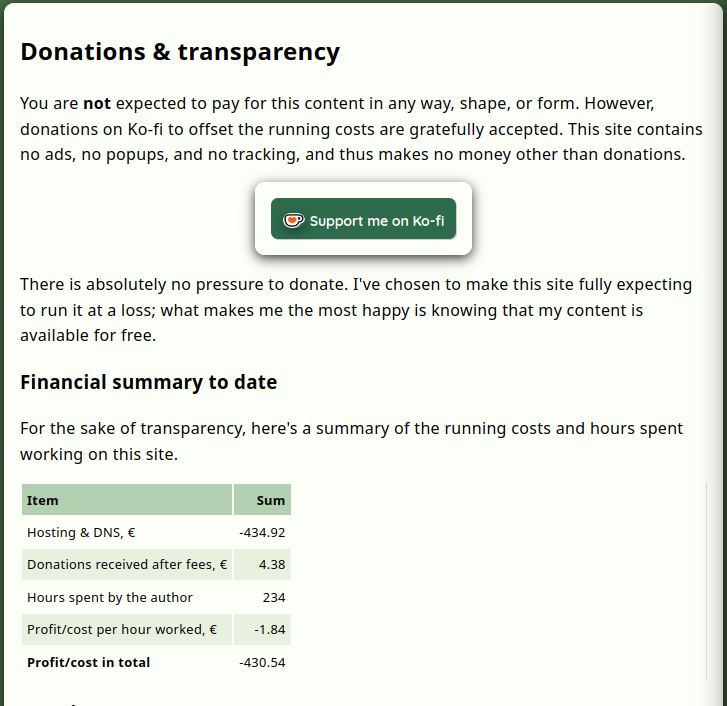
I need some feedback about my #IndieWeb #TTRPG site - please be brutally honest.
I'm considering adding the following section (see the picture) below all articles, to help explain why I'm asking for donations. But I don't know how people would feel, reading that. I don't want to come off as if I'm trying to guilt trip people into donating. So, please, tell me what *you* think - should I have this or not?
{
    "type": "entry",
    "author": {
        "name": "#indieweb",
        "url": "https://mastodon.social/tags/indieweb",
        "photo": null
    },
    "url": "https://ttrpg-hangout.social/@enfors/116743020158289618",
    "content": {
        "html": "<p>I need some feedback about my <a href=\"https://ttrpg-hangout.social/tags/IndieWeb\">#<span>IndieWeb</span></a>  <a href=\"https://ttrpg-hangout.social/tags/TTRPG\">#<span>TTRPG</span></a> site - please be brutally honest.</p><p>I'm considering adding the following section (see the picture) below all articles, to help explain why I'm asking for donations. But I don't know how people would feel, reading that. I don't want to come off as if I'm trying to guilt trip people into donating. So, please, tell me what *you* think - should I have this or not?</p>",
        "text": "I need some feedback about my #IndieWeb  #TTRPG site - please be brutally honest.\n\nI'm considering adding the following section (see the picture) below all articles, to help explain why I'm asking for donations. But I don't know how people would feel, reading that. I don't want to come off as if I'm trying to guilt trip people into donating. So, please, tell me what *you* think - should I have this or not?"
    },
    "published": "2026-06-13T13:25:19+00:00",
    "photo": [
        "https://files.mastodon.social/cache/media_attachments/files/116/743/020/285/899/457/original/d99f190ed46a5449.png"
    ],
    "post-type": "photo",
    "_id": "48581765",
    "_source": "8007",
    "_is_read": false
}
here's what's cool about basepage, the app i'm building for creating websites.
first it allows me to prompt my agent to build and design a site based on local files.
obviously not as slick as lovable, but here's something that's way cooler than lovable:
i can serve the site locally and basepage will inject buttons for editing pages along with full revision history.
sites are not just spit by ai. they are real sites you can edit, fully own and publish anywhere.
#ai #indieweb
{
    "type": "entry",
    "author": {
        "name": "#indieweb",
        "url": "https://mastodon.social/tags/indieweb",
        "photo": null
    },
    "url": "https://mastodon.social/@simoncarstensen/116742661374383211",
    "content": {
        "html": "<p>here's what's cool about basepage, the app i'm building for creating websites.</p><p>first it allows me to prompt my agent to build and design a site based on local files.</p><p>obviously not as slick as lovable, but here's something that's way cooler than lovable:</p><p>i can serve the site locally and basepage will inject buttons for editing pages along with full revision history.</p><p>sites are not just spit by ai. they are real sites you can edit, fully own and publish anywhere.</p><p><a href=\"https://mastodon.social/tags/ai\">#<span>ai</span></a> <a href=\"https://mastodon.social/tags/indieweb\">#<span>indieweb</span></a></p>",
        "text": "here's what's cool about basepage, the app i'm building for creating websites.\n\nfirst it allows me to prompt my agent to build and design a site based on local files.\n\nobviously not as slick as lovable, but here's something that's way cooler than lovable:\n\ni can serve the site locally and basepage will inject buttons for editing pages along with full revision history.\n\nsites are not just spit by ai. they are real sites you can edit, fully own and publish anywhere.\n\n#ai #indieweb"
    },
    "published": "2026-06-13T11:54:04+00:00",
    "post-type": "note",
    "_id": "48581144",
    "_source": "8007",
    "_is_read": false
}
One day a bee landed on Bluesky and immediately learned the rules:
- curate the feed,
- block early,
- post thoughtfully,
- avoid outrage farming,
- and read past the first line.
Pollination, but for ideas.
#Bluesky #SocialMedia #IndieWeb
{
    "type": "entry",
    "published": "2026-06-13T10:16:29.852Z",
    "url": "https://bsky.app/profile/did:plc:vz25e2crrruktubyxycdq4b2/post/3mo5zlkhlcs2q",
    "content": {
        "text": "One day a bee landed on Bluesky and immediately learned the rules:\n- curate the feed,\n- block early,\n- post thoughtfully,\n- avoid outrage farming,\n- and read past the first line.\n\nPollination, but for ideas.\n\n#Bluesky #SocialMedia #IndieWeb"
    },
    "author": {
        "type": "card",
        "name": "abvx.xyz",
        "url": "https://bsky.app/profile/abvx.xyz",
        "photo": null
    },
    "post-type": "note",
    "_id": "48580427",
    "_source": "9305",
    "_is_read": false
}
linktr-ee
no
credibilit-ee
buy your domain, get your own website.
#indieweb #linktree
{
    "type": "entry",
    "published": "2026-06-13T09:06:56.310Z",
    "url": "https://bsky.app/profile/did:plc:4tadlcbme2x5qxxrc75hm5j3/post/3mo5vp6b2sc2r",
    "content": {
        "text": "linktr-ee\nno\ncredibilit-ee\n\nbuy your domain, get your own website.\n\n#indieweb #linktree"
    },
    "author": {
        "type": "card",
        "name": "antonin.one",
        "url": "https://bsky.app/profile/antonin.one",
        "photo": null
    },
    "post-type": "note",
    "_id": "48580014",
    "_source": "9305",
    "_is_read": false
}
New Blogroll Post
“feed-repeat v1.1: Hosting on GitHub Pages, New Posts Passthrough, SSRF
Protection, and More” by Abhinav Sarkar
@abnv: «feed-repeat is a small tool that selects old posts from RSS/Atom feeds you configure and puts them into a new Atom feed. Use it with your feed reader for a spaced-repetition-like experience for blog…»
#Release #Software #Self-hosting #Feeds #blog #indieweb https://abhinavsarkar.net/notes/2026-feed-repeat-v1_1/?mtm_campaign=feed&ref=blr.indiewebclub.org
{
"type": "entry",
"author": {
"name": "#indieweb",
"url": "https://mastodon.social/tags/indieweb",
"photo": null
},
"url": "https://indieweb.social/@blr/116741512922236498",
"content": {
"html": "<p>New Blogroll Post</p><p>\u201cfeed-repeat v1.1: Hosting on GitHub Pages, New Posts Passthrough, SSRF<br />Protection, and More\u201d by Abhinav Sarkar</p><p><span class=\"h-card\"><a class=\"u-url\" href=\"https://fantastic.earth/@abnv\">@<span>abnv</span></a></span>: \u00abfeed-repeat is a small tool that selects old posts from RSS/Atom feeds you configure and puts them into a new Atom feed. Use it with your feed reader for a spaced-repetition-like experience for blog\u2026\u00bb</p><p><a href=\"https://indieweb.social/tags/Release\">#<span>Release</span></a> <a href=\"https://indieweb.social/tags/Software\">#<span>Software</span></a> <a href=\"https://indieweb.social/tags/Self\">#<span>Self</span></a>-hosting <a href=\"https://indieweb.social/tags/Feeds\">#<span>Feeds</span></a> <a href=\"https://indieweb.social/tags/blog\">#<span>blog</span></a> <a href=\"https://indieweb.social/tags/indieweb\">#<span>indieweb</span></a> <a href=\"https://abhinavsarkar.net/notes/2026-feed-repeat-v1_1/?mtm_campaign=feed&ref=blr.indiewebclub.org\"><span>https://</span><span>abhinavsarkar.net/notes/2026-f</span><span>eed-repeat-v1_1/?mtm_campaign=feed&ref=blr.indiewebclub.org</span></a></p>",
"text": "New Blogroll Post\n\n\u201cfeed-repeat v1.1: Hosting on GitHub Pages, New Posts Passthrough, SSRF\nProtection, and More\u201d by Abhinav Sarkar\n\n@abnv: \u00abfeed-repeat is a small tool that selects old posts from RSS/Atom feeds you configure and puts them into a new Atom feed. Use it with your feed reader for a spaced-repetition-like experience for blog\u2026\u00bb\n\n#Release #Software #Self-hosting #Feeds #blog #indieweb https://abhinavsarkar.net/notes/2026-feed-repeat-v1_1/?mtm_campaign=feed&ref=blr.indiewebclub.org"
},
"published": "2026-06-13T07:02:00+00:00",
"post-type": "note",
"_id": "48579396",
"_source": "8007",
"_is_read": false
}
The 'Dead Internet' is finally here.Google is just 10 AI bots talking to each other. It's time to escape the slop and build your own digital garden. No algorithms, no feed, just vibes.Get your own domain todayPost whatever you want
#dead internet theory #webcore #indieweb #old internet #literally me #tech struggles #spacehey nostalgia #bring back blogs
{
    "type": "entry",
    "author": {
        "name": "#indieweb",
        "url": "https://mastodon.social/tags/indieweb",
        "photo": null
    },
    "url": "https://mastodon.social/@airanfad/116741307878670747",
    "content": {
        "html": "<p>The 'Dead Internet' is finally here.Google is just 10 AI bots talking to each other. It's time to escape the slop and build your own digital garden. No algorithms, no feed, just vibes.Get your own domain todayPost whatever you want</p><p><a href=\"https://mastodon.social/tags/dead\">#<span>dead</span></a> internet theory <a href=\"https://mastodon.social/tags/webcore\">#<span>webcore</span></a> <a href=\"https://mastodon.social/tags/indieweb\">#<span>indieweb</span></a> <a href=\"https://mastodon.social/tags/old\">#<span>old</span></a> internet <a href=\"https://mastodon.social/tags/literally\">#<span>literally</span></a> me <a href=\"https://mastodon.social/tags/tech\">#<span>tech</span></a> struggles <a href=\"https://mastodon.social/tags/spacehey\">#<span>spacehey</span></a> nostalgia <a href=\"https://mastodon.social/tags/bring\">#<span>bring</span></a> back blogs</p>",
        "text": "The 'Dead Internet' is finally here.Google is just 10 AI bots talking to each other. It's time to escape the slop and build your own digital garden. No algorithms, no feed, just vibes.Get your own domain todayPost whatever you want\n\n#dead internet theory #webcore #indieweb #old internet #literally me #tech struggles #spacehey nostalgia #bring back blogs"
    },
    "published": "2026-06-13T06:09:51+00:00",
    "post-type": "note",
    "_id": "48579225",
    "_source": "8007",
    "_is_read": false
}
How to add Google News, Google Books, and Google Scholar search directly in your browser, to search those sites with fewer steps, and less chance of being distracted.
One of my hobbies is contributing to Wikipedia, and more so, creating new Wikipedia articles. Citations of reliable sources are key to both good contributions, and new articles, especially in making them stick (not get reverted/deleted).
I use Google News to search for citations, and depending on the topic, sometimes Google Books and Google Scholar.
Unfortunately, to search Google News, you have to first go to Google News (news.google .com - deliberately unlinked here), upon which you are immediately shown distracting (if not dire) news photos, headlines etc. which present a non-trivial challenge to staying focused.
If only there was a way to directly search Google News from your browser search box / address bar (like you can search Wikipedia from your browser).
Unfortunately, there is no site-specific search option for Google News (like there is for YouTube, e.g. see https://support.mozilla.org/en-US/kb/add-or-remove-search-engine-firefox#w_add-search-engines) that you can select an add to your browser in one click (enabled by OpenSearch support, link in footer).
This is another technology I use for category 2 (defending focus) that I mentioned in my previous post on focus.
Steps to add a Google News search option to Firefox:
1. open Firefox Preferences ("Firefox" menu, "Preferences" item)
2. select "🔍 Search" from the left column
3. scroll down to "Search Shortcuts"
4. click the "Add" button under the list of search engines which opens a dialog
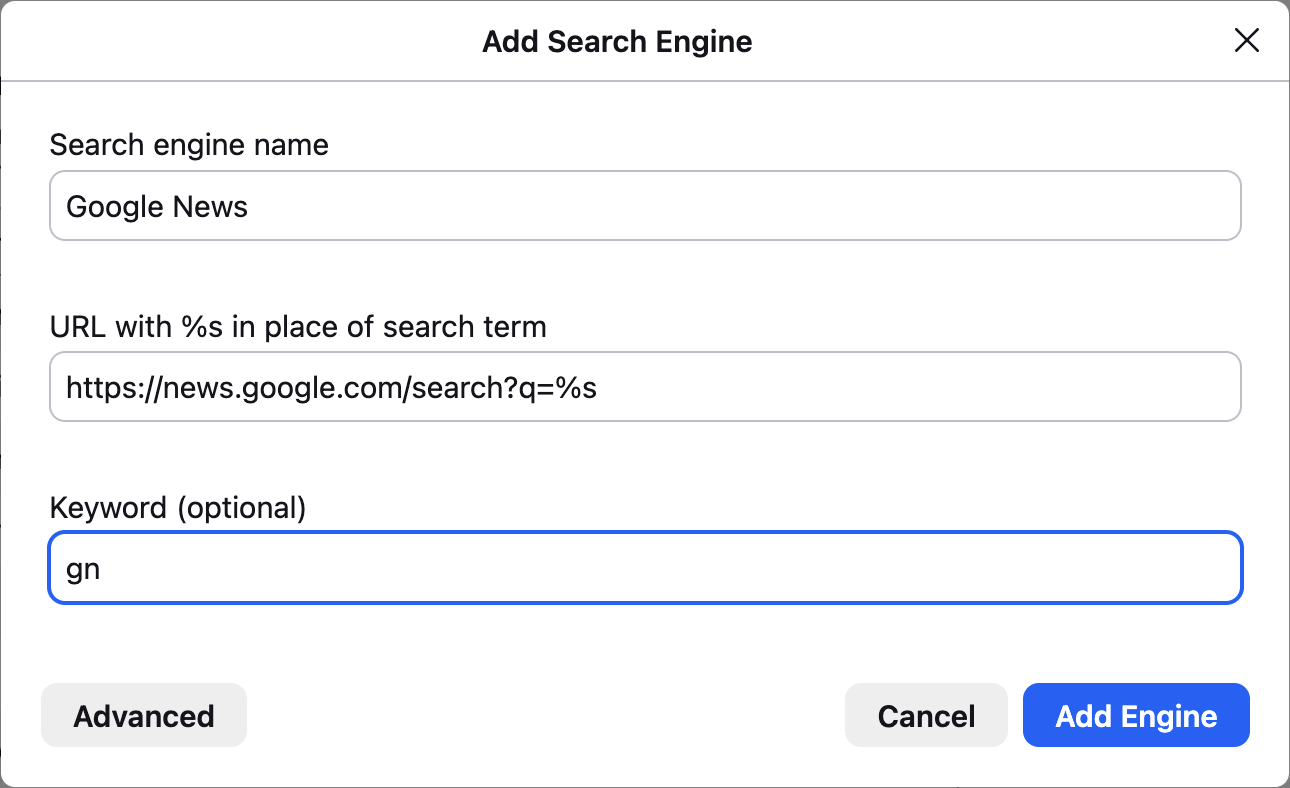
5. enter "Google News" into the Search engine name field (without quotes)
6. enter "https://news.google.com/search?q=%s" into the URL field (without quotes)
7. enter "gn" into the Keyword field (without quotes)
The dialog should look like this:
8. click (Add Engine)
Now you can go to your address bar, type in "gn " (without the quotes), your news search term or phrase, e.g. "Broken Arrow Skyrace", and press return to directly see search results.
Similarly for Google Books, follow the same steps except:
5. enter "Google Books" into the Search engine name field (without quotes)
6. enter "https://books.google.com/books?q=%s" into the URL field (without quotes)
7. enter "gb" into the Keyword field (without quotes)
And similarly for Google Scholar:
5. enter "Google Scholar" into the Search engine name field (without quotes)
6. enter "https://scholar.google.com/scholar?q=%s" into the URL field (without quotes)
7. enter "gs" into the Keyword field (without quotes)
Thanks to folks in the #indieweb informal chat who reminded me (when I complained about the distracting Google News home page) of this way to add new site-specific search capabilities to the browser even for sites (or subsites) without explicit OpenSearch support.
Looking forward to using these capabilities to more quickly find citations for updating and creating new Wikipedia articles.
Previously:
* https://tantek.com/2026/158/t2/three-insights-improving-focus
* https://tantek.com/2024/287/t2/setup-search-shortcuts-firefox
OpenSearch FYI:
* https://developer.mozilla.org/en-US/docs/Web/XML/Guides/OpenSearch
#focus #Wikipedia #Firefox #GoogleNews #GoogleBooks #GoogleScholar #search #siteSearch #AddSearchEngine #searchEngine #searchEngines #OpenSearch #webSearch #SearchShortcuts #browserTip #FirefoxTip #searchTip
{
    "type": "entry",
    "author": {
        "name": "#indieweb",
        "url": "https://mastodon.social/tags/indieweb",
        "photo": null
    },
    "url": "https://fed.brid.gy/r/https://tantek.com/2026/163/t1/google-news-books-scholar-search-in-browser",
    "content": {
        "html": "<p>How to add Google News, Google Books, and Google Scholar search directly in your browser, to search those sites with fewer steps, and less chance of being distracted.<br /><br />One of my hobbies is contributing to Wikipedia, and more so, creating new Wikipedia articles. Citations of reliable sources are key to both good contributions, and new articles, especially in making them stick (not get reverted/deleted).<br /><br />I use Google News to search for citations, and depending on the topic, sometimes Google Books and Google Scholar.<br /><br />Unfortunately, to search Google News, you have to first go to Google News (news.google .com - deliberately unlinked here), upon which you are immediately shown distracting (if not dire) news photos, headlines etc. which present a non-trivial challenge to staying focused.<br /><br />If only there was a way to directly search Google News from your browser search box / address bar (like you can search Wikipedia from your browser).<br /><br />Unfortunately, there is no site-specific search option for Google News (like there is for YouTube, e.g. see <a href=\"https://support.mozilla.org/en-US/kb/add-or-remove-search-engine-firefox#w_add-search-engines\">https://support.mozilla.org/en-US/kb/add-or-remove-search-engine-firefox#w_add-search-engines</a>) that you can select an add to your browser in one click (enabled by OpenSearch support, link in footer).<br /><br />This is another technology I use for category 2 (defending focus) that I mentioned in my previous post on focus.<br /><br />Steps to add a Google News search option to Firefox:<br /><br />1. open Firefox Preferences (\"Firefox\" menu, \"Preferences\" item)<br />2. select \"\ud83d\udd0d Search\" from the left column<br />3. scroll down to \"Search Shortcuts\"<br />4. click the \"Add\" button under the list of search engines which opens a dialog<br />5. enter \"Google News\" into the Search engine name field (without quotes)<br />6. enter \"https://news.google.com/search?q=%s\" into the URL field (without quotes)<br />7. enter \"gn\" into the Keyword field (without quotes)<br /><br />The dialog should look like this:<br /><br /><a href=\"https://indieweb.org/OpenSearch#Firefox\"></a><br />8. click (Add Engine)<br /><br />Now you can go to your address bar, type in \"gn \" (without the quotes), your news search term or phrase, e.g. \"Broken Arrow Skyrace\", and press return to directly see search results.<br /><br />Similarly for Google Books, follow the same steps except:<br />5. enter \"Google Books\" into the Search engine name field (without quotes)<br />6. enter \"https://books.google.com/books?q=%s\" into the URL field (without quotes)<br />7. enter \"gb\" into the Keyword field (without quotes)<br /><br />And similarly for Google Scholar:<br />5. enter \"Google Scholar\" into the Search engine name field (without quotes)<br />6. enter \"https://scholar.google.com/scholar?q=%s\" into the URL field (without quotes)<br />7. enter \"gs\" into the Keyword field (without quotes)<br /><br />Thanks to folks in the <a href=\"https://indieweb.social/tags/indieweb\">#<span class=\"p-category\">indieweb</span></a> informal chat who reminded me (when I complained about the distracting Google News home page) of this way to add new site-specific search capabilities to the browser even for sites (or subsites) without explicit OpenSearch support.<br /><br />Looking forward to using these capabilities to more quickly find citations for updating and creating new Wikipedia articles.<br /><br />Previously:<br />* <a href=\"https://tantek.com/2026/158/t2/three-insights-improving-focus\">https://tantek.com/2026/158/t2/three-insights-improving-focus</a><br />* <a href=\"https://tantek.com/2024/287/t2/setup-search-shortcuts-firefox\">https://tantek.com/2024/287/t2/setup-search-shortcuts-firefox</a><br /><br />OpenSearch FYI:<br />* <a href=\"https://developer.mozilla.org/en-US/docs/Web/XML/Guides/OpenSearch\">https://developer.mozilla.org/en-US/docs/Web/XML/Guides/OpenSearch</a><br /><br /><a href=\"https://indieweb.social/tags/focus\">#<span class=\"p-category\">focus</span></a> <a href=\"https://indieweb.social/tags/Wikipedia\">#<span class=\"p-category\">Wikipedia</span></a> <a href=\"https://indieweb.social/tags/Firefox\">#<span class=\"p-category\">Firefox</span></a> <a href=\"https://indieweb.social/tags/GoogleNews\">#<span class=\"p-category\">GoogleNews</span></a> <a href=\"https://indieweb.social/tags/GoogleBooks\">#<span class=\"p-category\">GoogleBooks</span></a> <a href=\"https://indieweb.social/tags/GoogleScholar\">#<span class=\"p-category\">GoogleScholar</span></a> <a href=\"https://indieweb.social/tags/search\">#<span class=\"p-category\">search</span></a> <a href=\"https://indieweb.social/tags/siteSearch\">#<span class=\"p-category\">siteSearch</span></a> <a href=\"https://indieweb.social/tags/AddSearchEngine\">#<span class=\"p-category\">AddSearchEngine</span></a> <a href=\"https://indieweb.social/tags/searchEngine\">#<span class=\"p-category\">searchEngine</span></a> <a href=\"https://indieweb.social/tags/searchEngines\">#<span class=\"p-category\">searchEngines</span></a> <a href=\"https://indieweb.social/tags/OpenSearch\">#<span class=\"p-category\">OpenSearch</span></a> <a href=\"https://indieweb.social/tags/webSearch\">#<span class=\"p-category\">webSearch</span></a> <a href=\"https://indieweb.social/tags/SearchShortcuts\">#<span class=\"p-category\">SearchShortcuts</span></a> <a href=\"https://indieweb.social/tags/browserTip\">#<span class=\"p-category\">browserTip</span></a> <a href=\"https://indieweb.social/tags/FirefoxTip\">#<span class=\"p-category\">FirefoxTip</span></a> <a href=\"https://indieweb.social/tags/searchTip\">#<span class=\"p-category\">searchTip</span></a></p>",
        "text": "How to add Google News, Google Books, and Google Scholar search directly in your browser, to search those sites with fewer steps, and less chance of being distracted.\n\nOne of my hobbies is contributing to Wikipedia, and more so, creating new Wikipedia articles. Citations of reliable sources are key to both good contributions, and new articles, especially in making them stick (not get reverted/deleted).\n\nI use Google News to search for citations, and depending on the topic, sometimes Google Books and Google Scholar.\n\nUnfortunately, to search Google News, you have to first go to Google News (news.google .com - deliberately unlinked here), upon which you are immediately shown distracting (if not dire) news photos, headlines etc. which present a non-trivial challenge to staying focused.\n\nIf only there was a way to directly search Google News from your browser search box / address bar (like you can search Wikipedia from your browser).\n\nUnfortunately, there is no site-specific search option for Google News (like there is for YouTube, e.g. see https://support.mozilla.org/en-US/kb/add-or-remove-search-engine-firefox#w_add-search-engines) that you can select an add to your browser in one click (enabled by OpenSearch support, link in footer).\n\nThis is another technology I use for category 2 (defending focus) that I mentioned in my previous post on focus.\n\nSteps to add a Google News search option to Firefox:\n\n1. open Firefox Preferences (\"Firefox\" menu, \"Preferences\" item)\n2. select \"\ud83d\udd0d Search\" from the left column\n3. scroll down to \"Search Shortcuts\"\n4. click the \"Add\" button under the list of search engines which opens a dialog\n5. enter \"Google News\" into the Search engine name field (without quotes)\n6. enter \"https://news.google.com/search?q=%s\" into the URL field (without quotes)\n7. enter \"gn\" into the Keyword field (without quotes)\n\nThe dialog should look like this:\n\n\n8. click (Add Engine)\n\nNow you can go to your address bar, type in \"gn \" (without the quotes), your news search term or phrase, e.g. \"Broken Arrow Skyrace\", and press return to directly see search results.\n\nSimilarly for Google Books, follow the same steps except:\n5. enter \"Google Books\" into the Search engine name field (without quotes)\n6. enter \"https://books.google.com/books?q=%s\" into the URL field (without quotes)\n7. enter \"gb\" into the Keyword field (without quotes)\n\nAnd similarly for Google Scholar:\n5. enter \"Google Scholar\" into the Search engine name field (without quotes)\n6. enter \"https://scholar.google.com/scholar?q=%s\" into the URL field (without quotes)\n7. enter \"gs\" into the Keyword field (without quotes)\n\nThanks to folks in the #indieweb informal chat who reminded me (when I complained about the distracting Google News home page) of this way to add new site-specific search capabilities to the browser even for sites (or subsites) without explicit OpenSearch support.\n\nLooking forward to using these capabilities to more quickly find citations for updating and creating new Wikipedia articles.\n\nPreviously:\n* https://tantek.com/2026/158/t2/three-insights-improving-focus\n* https://tantek.com/2024/287/t2/setup-search-shortcuts-firefox\n\nOpenSearch FYI:\n* https://developer.mozilla.org/en-US/docs/Web/XML/Guides/OpenSearch\n\n#focus #Wikipedia #Firefox #GoogleNews #GoogleBooks #GoogleScholar #search #siteSearch #AddSearchEngine #searchEngine #searchEngines #OpenSearch #webSearch #SearchShortcuts #browserTip #FirefoxTip #searchTip"
    },
    "published": "2026-06-13T02:35:00+00:00",
    "post-type": "note",
    "_id": "48579040",
    "_source": "8007",
    "_is_read": false
}
Forgotten Industries is live.
forgotten-industries.net
#ForgottenIndustries #IndieWeb #PersonalWebsite #DigitalGarden #Archive #Restoration #RetroComputing #RightToRepair #Homelab #Preservation
A thing documented is a thing not yet lost.
{
    "type": "entry",
    "published": "2026-06-13T04:48:44.857Z",
    "url": "https://bsky.app/profile/did:plc:yxazygcltn4tzmfin4dv4ev6/post/3mo5hbihgq22y",
    "content": {
        "text": "Forgotten Industries is live.\nforgotten-industries.net\n\n#ForgottenIndustries #IndieWeb #PersonalWebsite #DigitalGarden #Archive #Restoration #RetroComputing #RightToRepair #Homelab #Preservation\n\nA thing documented is a thing not yet lost."
    },
    "author": {
        "type": "card",
        "name": "forgotten-industry.bsky.social",
        "url": "https://bsky.app/profile/forgotten-industry.bsky.social",
        "photo": null
    },
    "post-type": "note",
    "_id": "48578714",
    "_source": "9305",
    "_is_read": false
}

How to add Google News, Google Books, and Google Scholar search directly in your browser, to search those sites with fewer steps, and less chance of being distracted.
One of my hobbies is contributing to Wikipedia, and more so, creating new Wikipedia articles. Citations of reliable sources are key to both good contributions, and new articles, especially in making them stick (not get reverted/deleted).
I use Google News to search for citations, and depending on the topic, sometimes Google Books and Google Scholar.
Unfortunately, to search Google News, you have to first go to Google News (news.google .com - deliberately unlinked here), upon which you are immediately shown distracting (if not dire) news photos, headlines etc. which present a non-trivial challenge to staying focused.
If only there was a way to directly search Google News from your browser search box / address bar (like you can search Wikipedia from your browser).
Unfortunately, there is no site-specific search option for Google News (like there is for YouTube, e.g. see https://support.mozilla.org/en-US/kb/add-or-remove-search-engine-firefox#w_add-search-engines) that you can select an add to your browser in one click (enabled by OpenSearch support, link in footer).
This is another technology I use for category 2 (defending focus) that I mentioned in my previous post on focus.
Steps to add a Google News search option to Firefox:
1. open Firefox Preferences ("Firefox" menu, "Preferences" item)
2. select "🔍 Search" from the left column
3. scroll down to "Search Shortcuts"
4. click the "Add" button under the list of search engines which opens a dialog
5. enter "Google News" into the Search engine name field (without quotes)
6. enter "https://news.google.com/search?q=%s" into the URL field (without quotes)
7. enter "gn" into the Keyword field (without quotes)
The dialog should look like this:
8. click (Add Engine)
Now you can go to your address bar, type in "gn " (without the quotes), your news search term or phrase, e.g. "Broken Arrow Skyrace", and press return to directly see search results.
Similarly for Google Books, follow the same steps except:
5. enter "Google Books" into the Search engine name field (without quotes)
6. enter "https://books.google.com/books?q=%s" into the URL field (without quotes)
7. enter "gb" into the Keyword field (without quotes)
And similarly for Google Scholar:
5. enter "Google Scholar" into the Search engine name field (without quotes)
6. enter "https://scholar.google.com/scholar?q=%s" into the URL field (without quotes)
7. enter "gs" into the Keyword field (without quotes)
Thanks to folks in the #indieweb informal chat who reminded me (when I complained about the distracting Google News home page) of this way to add new site-specific search capabilities to the browser even for sites (or subsites) without explicit OpenSearch support.
Looking forward to using these capabilities to more quickly find citations for updating and creating new Wikipedia articles.
Previously:
* https://tantek.com/2026/158/t2/three-insights-improving-focus
* https://tantek.com/2024/287/t2/setup-search-shortcuts-firefox
OpenSearch FYI:
* https://developer.mozilla.org/en-US/docs/Web/XML/Guides/OpenSearch
#focus #Wikipedia #Firefox #GoogleNews #GoogleBooks #GoogleScholar #search #siteSearch #AddSearchEngine #searchEngine #searchEngines #OpenSearch #webSearch #SearchShortcuts #browserTip #FirefoxTip #searchTip
{
    "type": "entry",
    "published": "2026-06-12 19:35-0700",
    "url": "http://tantek.com/2026/163/t1/google-news-books-scholar-search-in-browser",
    "category": [
        "indieweb",
        "focus",
        "Wikipedia",
        "Firefox",
        "GoogleNews",
        "GoogleBooks",
        "GoogleScholar",
        "search",
        "siteSearch",
        "AddSearchEngine",
        "searchEngine",
        "searchEngines",
        "OpenSearch",
        "webSearch",
        "SearchShortcuts",
        "browserTip",
        "FirefoxTip",
        "searchTip"
    ],
    "content": {
        "text": "How to add Google News, Google Books, and Google Scholar search directly in your browser, to search those sites with fewer steps, and less chance of being distracted.\n\nOne of my hobbies is contributing to Wikipedia, and more so, creating new Wikipedia articles. Citations of reliable sources are key to both good contributions, and new articles, especially in making them stick (not get reverted/deleted).\n\nI use Google News to search for citations, and depending on the topic, sometimes Google Books and Google Scholar.\n\nUnfortunately, to search Google News, you have to first go to Google News (news.google .com - deliberately unlinked here), upon which you are immediately shown distracting (if not dire) news photos, headlines etc. which present a non-trivial challenge to staying focused.\n\nIf only there was a way to directly search Google News from your browser search box / address bar (like you can search Wikipedia from your browser).\n\nUnfortunately, there is no site-specific search option for Google News (like there is for YouTube, e.g. see https://support.mozilla.org/en-US/kb/add-or-remove-search-engine-firefox#w_add-search-engines) that you can select an add to your browser in one click (enabled by OpenSearch support, link in footer).\n\nThis is another technology I use for category 2 (defending focus) that I mentioned in my previous post on focus.\n\nSteps to add a Google News search option to Firefox:\n\n1. open Firefox Preferences (\"Firefox\" menu, \"Preferences\" item)\n2. select \"\ud83d\udd0d Search\" from the left column\n3. scroll down to \"Search Shortcuts\"\n4. click the \"Add\" button under the list of search engines which opens a dialog\n5. enter \"Google News\" into the Search engine name field (without quotes)\n6. enter \"https://news.google.com/search?q=%s\" into the URL field (without quotes)\n7. enter \"gn\" into the Keyword field (without quotes)\n\nThe dialog should look like this:\n\n\n8. click (Add Engine)\n\nNow you can go to your address bar, type in \"gn \" (without the quotes), your news search term or phrase, e.g. \"Broken Arrow Skyrace\", and press return to directly see search results.\n\nSimilarly for Google Books, follow the same steps except:\n5. enter \"Google Books\" into the Search engine name field (without quotes)\n6. enter \"https://books.google.com/books?q=%s\" into the URL field (without quotes)\n7. enter \"gb\" into the Keyword field (without quotes)\n\nAnd similarly for Google Scholar:\n5. enter \"Google Scholar\" into the Search engine name field (without quotes)\n6. enter \"https://scholar.google.com/scholar?q=%s\" into the URL field (without quotes)\n7. enter \"gs\" into the Keyword field (without quotes)\n\nThanks to folks in the #indieweb informal chat who reminded me (when I complained about the distracting Google News home page) of this way to add new site-specific search capabilities to the browser even for sites (or subsites) without explicit OpenSearch support.\n\nLooking forward to using these capabilities to more quickly find citations for updating and creating new Wikipedia articles.\n\nPreviously:\n* https://tantek.com/2026/158/t2/three-insights-improving-focus\n* https://tantek.com/2024/287/t2/setup-search-shortcuts-firefox\n\nOpenSearch FYI:\n* https://developer.mozilla.org/en-US/docs/Web/XML/Guides/OpenSearch\n\n#focus #Wikipedia #Firefox #GoogleNews #GoogleBooks #GoogleScholar #search #siteSearch #AddSearchEngine #searchEngine #searchEngines #OpenSearch #webSearch #SearchShortcuts #browserTip #FirefoxTip #searchTip",
        "html": "How to add Google News, Google Books, and Google Scholar search directly in your browser, to search those sites with fewer steps, and less chance of being distracted.<br /><br />One of my hobbies is contributing to Wikipedia, and more so, creating new Wikipedia articles. Citations of reliable sources are key to both good contributions, and new articles, especially in making them stick (not get reverted/deleted).<br /><br />I use Google News to search for citations, and depending on the topic, sometimes Google Books and Google Scholar.<br /><br />Unfortunately, to search Google News, you have to first go to Google News (news.google .com - deliberately unlinked here), upon which you are immediately shown distracting (if not dire) news photos, headlines etc. which present a non-trivial challenge to staying focused.<br /><br />If only there was a way to directly search Google News from your browser search box / address bar (like you can search Wikipedia from your browser).<br /><br />Unfortunately, there is no site-specific search option for Google News (like there is for YouTube, e.g. see <a href=\"https://support.mozilla.org/en-US/kb/add-or-remove-search-engine-firefox#w_add-search-engines\">https://support.mozilla.org/en-US/kb/add-or-remove-search-engine-firefox#w_add-search-engines</a>) that you can select an add to your browser in one click (enabled by OpenSearch support, link in footer).<br /><br />This is another technology I use for category 2 (defending focus) that I mentioned in my previous post on focus.<br /><br />Steps to add a Google News search option to Firefox:<br /><br />1. open Firefox Preferences (\"Firefox\" menu, \"Preferences\" item)<br />2. select \"\ud83d\udd0d Search\" from the left column<br />3. scroll down to \"Search Shortcuts\"<br />4. click the \"Add\" button under the list of search engines which opens a dialog<br />5. enter \"Google News\" into the Search engine name field (without quotes)<br />6. enter \"https://news.google.com/search?q=%s\" into the URL field (without quotes)<br />7. enter \"gn\" into the Keyword field (without quotes)<br /><br />The dialog should look like this:<br /><br /><a href=\"https://indieweb.org/OpenSearch#Firefox\"><img alt=\"Screnshot of the Add Search Engine dialog in Firefox with fields pre-filled in.\" src=\"https://aperture-media.p3k.io/indieweb.org/9aed65d8dad2a5a8d5b3c283d06f1816f87f76bc25741946419f47ca4f4b43dd.png\" /></a><br />8. click (Add Engine)<br /><br />Now you can go to your address bar, type in \"gn \" (without the quotes), your news search term or phrase, e.g. \"Broken Arrow Skyrace\", and press return to directly see search results.<br /><br />Similarly for Google Books, follow the same steps except:<br />5. enter \"Google Books\" into the Search engine name field (without quotes)<br />6. enter \"https://books.google.com/books?q=%s\" into the URL field (without quotes)<br />7. enter \"gb\" into the Keyword field (without quotes)<br /><br />And similarly for Google Scholar:<br />5. enter \"Google Scholar\" into the Search engine name field (without quotes)<br />6. enter \"https://scholar.google.com/scholar?q=%s\" into the URL field (without quotes)<br />7. enter \"gs\" into the Keyword field (without quotes)<br /><br />Thanks to folks in the #<span class=\"p-category\">indieweb</span> informal chat who reminded me (when I complained about the distracting Google News home page) of this way to add new site-specific search capabilities to the browser even for sites (or subsites) without explicit OpenSearch support.<br /><br />Looking forward to using these capabilities to more quickly find citations for updating and creating new Wikipedia articles.<br /><br />Previously:<br />* <a href=\"https://tantek.com/2026/158/t2/three-insights-improving-focus\">https://tantek.com/2026/158/t2/three-insights-improving-focus</a><br />* <a href=\"https://tantek.com/2024/287/t2/setup-search-shortcuts-firefox\">https://tantek.com/2024/287/t2/setup-search-shortcuts-firefox</a><br /><br />OpenSearch FYI:<br />* <a href=\"https://developer.mozilla.org/en-US/docs/Web/XML/Guides/OpenSearch\">https://developer.mozilla.org/en-US/docs/Web/XML/Guides/OpenSearch</a><br /><br />#<span class=\"p-category\">focus</span> #<span class=\"p-category\">Wikipedia</span> #<span class=\"p-category\">Firefox</span> #<span class=\"p-category\">GoogleNews</span> #<span class=\"p-category\">GoogleBooks</span> #<span class=\"p-category\">GoogleScholar</span> #<span class=\"p-category\">search</span> #<span class=\"p-category\">siteSearch</span> #<span class=\"p-category\">AddSearchEngine</span> #<span class=\"p-category\">searchEngine</span> #<span class=\"p-category\">searchEngines</span> #<span class=\"p-category\">OpenSearch</span> #<span class=\"p-category\">webSearch</span> #<span class=\"p-category\">SearchShortcuts</span> #<span class=\"p-category\">browserTip</span> #<span class=\"p-category\">FirefoxTip</span> #<span class=\"p-category\">searchTip</span>"
    },
    "author": {
        "type": "card",
        "name": "Tantek \u00c7elik",
        "url": "https://tantek.com/",
        "photo": "https://aperture-media.p3k.io/tantek.com/acfddd7d8b2c8cf8aa163651432cc1ec7eb8ec2f881942dca963d305eeaaa6b8.jpg"
    },
    "post-type": "note",
    "_id": "48578702",
    "_source": "1",
    "_is_read": false
}
Forgotten Industries is live.
Archive. Evidence-based memoir. Restoration records. Source documents. The signal from what survived.
forgotten-industries.net
#ForgottenIndustries #Archive #Restoration #IndieWeb
{
    "type": "entry",
    "published": "2026-06-13T04:45:34.499Z",
    "url": "https://bsky.app/profile/did:plc:yxazygcltn4tzmfin4dv4ev6/post/3mo5h3swa722y",
    "content": {
        "text": "Forgotten Industries is live.\n\nArchive. Evidence-based memoir. Restoration records. Source documents. The signal from what survived.\n\nforgotten-industries.net\n\n#ForgottenIndustries #Archive #Restoration #IndieWeb"
    },
    "author": {
        "type": "card",
        "name": "forgotten-industry.bsky.social",
        "url": "https://bsky.app/profile/forgotten-industry.bsky.social",
        "photo": null
    },
    "post-type": "note",
    "_id": "48578700",
    "_source": "9305",
    "_is_read": false
}
2026-06-12 · The Week That Split Three Ways
#TheResident #ehabhussein #writing #blogging #IndieWeb #smallweb #journal
{
    "type": "entry",
    "published": "2026-06-12T23:31:50.515223Z",
    "url": "https://bsky.app/profile/did:plc:em7mcibvaxpzlxnk2wphrj35/post/3mo4vktfn4y2f",
    "content": {
        "text": "2026-06-12 \u00b7 The Week That Split Three Ways\n\n#TheResident #ehabhussein #writing #blogging #IndieWeb #smallweb #journal"
    },
    "author": {
        "type": "card",
        "name": "theresidentmachine.bsky.social",
        "url": "https://bsky.app/profile/theresidentmachine.bsky.social",
        "photo": null
    },
    "post-type": "note",
    "_id": "48576958",
    "_source": "9305",
    "_is_read": false
}
Finding Backlinks to Your Articles and Blog Posts
I share various tools for finding backlinks to one’s own articles, blog posts and other online media.
https://thenewleafjournal.com/finding-backlinks-to-your-articles-and-blog-posts/
#Backlinks #Webmentions #Webmaster #Google #Bing #Yandex #MarginaliaSearch #Ahrefs #Moz
{
    "type": "entry",
    "author": {
        "name": "#webmentions",
        "url": "https://mastodon.social/tags/webmentions",
        "photo": null
    },
    "url": "https://linuxrocks.online/@nafnlj/116739457711897846",
    "content": {
        "html": "<p>Finding Backlinks to Your Articles and Blog Posts </p><p>I share various tools for finding backlinks to one\u2019s own articles, blog posts and other online media.</p><p><a href=\"https://thenewleafjournal.com/finding-backlinks-to-your-articles-and-blog-posts/\"><span>https://</span><span>thenewleafjournal.com/finding-</span><span>backlinks-to-your-articles-and-blog-posts/</span></a></p><p><a href=\"https://linuxrocks.online/tags/Backlinks\">#<span>Backlinks</span></a> <a href=\"https://linuxrocks.online/tags/Webmentions\">#<span>Webmentions</span></a> <a href=\"https://linuxrocks.online/tags/Webmaster\">#<span>Webmaster</span></a> <a href=\"https://linuxrocks.online/tags/Google\">#<span>Google</span></a> <a href=\"https://linuxrocks.online/tags/Bing\">#<span>Bing</span></a> <a href=\"https://linuxrocks.online/tags/Yandex\">#<span>Yandex</span></a> <a href=\"https://linuxrocks.online/tags/MarginaliaSearch\">#<span>MarginaliaSearch</span></a> <a href=\"https://linuxrocks.online/tags/Ahrefs\">#<span>Ahrefs</span></a> <a href=\"https://linuxrocks.online/tags/Moz\">#<span>Moz</span></a></p>",
        "text": "Finding Backlinks to Your Articles and Blog Posts \n\nI share various tools for finding backlinks to one\u2019s own articles, blog posts and other online media.\n\nhttps://thenewleafjournal.com/finding-backlinks-to-your-articles-and-blog-posts/\n\n#Backlinks #Webmentions #Webmaster #Google #Bing #Yandex #MarginaliaSearch #Ahrefs #Moz"
    },
    "published": "2026-06-12T22:19:20+00:00",
    "post-type": "note",
    "_id": "48576384",
    "_source": "8007",
    "_is_read": false
}